

Introduction
In this article, we will learn how we create server-side pagination which is very useful whenever we need to display a large number of records. This is the second part of my article in the server-side pagination series, you can check the first part of this article from the below-mentioned link.
How will it work?
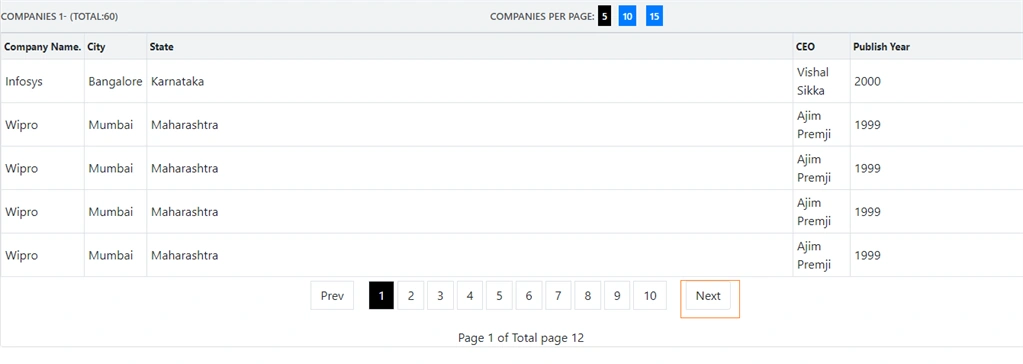
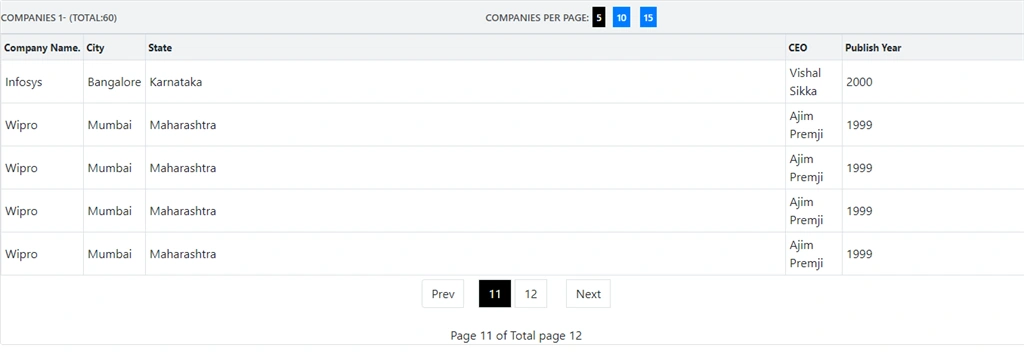
In this article, we are going to show Prev and Next button with custom logic. Whenever we click on the next button it shows the next page records, for example, suppose we are on page 1 and after clicking on next it would show 2nd-page records but here we will see different logic.
BACK END
Here in the previous article, we have already created a database and tables so no need to create it again; if you don't have the related database, tables, and stored procedure, then please check part 1.
WEB API
Complete code of pagination controller
- using System.Collections.Generic;
- using System.Data.Entity.Core.Objects;
- using System.Linq;
- using System.Web.Http;
- using Pagination.Models;
- namespace Pagination.Controllers
- {
- public class PaginationController : ApiController
- {
- CompanyEntities2 db = new CompanyEntities2();
- [HttpGet]
- public object getAllCompanies(int pageNo, int pageSize, string sortOrder)
- {
- var oMyString = new ObjectParameter("totalCount", typeof(int));
- var companyDetails = db.Usp_GetAllCompanies(pageNo, pageSize, sortOrder).ToList();
- return companyDetails;
- }
- [HttpGet]
- public object getAllCompaniesCount()
- {
- var companyDetailsCount = db.Usp_getAllCompaniesCount().SingleOrDefault();
- return companyDetailsCount;
- }
- }
- }
FRONT END
Step 1
Let's copy the HTML code and replace it with pagination.html file, I have made some changes as compared to part 1, including new buttons to check the number of companies on one page like 5,10,15,5 has been selected by default, when you click on 10 then 10 records will show in one page.
- <div class="row">
- <div class="col-12 col-md-12">
- <div class="card">
- <div class="card-header">
- <div class="row">
- <div>
- Companies 1-{{pageSize}} (Total:{{totalCompaniesCount}})
- </div>
- <div style="margin: auto;" class="add-row add-row-rel top-paging">
- <span class="cpp">Companies per page:</span>
- <a (click)="setRecPerPage(small)" [ngClass]="smallPageRow? 'active':'mr-2'">{{small}}</a>
- <a (click)="setRecPerPage(medium)" [ngClass]="mediumPageRow? 'active':'mr-2'">{{medium}}</a>
- <a (click)="setRecPerPage(large)" [ngClass]="largePageRow? 'active':'mr-2'">{{large}}</a>
- </div>
- </div>
- </div>
- <div class="card-body position-relative">
- <!-- <div class="tbl-note-dentist">
- Sort list by select <span>table headers</span>, click again to reorder
- ascending/descending
- </div> -->
- <div class="table-responsive cnstr-record companie-tbl">
- <table class="table table-bordered heading-hvr">
- <thead>
- <tr>
- <th style="cursor: pointer;" [ngClass]="order =='CompanyNumber'? 'active':''"
- (click)="setOrder('CompanyNumber')" width="80">Company Name.</th>
- <th style="cursor: pointer;" [ngClass]="order =='CompanyType'? 'active':''"
- (click)="setOrder('CompanyType')" width="75">City</th>
- <th [ngClass]="order =='CompanyName'? 'active':''" style="cursor: pointer;"
- (click)="setOrder('CompanyName')">State
- </th>
- <th [ngClass]="order =='OrgNo'? 'active':''" style="cursor: pointer;" (click)="setOrder('OrgNo')"
- width="75">CEO
- </th>
- <th [ngClass]="order =='Street'? 'active':''" style="cursor: pointer; width:250px"
- (click)="setOrder('Street')">Publish Year</th>
- </tr>
- </thead>
- <tbody>
- <tr *ngFor="let item of companies">
- <td>{{item.CompanyName}}</td>
- <td>{{item.City}}</td>
- <td>{{item.State}}</td>
- <td>{{item.Owner}}</td>
- <td>{{item.PublishYear}}</td>
- </tr>
- </tbody>
- </table>
- </div>
- <!-- Code by pagination -->
- <div class="container mw-100">
- <div class="row">
- <div class="col-md-3"></div>
- <div *ngIf="companies !=0" class="col-md-6">
- <ul class="pagination justify-content-center">
- <li class="page-item">
- <a (click)="showPrevCompanies()"
- [ngClass]="(paginationService.showNoOfCurrentPage ==1)?'notAllowed':'page-link'"
- style="margin-top: 5px; margin-right: 20px;cursor: pointer;">Prev</a>
- </li>
- <li *ngFor="let page of pageField;let i=index" class="page-item">
- <a (click)="showCompaniesByPageNumber(page,i)" [ngClass]="pageNumber[i] ? 'pageColor':'page-link'"
- style=" margin-right: 5px;;margin-top: 5px;cursor: pointer;">{{page}}</a>
- </li>
- <li class="page-item">
- <a (click)="showNextCompanies()"
- [ngClass]="(paginationService.disabledNextBtn)?'notAllowed':'page-link'"
- style="margin-top: 5px;margin-left: 20px; cursor: pointer;">Next</a>
- </li>
- </ul>
- <div style="text-align: center;">
- Page {{currentPage}} of Total page {{paginationService.exactPageList}}
- </div>
- </div>
- </div>
- </div>
- </div>
- </div>
- </div>
- </div>
Step 2
Some changes in css file -- so just replace this code with pagination.component.css file.
- @charset "utf-8";
- /* CSS Document */
- @media all {
- *{
- padding: 0 px;margin: 0 px;
- }
- div {
- vertical - align: top;
- }
- img {
- max - width: 100 % ;
- }
- html {
- -webkit - font - smoothing: antialiased; - moz - osx - font - smoothing: grayscale;
- }
- body {
- overflow: auto!important;width: 100 % !important;
- }
- html, body {
- background - color: #e4e5e6;
- }
- html {
- position: relative;min - height: 100 % ;
- }.card {
- border - radius: 4 px;
- }.card - header: first - child {
- border - radius: 4 px 4 px 0 px 0 px;
- }
- /*Typekit*/
- html, body {
- font - family: 'Roboto', sans - serif;
- font - weight: 400;
- font - size: 13 px;
- }
- body {
- padding - top: 52 px;
- }
- p {
- font - family: 'Roboto', sans - serif;
- color: #303030; font-weight:400; margin-bottom:1rem;}
- input, textarea, select{font-family:'Roboto', sans-serif;}
- h1,h2,h3,h4,h5,h6{font-family:'Roboto', sans-serif; font-weight:700;}
- h1{font-size:20px; color:# 000000;
- margin - bottom: 10 px;
- }
- h2 {
- font - size: 30 px;
- }
- h3 {
- font - size: 24 px;
- }
- h4 {
- font - size: 18 px;
- }
- h5 {
- font - size: 14 px;
- }
- h6 {
- font - size: 12 px;
- }.row {
- margin - right: -8 px;
- margin - left: -8 px;
- }.col, .col - 1, .col - 10, .col - 11, .col - 12, .col - 2, .col - 3, .col - 4, .col - 5, .col - 6, .col - 7, .col - 8, .col - 9, .col - auto, .col - lg, .col - lg - 1, .col - lg - 10, .col - lg - 11, .col - lg - 12, .col - lg - 2, .col - lg - 3, .col - lg - 4, .col - lg - 5, .col - lg - 6, .col - lg - 7, .col - lg - 8, .col - lg - 9, .col - lg - auto, .col - md, .col - md - 1, .col - md - 10, .col - md - 11, .col - md - 12, .col - md - 2, .col - md - 3, .col - md - 4, .col - md - 5, .col - md - 6, .col - md - 7, .col - md - 8, .col - md - 9, .col - md - auto, .col - sm, .col - sm - 1, .col - sm - 10, .col - sm - 11, .col - sm - 12, .col - sm - 2, .col - sm - 3, .col - sm - 4, .col - sm - 5, .col - sm - 6, .col - sm - 7, .col - sm - 8, .col - sm - 9, .col - sm - auto, .col - xl, .col - xl - 1, .col - xl - 10, .col - xl - 11, .col - xl - 12, .col - xl - 2, .col - xl - 3, .col - xl - 4, .col - xl - 5, .col - xl - 6, .col - xl - 7, .col - xl - 8, .col - xl - 9, .col - xl - auto {
- padding - right: 8 px;
- padding - left: 8 px;
- }.card - header {
- background - color: #f0f3f5;
- border - bottom: 1 px solid #c8ced3;
- font - size: 13 px;
- font - weight: 600;
- color: #464646; text-transform:uppercase; padding:.75rem 8px;}
- .cnstr-record th{white-space:nowrap;padding:.45rem .2rem; font-size:13px; border-bottom-width:0px!important;}
- .cnstr-record thead{background:# f0f3f5;
- }.cnstr - record.form - control {
- font - size: 13 px;
- padding: 0 px 0 rem 0 px 0.2 rem;
- height: calc(2 rem + 2 px);
- }.cnstr - record select.form - control {
- padding - left: .05 rem;
- }.cnstr - record.table td, .cnstr - record.table th {
- vertical - align: middle;
- }.cnstr - record.table td {
- padding: .3 rem;
- }.cnstr - record.table td h4 {
- margin: 0 px;
- }.wp - 50 {
- width: 50 px;
- }.wp - 60 {
- width: 60 px;
- }.wp - 70 {
- width: 70 px;
- }.wp - 80 {
- width: 80 px;
- }.wp - 90 {
- width: 90 px;
- }.wp - 100 {
- width: 100 px;
- }.mw - auto {
- min - width: inherit;
- }.expand - row {
- width: 100 % ;border: solid 1 px #596269; display:inline-block; border-radius:3px; width:16px; height:16px; vertical-align:top; background:# 596269;color: #ffffff!important;
- }.expand - row img {
- vertical - align: top;
- position: relative;
- top: 2 px;
- }.sub - table th {
- font - weight: 400;
- font - size: 12 px;
- }.sub - table td {
- background: #efefef;
- }.no - bg td {
- background: inherit;
- }.mw - 100 {
- max - width: 100 % ;
- }.activeTabColor {
- color: #fff;
- background - color: #000000;
- }
- .page-item:first-child .page-link {
- margin-left: 0;
- border-top-left-radius: .25rem;
- border-bottom-left-radius: .25rem;
- }
- .pageColor{
- position: relative;
- display: block;
- padding: .5rem .75rem;
- margin-left: -1px;
- line-height: 1.25;
- color: white!important;
- background-color: black!important;
- border: 1px solid # dee2e6;
- }.notAllowed {
- position: relative;
- display: block;
- padding: .5 rem .75 rem;
- margin - left: -1 px;
- line - height: 1.25;
- color: #007bff;
- background-color: # fff;
- border: 1 px solid #dee2e6;
- cursor: not - allowed;
- }.page - link {
- position: relative;
- display: block;
- padding: .5 rem .75 rem;
- margin - left: -1 px;
- line - height: 1.25;
- color: #007bff;
- background-color: # fff;
- border: 1 px solid #dee2e6;
- }.mr - 2 {
- background - color: #007bff;
- color: white!important;
- margin: 5px;
- padding: 5px;
- cursor: pointer;
- }
- .active{
- background-color: black;
- color: white!important;
- margin: 5px;
- padding: 5px;
- cursor: pointer;
- }
- }
Pranam BhatPosted Jun 11, 2021, 2:46 PM
Great example! Thank you!!