
Service Contracts with Single Unique Endpoint
Hosted on Web App
Today, in this article let's see the clear implementation of when a case arises
to use several service contracts and then implement the developed service in
well formed unique way. So firstly, let get ready and fire up visual studio
2010. File->New Project-> WCF Service Application
So, initially let's start creating simple service contract which is named as
IService1
So the Complete Code of IService1 looks like this:
using
System;
using
System.Collections.Generic;
using
System.Linq;
using
System.Runtime.Serialization;
using
System.ServiceModel;
using
System.ServiceModel.Web;
using
System.Text;
namespace
MultipleServiceContracts
{
// NOTE: You can use the "Rename" command on the "Refactor"
menu to change the interface name "IService1" in both code and config file
together.
[ServiceContract]
public interface
IService1 : Interface3, Interface2,
Interface1, Interface4
{
[OperationContract] double Add(double
a, double b);
}
}
Let's start creating other service contracts as well. The Complete Code of
Interface1 looks like this:
using
System;
using
System.Collections.Generic;
using
System.Linq;
using
System.ServiceModel;
using
System.Text;
namespace
MultipleServiceContracts
{
[ServiceContract]
public interface
Interface1
{
[OperationContract]
double Sub(double
a, double b);
}
}
The Complete Code of Interface2 looks like this:
using
System;
using
System.Collections.Generic;
using
System.Linq;
using
System.ServiceModel;
using
System.Text;
namespace
MultipleServiceContracts
{
[ServiceContract]
public interface
Interface2
{
[OperationContract]
double Mul(double
a, double b);
}
}
The Complete Code of Interface3 looks like this:
using
System;
using
System.Collections.Generic;
using
System.Linq;
using
System.ServiceModel;
using
System.Text;
namespace
MultipleServiceContracts
{
[ServiceContract]
public interface
Interface3
{
[OperationContract]
double div(double
a, double b);
}
}
The Complete Code of Interface4 looks like this:
using
System;
using
System.Collections.Generic;
using
System.Linq;
using
System.ServiceModel;
using
System.Text;
namespace
MultipleServiceContracts
{
[ServiceContract]
public interface
Interface4
{
[OperationContract]
double Mod(double
a, double b);
}
}
Now, it's time for us to get ready to create new service. The Complete Code of
Service1.svc looks like this:
using
System;
using
System.Collections.Generic;
using
System.Linq;
using
System.Runtime.Serialization;
using
System.ServiceModel;
using
System.ServiceModel.Web;
using
System.Text;
namespace
MultipleServiceContracts
{
// NOTE: You can use the "Rename" command on the "Refactor"
menu to change the class name "Service1" in code, svc and config file together.
public class
Service1 : IService1
{
public double
Add(double a, double
b)
{
return a + b;
}
public double
Sub(double a, double
b)
{
return a - b;
}
public double
Mul(double a, double
b)
{
return a * b;
}
public double
div(double a, double
b)
{
return a / b;
}
public double
Mod(double a, double
b)
{
return a % b;
}
}
}
The Complete Code of Web.Config looks like this:
<?xml
version="1.0"?>
<configuration>
<system.web>
<compilation
debug="true"
targetFramework="4.0"
/>
</system.web>
<system.serviceModel>
<behaviors>
<serviceBehaviors>
<behavior
name="Application">
<!--
To avoid disclosing metadata information, set the value below to false and
remove the metadata endpoint above before deployment
-->
<serviceMetadata
httpGetEnabled="true"/>
<!--
To receive exception details in faults for debugging purposes, set the value
below to true. Set to false before deployment to avoid disclosing exception
information
-->
<serviceDebug
includeExceptionDetailInFaults="false"/>
</behavior>
</serviceBehaviors>
</behaviors>
<services>
<service
name="MultipleServiceContracts.Service1"
behaviorConfiguration="Application">
<endpoint
address="/Simple"
binding="basicHttpBinding"
contract="MultipleServiceContracts.IService1"></endpoint>
<endpoint
address="mex"
binding="mexHttpBinding"
contract="IMetadataExchange"></endpoint>
<host>
<baseAddresses>
<add
baseAddress="http://localhost:50325/Service1.svc"/>
</baseAddresses>
</host>
</service>
</services>
<serviceHostingEnvironment
multipleSiteBindingsEnabled="true"
/>
</system.serviceModel>
<system.webServer>
<modules
runAllManagedModulesForAllRequests="true"/>
</system.webServer>
</configuration>
Now we are done with WCF Application. Now let's go and add new web project. So
the Complete Code of WebForm1.aspx looks like this:
<%@
Page Language="C#"
AutoEventWireup="true"
CodeBehind="WebForm1.aspx.cs"
Inherits="ServiceContracts.WebForm1"
%>
<!DOCTYPE
html PUBLIC
"-//W3C//DTD XHTML 1.0 Transitional//EN"
"http://www.w3.org/TR/xhtml1/DTD/xhtml1-transitional.dtd">
<html
xmlns="http://www.w3.org/1999/xhtml">
<head
id="Head1" runat="server">
<title></title>
<style
type="text/css">
.div
{
background-color:
Silver;
border-color:
Red;
border-style:
solid;
}
</style>
</head>
<body>
<form
id="form1"
runat="server">
<asp:ScriptManager
ID="ScriptManager1"
runat="server">
</asp:ScriptManager>
<asp:UpdatePanel
ID="UpdatePanel1"
runat="server">
<ContentTemplate>
<div
class="div">
<center>
<table>
<tr>
<td>
<asp:Label
ID="Label1"
runat="server"
Font-Bold="true"
Font-Italic="true"
Text="Please Enter
Second Number
"
Font-Size="Large"></asp:Label>
</td>
<td>
<asp:TextBox
ID="TextBox1"
runat="server"></asp:TextBox>
</td>
</tr>
<tr>
<td>
<asp:Label
ID="Label2"
runat="server"
Font-Bold="true"
Font-Italic="true"
Text="Please Enter
Second Number
"
Font-Size="Large"></asp:Label>
</td>
<td>
<asp:TextBox
ID="TextBox2"
runat="server"></asp:TextBox>
</td>
</tr>
<tr>
<td>
</td>
<td>
<asp:Button
ID="Button1"
runat="server"
Text="Addition"
Width="117px"
OnClick="Button1_Click"
/>
</td>
</tr>
<tr>
<td>
</td>
<td>
<asp:Button
ID="Button2"
runat="server"
Text="Substraction"
Width="117px"
OnClick="Button2_Click"
/>
</td>
</tr>
<tr>
<td>
</td>
<td>
<asp:Button
ID="Button3"
runat="server"
Text="Multiplication"
Width="117px"
OnClick="Button3_Click"
/>
</td>
</tr>
<tr>
<td>
</td>
<td>
<asp:Button
ID="Button4"
runat="server"
Text="Division"
Width="117px"
OnClick="Button4_Click"
/>
</td>
</tr>
<tr>
<td>
</td>
<td>
<asp:Button
ID="Button5"
runat="server"
Text="Modulos"
Width="117px"
OnClick="Button5_Click"
/>
</td>
</tr>
</table>
<table>
<tr>
<td>
<asp:Label
ID="Label3"
runat="server"
Visible="false"
ForeColor="Brown"
Font-Size="Larger"></asp:Label>
</td>
</tr>
</table>
</center>
</div>
</ContentTemplate>
</asp:UpdatePanel>
</form>
</body>
</html>
The Complete Code of WebForm1.aspx.cs looks like this:
using
System;
using
System.Collections.Generic;
using
System.Linq;
using
System.Web;
using
System.Web.UI;
using
System.Web.UI.WebControls;
using
ServiceContracts.ServiceReference1;
namespace
ServiceContracts
{
public partial
class WebForm1
: System.Web.UI.Page
{
protected void
Page_Load(object sender,
EventArgs e)
{
TextBox1.Focus();
}
protected void
Button1_Click(object sender,
EventArgs e)
{
try
{
if (TextBox1.Text ==
"" || TextBox2.Text ==
"")
{
Label3.Text = "<center><b><i>
Please Enter Some Values";
Label3.Visible = true;
}
else
{
var objClient =
new Service1Client();
Label3.Text = "The Addition Two
Numbers is:   <b>" + (objClient.Add(Convert.ToDouble(TextBox2.Text),
Convert.ToDouble(TextBox1.Text))).ToString();
Label3.Visible = true;
TextBox1.Text = "";
TextBox2.Text = "";
}
}
catch (Exception
ex)
{
ex.Message.ToString();
}
}
protected void
Button2_Click(object sender,
EventArgs e)
{
try
{
if (TextBox1.Text ==
"" || TextBox2.Text ==
"")
{
Label3.Text = "<center><b><i>Please
Enter Some Values";
Label3.Visible = true;
}
else
{
var objClient =
new Service1Client();
Label3.Text = "The Substraction
of Two Numbers is:   <b>" + objClient.Sub(Convert.ToDouble(TextBox1.Text),
Convert.ToDouble(TextBox2.Text)).ToString();
Label3.Visible = true;
TextBox1.Text = "";
TextBox2.Text = "";
}
}
catch (Exception
ex)
{
ex.Message.ToString();
}
}
protected void
Button3_Click(object sender,
EventArgs e)
{
try
{
if (TextBox1.Text ==
"" || TextBox2.Text ==
"")
{
Label3.Text = "<center><b><i>
Please Enter Some Values ";
Label3.Visible = true;
}
else
{
var objClient =
new Service1Client();
Label3.Text = "The
Multiplication of Two Numbers is:   <b>" + objClient.Mul(Convert.ToDouble(TextBox1.Text),
Convert.ToDouble(TextBox2.Text)).ToString();
Label3.Visible = true;
TextBox1.Text = "";
TextBox2.Text = "";
}
}
catch (Exception
ex)
{
ex.Message.ToString();
}
}
protected void
Button4_Click(object sender,
EventArgs e)
{
try
{
if (TextBox1.Text ==
"" || TextBox2.Text ==
"")
{
Label3.Text = "<center><b><i>Please
Enter Some Values";
Label3.Visible = true;
}
else
{
var objClient =
new Service1Client();
Label3.Text = "The Division of
Two Numbers is:   <b>" + objClient.div(Convert.ToDouble(TextBox1.Text),
Convert.ToDouble(TextBox2.Text)).ToString();
Label3.Visible = true;
TextBox1.Text = "";
TextBox2.Text = "";
}
}
catch (Exception
ex)
{
ex.Message.ToString();
}
}
protected void
Button5_Click(object sender,
EventArgs e)
{
try
{
if (TextBox1.Text ==
"" || TextBox2.Text ==
"")
{
Label3.Text = "";
Label3.Visible = true;
}
else
{
var objClient =
new Service1Client();
Label3.Text = "The Modulos of
Two Numbers is:   <b>" + objClient.Mod(Convert.ToDouble(TextBox1.Text),
Convert.ToDouble(TextBox2.Text)).ToString();
Label3.Visible = true;
TextBox1.Text = "";
TextBox2.Text = "";
}
}
catch (Exception
ex)
{
ex.Message.ToString();
}
}
}
}
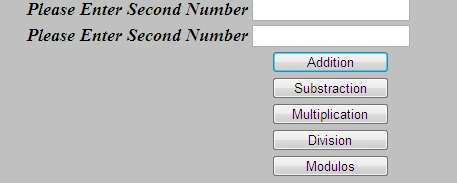
The Output of the Application looks like this:
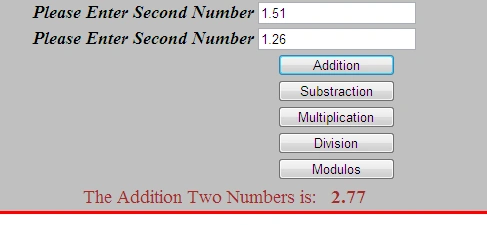
The Addition Operation Output looks like this:
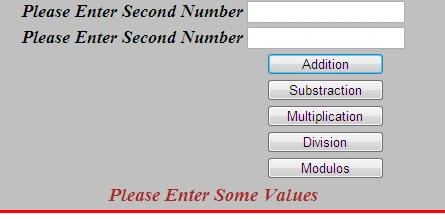
The Invalid Information Passed Output looks like this:
I hope this article is useful for you.

Service Contracts with Single Unique Endpoint Hosted on Web App
Join the conversation! Your thoughts help the community grow.
Sign in to leave a comment
It is the same account you read, post and publish with — and you will come straight back to this page.
Arjun PanwarPosted Jan 2, 2012, 11:50 AM
Really very nice
SapnaPosted Dec 30, 2011, 6:13 AM
Dear Vijay it's very useful article for us. Keep it up thanks
Emmy DickensPosted Dec 30, 2011, 4:59 AM
I want to implement this, thankuu for sharing
Sonakshi SinghPosted Dec 30, 2011, 4:46 AM
well explained
Monika AroraPosted Dec 30, 2011, 4:46 AM
Great what an article. I will surely implement this.