

Authentication is the validation of a user's identity against an authentication provider, which is a directory or database that contains the user’s credentials and can verify that the user submitted them correctly. User authentication occurs when a user attempts to access a SharePoint resource.
SharePoint 2013 supports two authentication types,
- Claims-based authentication
- Windows classic mode authentication
- The result of a Windows classic mode authentication is a Windows security token. We recommend that you use claims-based authentication for user authentication.
- This is also referred to as “classic mode authentication”.
- This approach has a disadvantage that it is not future proof and unsuitable for environments such as extranet, inter-organization, or situations where the domain may not be accessible or there may be many domains in play.
Claims-based authentication
Claims-based authentication is a claims-based security token, which the SharePoint Security Token Service (STS) generates. When a user signs in to SharePoint, the user's token is validated and then used to sign in to SharePoint. The user's token is a security token issued by a claims provider.
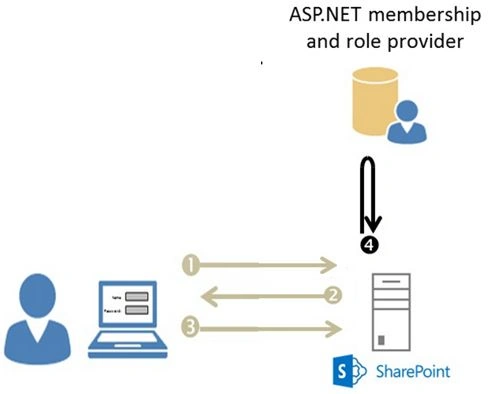
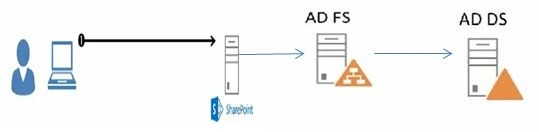
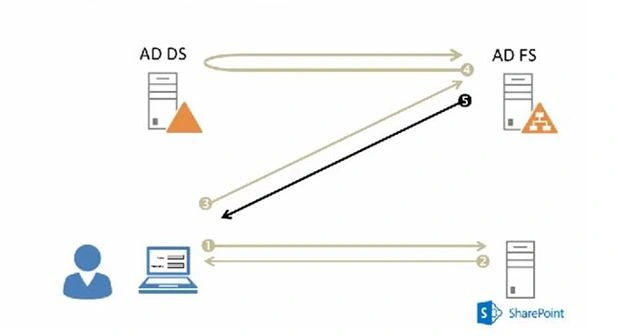
Claims-based authentication will support Windows, forms-based, and Security Assertion Markup Language (SAML)-based claims authentication.
Claims-based authentication is a claims-based security token, which the SharePoint Security Token Service (STS) generates. When a user signs in to SharePoint, the user's token is validated and then used to sign in to SharePoint. The user's token is a security token issued by a claims provider.
Claims-based authentication will support Windows, forms-based, and Security Assertion Markup Language (SAML)-based claims authentication.
- Windows authentication
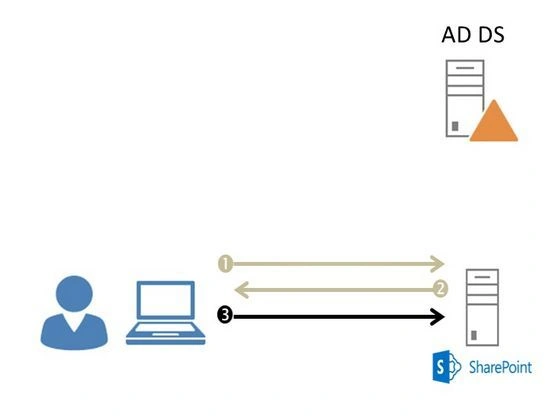
Windows authentication is a normal windows login to access the SharePoint Site.
Gowtham RajamanickamPosted May 17, 2016, 4:17 AM
Thank u all
Ketak BhalsingPosted May 17, 2016, 2:01 AM
Good info....
Kuppurasu NagarajPosted May 11, 2016, 9:14 AM
Nice Sharing..