

In this particular article I am showing data in tiles format.
So now we can display data in any format and have custom paging, sorting, and search.
For this you require a SharePoint site with Events List. The Events list needs to have the following columns.
Also you need a Location List.This Location List has a Title column which we need to refer to in Events List.
I am attaching both the list templates.
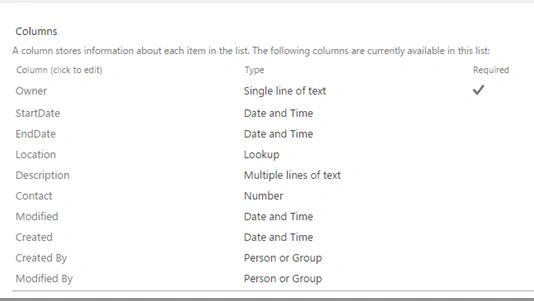
Owner is Title Column.
The Project basically contains a search box and a button and below the data is displayed in horizontal format. At the end you can see custom pager.
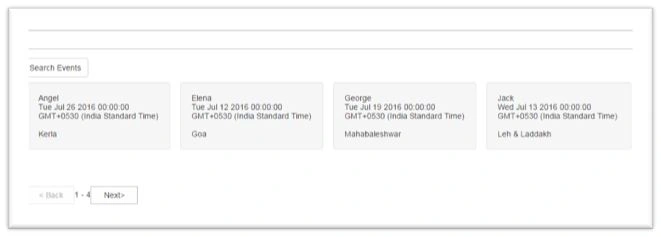
The Data is sorted on the basis of Title Column; i.e, Owner.
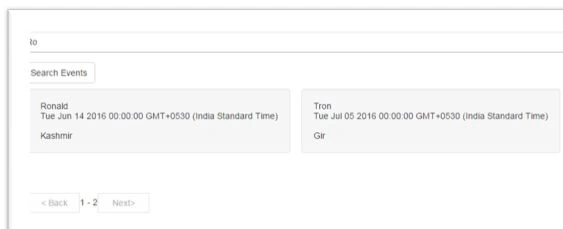
When you enter a key word in a search box and click on “Search Events”, it searches based on Title (Owner) column.
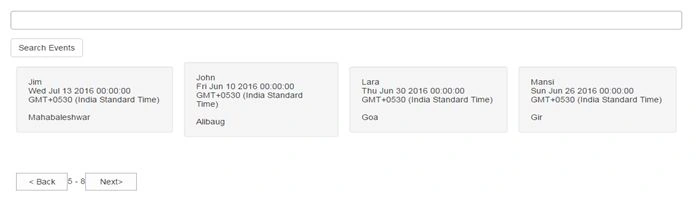
The code has page size 4 which can be changed.
- <!DOCTYPEHTMLPUBLIC"-//W3C//DTD XHTML 1.0 Transitional//EN""http://www.w3.org/TR/xhtml1/DTD/xhtml1-transitional.dtd">
- <html>
- <head>
- <title>Events</title>
- <linkrel="stylesheet"type="text/css"href="https://maxcdn.bootstrapcdn.com/bootstrap/3.3.6/css/bootstrap.min.css"/>
- <scripttype="text/javascript"src="https://cdnjs.cloudflare.com/ajax/libs/jquery/3.0.0/jquery.min.js">
- </script>
- <scriptsrc="//ajax.aspnetcdn.com/ajax/4.0/1/MicrosoftAjax.js"type="text/javascript">
- </script>
- <scripttype="text/javascript"src="/_layouts/15/sp.runtime.js">
- </script>
- <scripttype="text/javascript"src="/_layouts/15/sp.js">
- </script>
- <styletype="text/css">
- .pager {
- padding-left: 9px;
- /*margin: 20px 0;*/
- text-align: center;
- list-style: none;
- float: left;
- }
- .boxspace
- {
- padding:9px;
- }
- </style>
- <scripttype="text/javascript">
- var pageIndex = 1; // default page index value
- var pageSize = 4;//defualt page size
- var nextPagingInfo;
- var previousPagingInfo;
- var position;
- var splistitems;
- var searchvalue;
- var sflag;
- var sortColumn = 'Title';//name if sort column
- var listname = 'Events';//name if list
- //next click code
- function btnnextclick() {
- pageIndex = pageIndex + 1;
- if (nextPagingInfo) {
- position = new SP.ListItemCollectionPosition();
- position.set_pagingInfo(nextPagingInfo);
- }
- else {
- position = null;
- }
- getListItems();
- }
- //prev click code
- function btnprevclick() {
- pageIndex = pageIndex - 1;
- position = new SP.ListItemCollectionPosition();
- position.set_pagingInfo(previousPagingInfo);
- getListItems();
- }
- $(document).ready(function () {
- //fetch items from list on page load
- getListItems();
- });
- function getListItems(searchbtnclickflag) {
- try {
- sflag = searchbtnclickflag;//value will be undefined as search button is not clicked
- var context = new SP.ClientContext.get_current();
- // Load the web object
- this.web = context.get_web();
- //Get the list
- var list = this.web.get_lists().getByTitle(listname);
- var spQuery = new SP.CamlQuery();
- //if search button is click then if condition will execute to set the default position of pager
- if (sflag == "1") {
- spQuery.set_listItemCollectionPosition(undefined);
- }
- else {
- spQuery.set_listItemCollectionPosition(position);
- }
- //on page load search input box is not created,hence this condition will execute.
- if (document.getElementById('search') == null) {
- spQuery.set_viewXml("
- <View>
- <Query>
- <OrderBy>
- <FieldRef Name='" + sortColumn + "' Ascending='True'/>
- </OrderBy>
- </Query>" + "
- <RowLimit>" + pageSize + "</RowLimit>
- </View>");
- }
- //when search box does not contain any text
- elseif (document.getElementById('search').value == "") {
- spQuery.set_viewXml("
- <View>
- <Query>
- <OrderBy>
- <FieldRef Name='" + sortColumn + "' Ascending='True'/>
- </OrderBy>
- </Query>" + "
- <RowLimit>" + pageSize + "</RowLimit>
- </View>");
- }
- //when search value contains text
- else {
- searchvalue = document.getElementById('search').value;
- spQuery.set_viewXml("
- <View>
- <Query>
- <Where>
- <Contains>
- <FieldRef Name='Title' />
- <Value Type='Text'>" + document.getElementById('search').value + "</Value>
- </Contains>
- </Where>
- <OrderBy>
- <FieldRef Name='" + sortColumn +
- "' Ascending='True'/>
- </OrderBy>
- </Query>" + "
- <RowLimit>" + pageSize + "</RowLimit>
- </View>");
- }
- splistitems = list.getItems(spQuery);
- context.load(splistitems);
- context.executeQueryAsync(Function.createDelegate(this,
- get_splistitems_onSuccess), Function.createDelegate(this,
- get_splistitems_onFailure));
- }
- catch (e) {
- alert("An error occurred while fetching data. Please contact your system administrator.");
- }
- }
- function get_splistitems_onSuccess() {
- if (splistitems.get_count() > 0) {
- var splistitemCollection = splistitems.getEnumerator();
- var table = "
- <input type='text'class='form-control' id='search' value='" + searchvalue + "'/>
- <br/>
- <button id='btnsearch' class='btn btn-default' type='button' onclick='getListItems(1)' value='Search Events'>Search Events</button>
- <br/>
- <table class='status'>
- <tr>";
- while (splistitemCollection.moveNext()) {
- var listItem = splistitemCollection.get_current();
- table += "
- <td class='boxspace'>
- <div class='well'>
- <span class='span2 title boldName id='" + listItem.get_item('ID') + "span1" + "'>" + listItem.get_item('Title') + "</span>
- <br/>
- <span class='span2 title boldCategory' id='" + listItem.get_item('ID') + "span2" + "'>" + listItem.get_item('StartDate') + "</span>
- <br/>
- <br/>
- <span class='span2 title boldCode' id='" + listItem.get_item('ID') + "span3" + "'>" + listItem.get_item('Location').get_lookupValue() + "</span>
- </div>
- </a>
- </td>";
- }
- table += "
- </tr>
- </table>";
- tableview.innerHTML = table + "
- <br/>
- <div class='pager'>
- <button id='btnBack' type='button' onclick='btnprevclick()'>"
- + "< Back" + "
- </button>" +
- "
- <span id='pageInfo'></span>" +
- "
- <button id='btnNext' type='button' onclick='btnnextclick()'>Next></button>" +
- "
- </div>";
- if (document.getElementById('search').value == "undefined") {
- document.getElementById('search').value = "";
- }
- managePagerControl();
- }
- else {
- alert("No Data found");
- }
- }
- function managePagerControl() {
- if (sflag == "1") {
- pageIndex = 1;
- }
- if (splistitems.get_listItemCollectionPosition()) {
- nextPagingInfo = splistitems.get_listItemCollectionPosition().get_pagingInfo();
- } else {
- nextPagingInfo = null;
- }
- //The following code line shall add page information between the next and back buttons
- $("#pageInfo").html((((pageIndex - 1) * pageSize) + 1) + " - " + ((pageIndex * pageSize) - (pageSize - splistitems.get_count())));
- previousPagingInfo = "PagedPrev=TRUE&Paged=TRUE&p_ID=" + splistitems.itemAt(0).get_item('ID') + "&p_" + sortColumn + "=" + encodeURIComponent(splistitems.itemAt(0).get_item(sortColumn));
- if (pageIndex <= 1) {
- $("#btnBack").attr('disabled', 'disabled');
- }
- else {
- $("#btnBack").removeAttr('disabled');
- }
- if (nextPagingInfo) {
- $("#btnNext").removeAttr('disabled');
- }
- else {
- $("#btnNext").attr('disabled', 'disabled');
- }
- }
- function get_splistitems_onFailure() {
- alert("An error occurred while fetching data. Please contact your system administrator."+e);
- }
- </script>
- </head>
- <body>
- <!--HTML Content-->
- <divclass="Status"id="tableview">
- </div>
- </body>undefined</html>
Santhakumar MunuswamyPosted Jun 25, 2016, 3:19 AM
Nice share
Kuppurasu NagarajPosted Jun 14, 2016, 1:18 PM
Nice Sharing..
Harsh DPosted Jun 14, 2016, 2:21 AM
Thank u guys
Vignesh ManiPosted Jun 11, 2016, 4:33 PM
nice one
Debasis SahaPosted Jun 11, 2016, 2:14 AM
Good One..
Thiruppathi RPosted Jun 10, 2016, 12:46 PM
Nice One..