

In ASP.NET C# we have Grid Views, Data Lists and so on for showing data but here we will create table at run time and we will show our data in that table.
The following is my SQL Server Data Table structure.
Image 1.
The following is the data in my table: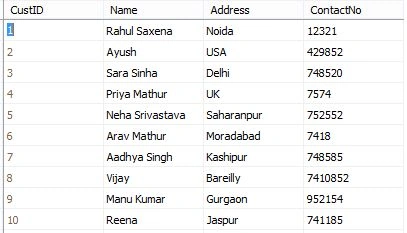
Image 2.
The following is my Aspx page is:
- <%@ Page Language="C#" AutoEventWireup="true" CodeBehind="ShowData.aspx.cs" Inherits="DisplayDataInDynamicallyTable.ShowData" %>
- <!DOCTYPE html>
- <html xmlns="http://www.w3.org/1999/xhtml">
- <head runat="server">
- <title>Display Data in Dynamically Created Table</title>
- </head>
- <body>
- <form id="form1" runat="server">
- <table style="width: 50%; text-align: center; background-color: skyblue;">
- <tr>
- <td align="center">
- <asp:PlaceHolder ID="DBDataPlaceHolder" runat="server"></asp:PlaceHolder>
- </td>
- </tr>
- </table>
- </form>
- </body>
- </html>
- using System;
- using System.Collections.Generic;
- using System.Linq;
- using System.Web;
- using System.Web.UI;
- using System.Web.UI.WebControls;
- using System.Data;
- using System.Data.SqlClient;
- using System.Text;
- namespace DisplayDataInDynamicallyTable
- {
- public partial class ShowData : System.Web.UI.Page
- {
- SqlDataAdapter da;
- DataSet ds = new DataSet();
- StringBuilder htmlTable = new StringBuilder();
- protected void Page_Load(object sender, EventArgs e)
- {
- if (!Page.IsPostBack)
- BindData();
- }
- private void BindData()
- {
- SqlConnection con = new SqlConnection();
- con.ConnectionString = @"Data Source=MYPC\SqlServer2k8;Integrated Security=true;Initial Catalog=MyCompany";
- SqlCommand cmd = new SqlCommand("SELECT * FROM Customer", con);
- da = new SqlDataAdapter(cmd);
- da.Fill(ds);
- con.Open();
- cmd.ExecuteNonQuery();
- con.Close();
- htmlTable.Append("<table border='1'>");
- htmlTable.Append("<tr style='background-color:green; color: White;'><th>Customer ID.</th><th>Name</th><th>Address</th><th>Contact No</th></tr>");
- if (!object.Equals(ds.Tables[0], null))
- {
- if (ds.Tables[0].Rows.Count > 0)
- {
- for (int i = 0; i < ds.Tables[0].Rows.Count; i++)
- {
- htmlTable.Append("<tr style='color: White;'>");
- htmlTable.Append("<td>" + ds.Tables[0].Rows[i]["CustID"] + "</td>");
- htmlTable.Append("<td>" + ds.Tables[0].Rows[i]["Name"] + "</td>");
- htmlTable.Append("<td>" + ds.Tables[0].Rows[i]["Address"] + "</td>");
- htmlTable.Append("<td>" + ds.Tables[0].Rows[i]["ContactNo"] + "</td>");
- htmlTable.Append("</tr>");
- }
- htmlTable.Append("</table>");
- DBDataPlaceHolder.Controls.Add(new Literal { Text = htmlTable.ToString() });
- }
- else
- {
- htmlTable.Append("<tr>");
- htmlTable.Append("<td align='center' colspan='4'>There is no Record.</td>");
- htmlTable.Append("</tr>");
- }
- }
- }
- }
- }
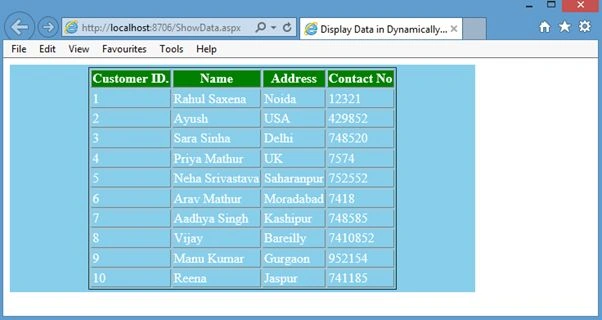
Image 3.
Laxmidhar SahooPosted Mar 4, 2020, 11:07 PM
Thanks for a usefull article
Abid AkhtarPosted Jun 18, 2018, 7:29 AM
Similarly how to get that input value and add it with another input field and display its output in third row?
Abid AkhtarPosted Jun 18, 2018, 7:28 AM
How to add input textfield in it?
Vivek GuptaPosted May 20, 2018, 8:55 PM
How can I add a radio button with each row. And when I click the radio button, a new page would open and display more details for that customer.
Abhijeet GhatagePosted Apr 29, 2018, 3:04 AM
How to pass html table data to database in asp.net using c# without mvc
sachin madishetttyPosted Dec 22, 2017, 12:13 AM
Is there any method to access database in aspx file and iterate the database table in aspx using foreach loop . I want this in web form ,not for mvc type application....
kalu singh raoPosted Jul 11, 2016, 9:38 AM
Nice...
Rahul Kumar SaxenaPosted Feb 26, 2015, 4:38 AM
Would u please explain this Ashish Sharma...?