

Xaml:
<sdk:TabControl/>
Steps Involved:
Creating a Silverlight Application:
- Open Visual Studio 2010.
- Go to File => New => Project.
- Select Silverlight from the Installed templates and choose the Silverlight Application template.
- Enter the Name and choose the location.
- Click OK.
- In the New Silverlight Application wizard check the "Host the Silverlight Application in a new Web site".
- Click OK.
Creating the UI:
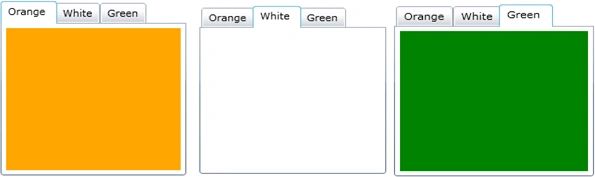
Open MainPage.xaml file and replace the code with the following.
<UserControl xmlns:sdk="http://schemas.microsoft.com/winfx/2006/xaml/presentation/sdk" x:Class="SilverlightTabControl.MainPage"
xmlns="http://schemas.microsoft.com/winfx/2006/xaml/presentation"
xmlns:x="http://schemas.microsoft.com/winfx/2006/xaml"
xmlns:d="http://schemas.microsoft.com/expression/blend/2008"
xmlns:mc="http://schemas.openxmlformats.org/markup-compatibility/2006"
mc:Ignorable="d"
d:DesignHeight="300" d:DesignWidth="400">
<Grid x:Name="LayoutRoot">
<sdk:TabControl Height="200" Width="200">
<sdk:TabItem Header="Orange">
<StackPanel Background="Orange">
</StackPanel>
</sdk:TabItem>
<sdk:TabItem Header="White">
<StackPanel Background="White">
</StackPanel>
</sdk:TabItem>
<sdk:TabItem Header="Green">
<StackPanel Background="Green">
</StackPanel>
</sdk:TabItem>
</sdk:TabControl>
</Grid>
</UserControl>
vivek reddy gummakondaPosted Dec 18, 2010, 7:15 PM
Hi vijai, i have a xaml file in my project say first.xaml.... when i click a tab first.xaml should be displayed under the clicked tab's area... can you please help me out to solve such an issue....!!!