

Introduction
In our previous article, we have seen 5 simple steps to create web role application. Web role projects in Azure are like web applications. Azure has one more type of project i.e. worker role. Worker role applications are back ground processing application like windows process which runs on the back ground. In this article we will try to understand 6 basic steps to create worker role project and as we run through the article we will try to understand the various fundamental methods which are executed in worker role projects.If you are really lazy like me you can download my two azure basic videos which explain what azure is all about Azure Faq Part 1 :- Video1 Azure Faq Part 2 :- Video2.
Please feel free to download my free 500 question and answer eBook which covers .NET , ASP.NET , SQL Server , WCF , WPF , WWF@ http://www.questpond.com.
Step 1:- Ensure you have things at place
In case you are a complete fresher to Azure, please ensure you have all the pre-requisite at place. You can read the below article to get the basic prerequisite http://www.c-sharpcorner.com/UploadFile/shivprasadk/136/Default.aspx?ArticleID=06ceb214-4077-4380-81b0-7d2c56021193Step 2:- What will we do?
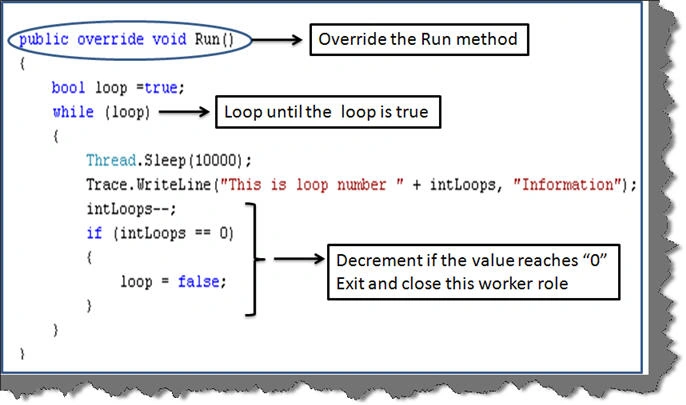
Worker roles are nothing but back ground process which runs on windows azure platform. We will create a simple background process which will run for X number of times and every time it runs, it will wait for 10000 MS.Step 3:- Select the worker role template
So create a new project using the worker role template as shown below.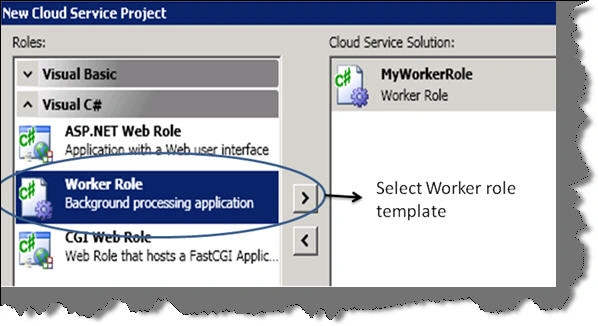


Join the conversation! Your thoughts help the community grow.