

Introduction
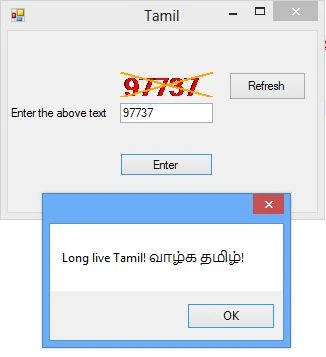
After researching image processing I found this simple logic to generate a CAPTCHA code for human confirmation. This simple image generation using graphics may help the developer to generate a CAPTCHA code in a better way.
Concept behind the logic
Using the advantage of graphics, import a custom image into graphics as a draw sheet and render the text and whatever we require to be drawn in the CAPTCHA image. The complexity of the graphics used to generate the image is directly proportional to the complexity of the CAPTCHA image.
The following is the C# code behind the approach.
public partial class Form1 : Form
{
public Form1()
{
InitializeComponent();
generateImage();
}
int value = 0;
private void generateImage()
{
Random random = new Random (); // get a random instance
value = random.Next(10000, 99999); // get a random value between any range
var image = new Bitmap(this.pictureBox1.Width, this.pictureBox1.Height); // Get a bitmap
var font = new Font("TimesNewRoman", 25, System.Drawing.FontStyle.Bold, System.Drawing.GraphicsUnit.Pixel); // Get a font
var graphics = Graphics.FromImage(image); // Get a graphics with the bitmap image
graphics.DrawString(value.ToString (), font, Brushes.Red, new PointF(0, 0)); // Add the value in the graphics
Pen p = new Pen(Brushes.Orange, 2.0f); // get pen width
graphics.DrawLine(p, new PointF(0,this.pictureBox1 .Height), new Point(this.pictureBox1.Width,0)); // draw a diagonal line
graphics.DrawLine(p, new PointF(0,0), new Point(this.pictureBox1.Width , this.pictureBox1.Height)); // draw another diagonal line
p.Dispose(); // dispose the pen to avoid memory leak
graphics.SmoothingMode = SmoothingMode.AntiAlias; // Smoothing the pixel
graphics.TextRenderingHint = TextRenderingHint.AntiAlias; // Smoothing the text rendering because stem width may differ
this.pictureBox1.Image = image; // load the image in the picturebox
}
private void button2_Click(object sender, EventArgs e)
{
this.generateImage();
}
private void button1_Click(object sender, EventArgs e)
{
if (this.textBox1.Text == value.ToString())
{
MessageBox.Show("Long live Tamil! வாழ்க தமிழ்!");
}
else
{
MessageBox.Show("the value you have entered is wrong");
textBox1.Text = String.Empty;
}
}
}
partial class Form1
{
/// <summary>
/// Required designer variable.
/// </summary>
private System.ComponentModel.IContainer components = null;
/// <summary>
/// Clean up any resources being used.
/// </summary>
/// <param name="disposing">true if managed resources should be disposed; otherwise, false.</param>
protected override void Dispose(bool disposing)
{
if (disposing && (components != null))
{
components.Dispose();
}
base.Dispose(disposing);
}
#region Windows Form Designer generated code
/// <summary>
/// Required method for Designer support - do not modify
/// the contents of this method with the code editor.
/// </summary>
private void InitializeComponent()
Selva GanapathyPosted Mar 29, 2014, 11:39 AM
Hi Nitin Sharma, The code actually generate the image you can use the image in web form image control instead if picture box control
Nitin SharmaPosted Mar 27, 2014, 6:45 AM
Dear Selva Ganapathy your above given code is working . thank you but i need this in asp web form, so please can you tell me how can i convert it according to web form because windows form have picture box control while web form have image control , please help me