Introduction
Today I will explain how to work with an SMS application in Android. I made my own SMS apps. I will tell you how they work and how they are made. In this application I used a layout in which I set many type layouts, all layouts and views are shown here.
In this application, I have used many activity classes for easy coding. Since you know how to connect activity to another, I also connect them in the manner shown here.
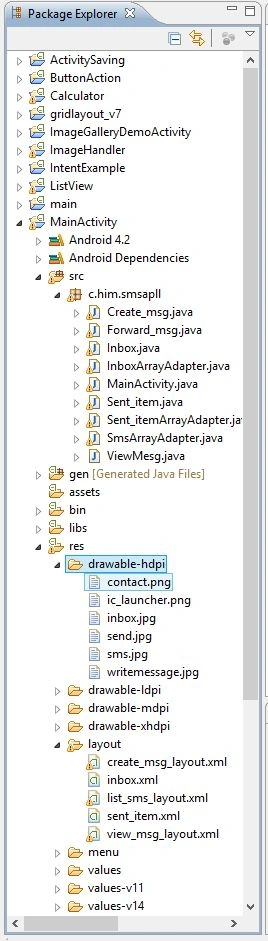
For this application you must have some clip art, you can save it in the drawable directory as shown below.
Step 1
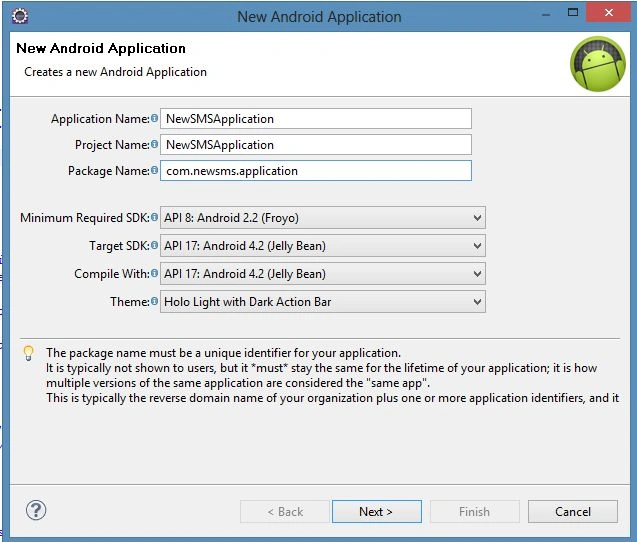
Create a new project as shown below.
Step 2
Create a "create_msg_layout.xml" file as in the following coding.
- <?xml version="1.0" encoding="utf-8"?>
- <RelativeLayout xmlns:android="http://schemas.android.com/apk/res/android"
- android:layout_width="match_parent"
- android:layout_height="match_parent"
- android:orientation="vertical" >
- <LinearLayout
- android:layout_width="match_parent"
- android:layout_height="wrap_content"
- android:layout_alignParentLeft="true"
- android:layout_alignParentTop="true"
- android:layout_marginTop="1dp" >
- <TextView
- android:id="@+id/textView1"
- android:layout_width="wrap_content"
- android:layout_height="wrap_content"
- android:text="To " />
- <EditText
- android:id="@+id/edSendNo"
- android:layout_width="wrap_content"
- android:layout_height="wrap_content"
- android:ems="10"
- android:inputType="number" >
- <requestFocus />
- </EditText>
- <Button
- android:id="@+id/btContactFtech"
- android:layout_width="match_parent"
- android:layout_height="wrap_content"
- android:text=" "
- android:background="@drawable/contact" />
- </LinearLayout>
- <LinearLayout
- android:layout_width="match_parent"
- android:layout_height="360dp"
- android:layout_above="@+id/linearLayout1"
- android:layout_alignParentLeft="true"
- android:layout_alignParentTop="true"
- android:layout_marginTop="50dp" >
- <EditText
- android:id="@+id/edSendText"
- android:layout_width="match_parent"
- android:layout_height="wrap_content"
- android:ems="10"
- android:inputType="textMultiLine" />
- </LinearLayout>
- <LinearLayout
- android:layout_width="match_parent"
- android:layout_height="wrap_content"
- android:layout_alignParentBottom="true"
- android:layout_centerHorizontal="true" >
- <Button
- android:id="@+id/btSend"
- android:layout_width="match_parent"
- android:layout_height="wrap_content"
- android:text="Send" />
- </LinearLayout>
- </RelativeLayout>
Step 3
Create a "inbox.xml" file as in the following coding.
- <?xml version="1.0" encoding="utf-8"?>
- <RelativeLayout xmlns:android="http://schemas.android.com/apk/res/android"
- android:layout_width="match_parent"
- android:layout_height="match_parent"
- android:orientation="vertical"
- android:scrollbars="vertical">
- <TextView
- android:id="@+id/tvName"
- android:layout_width="match_parent"
- android:layout_height="wrap_content"
- android:layout_alignParentLeft="true"
- android:layout_alignParentTop="true"
- android:layout_marginLeft="17dp"
- android:text=""
- android:textAppearance="?android:attr/textAppearanceLarge" />
- <TextView
- android:id="@+id/tvDate"
- android:layout_width="wrap_content"
- android:layout_height="wrap_content"
- android:layout_alignParentLeft="true"
- android:layout_below="@+id/tvName"
- android:text=""
- android:textAppearance="?android:attr/textAppearanceMedium" />
- <TextView
- android:id="@+id/tvTime"
- android:layout_width="wrap_content"
- android:layout_height="wrap_content"
- android:layout_alignBaseline="@+id/tvDate"
- android:layout_alignBottom="@+id/tvDate"
- android:layout_marginLeft="34dp"
- android:layout_toRightOf="@+id/tvDate"
- android:text=""
- android:textAppearance="?android:attr/textAppearanceMedium" />
- <TextView
- android:id="@+id/tvSmallMsgView"
- android:layout_width="match_parent"
- android:layout_height="20dp"
- android:layout_alignParentLeft="true"
- android:layout_below="@+id/tvDate"
- android:text=""
- android:textAppearance="?android:attr/textAppearanceSmall" />
- </RelativeLayout>
Step 4
Create a "list_sms_layout.xml" file, you will see the coding of this file in my attachment.
Step 5
Create a "sent_item_list.xml" file, you will see the coding of this file in my attachment.
Step 6
Create a "view_msg_layout.xml" file, you will see the coding of this file in my attachment.
Step 7
Now open the activity file "MainActivity.java" and update it with the following coding.
- package c.him.smsapll;
- import android.app.ListActivity;
- import android.content.Intent;
- import android.os.Bundle;
- import android.view.View;
- import android.widget.ArrayAdapter;
- import android.widget.ListView;
- import android.widget.Toast;
- public class MainActivity extends ListActivity {
- @Override
- protected void onCreate(Bundle savedInstanceState) {
- super.onCreate(savedInstanceState);
- final String[] listItem = {"Create Message","Inbox","Send Item"};
-
-
- setListAdapter(new SmsArrayAdapter(this, listItem));
- }
- @Override
- protected void onListItemClick(ListView l, View v, int position, long id) {
-
- super.onListItemClick(l, v, position, id);
- switch (position) {
- case 0:
- Intent i1 = new Intent(this,Create_msg.class);
- startActivity(i1);
- break;
- case 1:
- Intent i2 = new Intent(this,Inbox.class);
- startActivity(i2);
- break;
- case 2:
- Intent i3 = new Intent(this,Sent_item.class);
- startActivity(i3);
- break;
- default:
- break;
- }
- }
- }
Step 8
Create a new Java file "CreateMSG.java" as in the following coding.
- package c.him.smsapll;
- import java.util.ArrayList;
- import android.annotation.SuppressLint;
- import android.app.Activity;
- import android.content.ContentValues;
- import android.content.Intent;
- import android.database.Cursor;
- import android.inputmethodservice.Keyboard.Key;
- import android.net.Uri;
- import android.os.Bundle;
- import android.provider.ContactsContract.CommonDataKinds.Phone;
- import android.telephony.SmsManager;
- import android.view.KeyEvent;
- import android.view.View;
- import android.view.View.OnClickListener;
- import android.view.View.OnKeyListener;
- import android.widget.Button;
- import android.widget.EditText;
- import android.widget.Toast;
- public class Create_msg extends Activity {
- String[] numberlist = new String[20];
- int numberlist_index=0;
- EditText edWrite_no,edWrite_text;
- Button bSend,bFetchContact;
- String myEnterNumber="";
- boolean isNumericEntered = false;
- static Boolean control=false;
- @Override
- protected void onCreate(Bundle savedInstanceState) {
- super.onCreate(savedInstanceState);
- setContentView(R.layout.create_msg_layout);
- edWrite_no = (EditText)findViewById(R.id.edSendNo);
- edWrite_text=(EditText)findViewById(R.id.edSendText);
- edWrite_no.setOnKeyListener(new OnKeyListener() {
- @Override
- public boolean onKey(View v, int keyCode, KeyEvent event) {
- if(control==false)
- {
- control=true;
- }
- else
- {
- control=false;
- char pressedKey = (char)event.getUnicodeChar();
- if(pressedKey=='0'||pressedKey=='1'||pressedKey=='2'||pressedKey=='3'||pressedKey=='4'||pressedKey=='5'||pressedKey=='6'||pressedKey=='7'||pressedKey=='8'||pressedKey=='9')
- {
- myEnterNumber =myEnterNumber + pressedKey;
- isNumericEntered=true;
- }
- }
- return false;
- }
- });
- }
- @Override
- protected void onResume() {
-
- super.onResume();
- }
- protected void onStart() {
- super.onStart();
- bSend=(Button)findViewById(R.id.btSend);
- bFetchContact=(Button)findViewById(R.id.btContactFtech);
- bFetchContact.setOnClickListener(new OnClickListener() {
- @Override
- public void onClick(View v) {
- Uri uri = Uri.parse("content://contacts");
- Intent pickContactIntent = new Intent(Intent.ACTION_PICK, uri);
- pickContactIntent.setType(Phone.CONTENT_TYPE);
- startActivityForResult(pickContactIntent, 1);
- }
- });
-
- bSend.setOnClickListener(new OnClickListener() {
-
- @Override
- public void onClick(View v) {
- String s = edWrite_no.getText().toString();
- Check_addmyNumber();
- try
- {
- if(numberlist_index <= 0)
- {
- Toast.makeText(Create_msg.this, "Please, Either enter number or select number from contact.", Toast.LENGTH_SHORT).show();
- }
- else
- while(numberlist_index > 0)
- {
- Toast.makeText(Create_msg.this, "Sender index number : " + numberlist_index, Toast.LENGTH_SHORT).show();
- numberlist_index -=1;
- String number = numberlist[numberlist_index];
-
-
- Toast.makeText(Create_msg.this, "Sender number : " + number, Toast.LENGTH_SHORT).show();
- numberlist[numberlist_index]=null;
-
- if(numberlist_index == 0){
-
- finish();
- }
-
- }
- }
- catch(ArrayIndexOutOfBoundsException e)
- {
- Toast.makeText(Create_msg.this, "You can not send it more than 20 person.", Toast.LENGTH_SHORT).show();
- }
- }
- });
-
- }
- @Override
- protected void onActivityResult(int requestCode, int resultCode, Intent data) {
- super.onActivityResult(requestCode, resultCode, data);
- if (requestCode == 1) {
- if (resultCode == RESULT_OK) {
- Check_addmyNumber();
- Uri contactUri = data.getData();
- String[] projection = {Phone.NUMBER,Phone.DISPLAY_NAME,Phone.STATUS};
- Cursor cursor = getContentResolver().query(contactUri, projection, null, null, null);
- cursor.moveToFirst();
- int column = cursor.getColumnIndex(Phone.NUMBER);
- String number = cursor.getString(column);
-
- numberlist[numberlist_index]=number;
- numberlist_index +=1;
- int column2 = cursor.getColumnIndex(Phone.DISPLAY_NAME);
- String number2 = cursor.getString(column2);
- edWrite_no.setText(edWrite_no.getText().toString()+ " " + number2);
- }
- }
- }
- public void Check_addmyNumber(){
- if(isNumericEntered== true)
- {
- numberlist[numberlist_index]=myEnterNumber;
- numberlist_index +=1;
- myEnterNumber="";
- isNumericEntered=false;
- }
- }
- public void sendLongSMS(String number) {
- String phoneNumber = number;
- String message = edWrite_text.getText().toString();
- SmsManager smsManager = SmsManager.getDefault();
- ArrayList<String> parts = smsManager.divideMessage(message);
- smsManager.sendMultipartTextMessage(phoneNumber, null, parts, null, null);
- }
- public void sendSMSRecordToSendItem(String number) {
- ContentValues values = new ContentValues();
- values.put("address", number);
- values.put("body", edWrite_text.getText().toString());
- getContentResolver().insert(Uri.parse("content://sms/sent"), values);
- }
- }
Step 9
Create a file as "ForwordMSG.java", you will see the coding of this file in my attachment.
Step 10
Create a new file "Inbox.java" with the following coding.
- package c.him.smsapll;
- import java.text.DateFormat;
- import java.util.Date;
- import android.app.ListActivity;
- import android.content.Intent;
- import android.database.Cursor;
- import android.net.Uri;
- import android.os.Bundle;
- import android.util.Log;
- import android.view.View;
- import android.widget.ArrayAdapter;
- import android.widget.ListView;
- import android.widget.Toast;
- public class Inbox extends ListActivity
- {
- String[] Inbox_name = new String[100],
- Inbox_number = new String[100],
- Inbox_date = new String[100],
- Inbox_type = new String[100],
- Inbox_msg = new String[100];
- int pos = 0;
- @Override
- protected void onCreate(Bundle savedInstanceState)
- {
-
- super.onCreate(savedInstanceState);
- Inbox_Read();
- setListAdapter(new InboxArrayAdapter(this, Inbox_name, Inbox_number, Inbox_date, Inbox_type, Inbox_msg));
- }
- @Override
- protected void onListItemClick(ListView l, View v, int position, long id)
- {
-
- super.onListItemClick(l, v, position, id);
- Toast.makeText(Inbox.this, "Number : " + Inbox_number[position], Toast.LENGTH_SHORT).show();
- Intent intent = new Intent(this, ViewMesg.class);
- intent.putExtra("name", Inbox_name[position]);
- intent.putExtra("no", Inbox_number[position]);
- intent.putExtra("date", Inbox_date[position]);
- intent.putExtra("time", Inbox_type[position]);
- intent.putExtra("msg", Inbox_msg[position]);
- startActivity(intent);
- }
- void Inbox_Read()
- {
- Uri mSmsinboxQueryUri = Uri.parse("content://sms/inbox");
- Cursor cursor1 = getContentResolver().query(
- mSmsinboxQueryUri,
- new String[]
- {
- "_id",
- "thread_id",
- "address",
- "person",
- "date",
- "body",
- "type"
- }, null, null, null);
- startManagingCursor(cursor1);
- String[] columns = new String[]
- {
- "address",
- "person",
- "date",
- "body",
- "type"
- };
- if (cursor1.getCount() > 0)
- {
- String count = Integer.toString(cursor1.getCount());
- while (cursor1.moveToNext())
- {
- String number = cursor1.getString(cursor1.getColumnIndex(columns[0]));
- String name = cursor1.getString(cursor1.getColumnIndex(columns[1]));
- String date = cursor1.getString(cursor1.getColumnIndex(columns[2]));
- String msg = cursor1.getString(cursor1.getColumnIndex(columns[3]));
- String type = cursor1.getString(cursor1.getColumnIndex(columns[4]));
- Inbox_name[pos] = name;
- Inbox_number[pos] = number;
- if (date != null)
- {
- long l = Long.parseLong(date);
- Date d = new Date(l);
- Inbox_date[pos] = DateFormat.getDateInstance(DateFormat.LONG).format(d);
- Inbox_type[pos] = DateFormat.getTimeInstance().format(d);
- }
- else
- {
- Inbox_date[pos] = date;
- Inbox_type[pos] = type;
- }
-
- Inbox_msg[pos] = msg;
- pos += 1;
-
- }
- }
- }
- }
Step 11
Create a new file "InboxArrayAdapter.java", you will see this coding in my attachment.
Step 12
Create a new file "SentItem.java", you will see this in my attachment.
Step 13
Create a new file "SentItemArrayAdapter.java" with the following code.
- package c.him.smsapll;
- import java.util.Date;
- import android.content.Context;
- import android.util.Log;
- import android.view.LayoutInflater;
- import android.view.View;
- import android.view.ViewGroup;
- import android.widget.ArrayAdapter;
- import android.widget.ImageView;
- import android.widget.TextView;
- public class Sent_itemArrayAdapter extends ArrayAdapter {
- private Context context;
- private String[] Send_item_name,Send_item_number,Send_item_date,Send_item_type,Send_item_msg;
- Sent_itemArrayAdapter(Context context,String[] Send_item_name,String[] Send_item_number,String[] Send_item_date,String[] Send_item_type,String[] Send_item_msg)
- {
- super(context,R.layout.sent_item, Send_item_number);
- this.context= context;
- this.Send_item_name=Send_item_name;
- this.Send_item_number=Send_item_number;
- this.Send_item_date=Send_item_date;
- this.Send_item_type=Send_item_type;
- this.Send_item_msg=Send_item_msg;
- }
- @Override
- public View getView(int position, View convertView, ViewGroup parent) {
- LayoutInflater inflater = (LayoutInflater) context.getSystemService(Context.LAYOUT_INFLATER_SERVICE);
- View rowView = inflater.inflate(R.layout.sent_item, parent, false);
-
- TextView name = (TextView) rowView.findViewById(R.id.tvName);
- TextView date = (TextView) rowView.findViewById(R.id.tvDate);
- TextView msg = (TextView) rowView.findViewById(R.id.tvSmallMsgView);
- TextView type = (TextView) rowView.findViewById(R.id.tvTime);
-
-
-
-
-
- name.setText(Send_item_number[position]);
- date.setText(Send_item_date[position]);
- msg.setText(Send_item_msg[position]);
- type.setText(Send_item_type[position]);
-
-
-
-
-
-
-
-
-
-
-
- return rowView;
- }
- }
Step 14
Create a new file "SmsArray Adapter.java", you will see this coding in my attachment in the .rar file.
Step 15
Now create a new file "Viewmsg.java" as in the following coding.
- package c.him.smsapll;
- import android.app.Activity;
- import android.content.Intent;
- import android.os.Bundle;
- import android.view.View;
- import android.view.View.OnClickListener;
- import android.widget.Button;
- import android.widget.TextView;
- public class ViewMesg extends Activity{
- TextView number,date,time,msg;
- Button frd;
- @Override
- protected void onCreate(Bundle savedInstanceState) {
-
- super.onCreate(savedInstanceState);
- setContentView(R.layout.view_msg_layout);
- number=(TextView)findViewById(R.id.tvNumber);
- date=(TextView)findViewById(R.id.tvDate);
- time=(TextView)findViewById(R.id.tvTime);
- msg=(TextView)findViewById(R.id.tvMsg);
- frd=(Button)findViewById(R.id.btFrd);
- }
- @Override
- protected void onStart() {
-
- super.onStart();
- Intent i = getIntent();
- number.setText(i.getStringExtra("no"));
- date.setText(i.getStringExtra("date"));
- time.setText(i.getStringExtra("time"));
- msg.setText(i.getStringExtra("msg"));
-
- frd.setOnClickListener(new OnClickListener() {
- @Override
- public void onClick(View v) {
- Intent click = new Intent(ViewMesg.this,Forward_msg.class);
- click.putExtra("message", msg.getText());
- startActivity(click);
-
- }
- });
- }
-
- }
Step 16
Now open the manifest file and update it using all the activities and permissions shown below.
- <?xml version="1.0" encoding="utf-8"?>
- <manifest xmlns:android="http://schemas.android.com/apk/res/android"
- package="c.him.smsapll"
- android:versionCode="1"
- android:versionName="1.0" >
- <uses-sdk
- android:minSdkVersion="8"
- android:targetSdkVersion="17" />
- <uses-permission android:name="android.permission.READ_SMS"/>
- <uses-permission android:name="android.permission.WRITE_SMS"/>
- <application
- android:allowBackup="true"
- android:icon="@drawable/sms"
- android:label="@string/app_name"
- android:theme="@style/AppTheme" >
- <activity
- android:name="c.him.smsapll.MainActivity"
- android:label="@string/app_name" >
- <intent-filter>
- <action android:name="android.intent.action.MAIN" />
- <category android:name="android.intent.category.LAUNCHER" />
- </intent-filter>
- </activity>
- <activity android:name="Create_msg"
- android:label="@string/c_msg">
- </activity>
- <activity android:name="Inbox"
- android:label="@string/Inbox_msg">
- </activity>
- <activity android:name="Sent_item"
- android:label="@string/Send_item_msg">
- </activity>
- <activity android:name="Forward_msg"
- android:label="@string/Frd_msg">
- </activity>
- <activity android:name="ViewMesg"
- android:label="@string/View_msg">
- </activity>
- </application>
- </manifest>
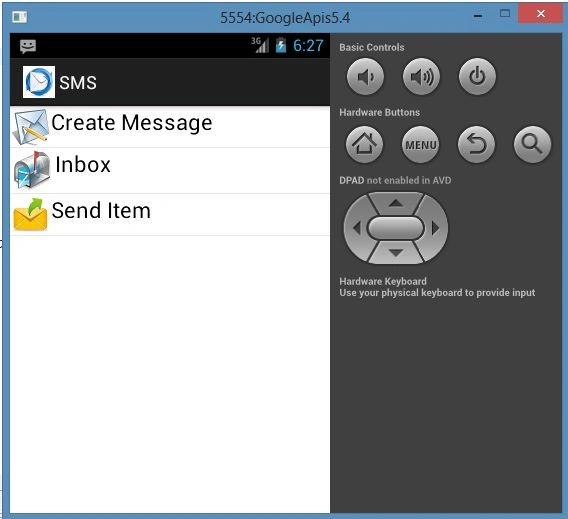
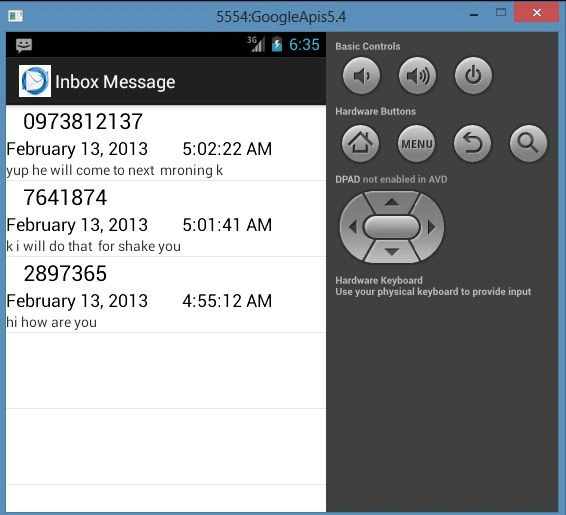
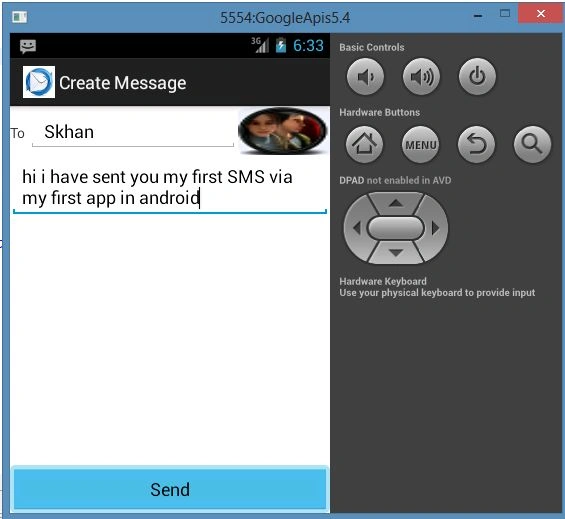
And at last, see the output as in the following:


M. BaihaqqiPosted Jul 11, 2017, 8:40 AM
What algorithm did you use for encrypting the message? sorry, I'm really new on this case.
Imam PrayogoPosted Sep 10, 2014, 4:16 AM
please sent this source code at [email protected]
edwin ariestoPosted Jul 26, 2014, 5:28 PM
sorry my email [email protected]
edwin ariestoPosted Jul 26, 2014, 5:28 PM
send your code to my email, after correct your code sms sends item. :) thanks you
edwin ariestoPosted Jul 26, 2014, 5:26 PM
you sms sent item not working, please send me right code :)
Pham PhuongPosted May 31, 2013, 3:13 AM
Sorry. SMS send Item it's not working.
Pham PhuongPosted May 31, 2013, 2:59 AM
Great ....... Thanks u very much. Can you send for me source code Sen MMS. Please. Email: [email protected]
arrul bardaiPosted Apr 15, 2013, 10:45 AM
thanks for the souce code program This really helped me thank you very much I hope you get a blessing in this life regards if there is source code for AES or blowfish encryption algorithms android please give the news to me via [email protected]