

Introduction
While playing with a Windows application I attempted to provide communication between two applications in a simple way. I also would like to have the communication of the two Microsoft Windows applications be very simple and I found the following simple logic to do theat.
Concept behind the approach
A Microsoft Windows application runs on separate host processes when it runs in an IDE and as an exe with an executable build. But interaction between the two separate processes was not possible. But by this approach we can provide interaction between two Windows application processes by a bridge of a temp storage.
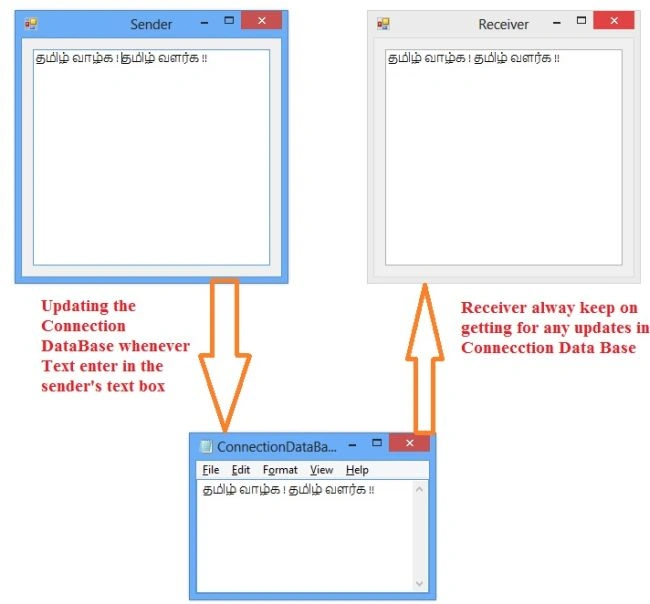
Here we have two Windows applications named “Sender” and “Receiver”. We will provide for interaction between the “Sender” and “Receiver” in a very simple way using a text file .txt as a bridge.
The sender updates the text in that temp .txt file whenever we enter text. Similarly the receiver monitors the .txt text file for any updates.
C# Code snippet for sender
namespace sender
{
public partial class Form1 : Form
{
string path = string.Empty;
public Form1()
{
InitializeComponent();
path= System.IO.Path.GetTempPath(); // Geting Temp Path
if (!File.Exists(path + "ConnectionDataBase.txt")) // Condition searching for the patch availablity
{
File.Create(path + "ConnectionDataBase.txt"); // Creating the file if the file not found
}
}
private void textBox1_TextChanged(object sender, EventArgs e)
{
using (System.IO.StreamWriter file = new System.IO.StreamWriter(path + "ConnectionDataBase.txt")) // Open a text file to update the content
{
file.Write(this.textBox1.Text); // Write the content
}
}
}
}
C# Code snippet for receiver
namespace receiver
Selva GanapathyPosted Apr 24, 2014, 1:23 PM
Hi Sam Hobbs, Thanks for your suggestion
Sam HobbsPosted Apr 24, 2014, 12:28 PM
Instead of using a real file, a NamedPipeServerStream Class could be used. A NamedPipeServerStream provides synchronization.
Sam HobbsPosted Apr 24, 2014, 12:23 PM
Instead of using a real file, a MemoryMappedFile could be used. It would however be necessary to also provide a synchronization mechanism, such as a named event.
Sam HobbsPosted Apr 24, 2014, 12:11 PM
Instead of using a timer to synchronize the two applications, it would be much more reliable to use a named event. Unfortunately .Net does not support named events. WCF however uses named events so that is a significant advantage of the use of WCF. To learn about named events, see: http://code.msdn.microsoft.com/wpapps/Using-named-events-for-IPC-133e5bf9