

Introduction
In this article, I will tell you how to create a single-page application using ASP.NET MVC and jQuery. Without using Angular, React, and other third-party JavaScripts, it is difficult to achieve SPA. In this article, I will explain only controller and UI level interaction. I skipped the data access layer. If you want, please download the attachment which includes the overall code of the application.
Note. I used the code-first approach for CRUD operations. After downloading the project file, restore packages change the connection string web. config and run the update-database command in the Package Manager Console.
Required Contents
- ASP.NET MVC
- JQUERY
- Sammy.JS (for Routing)
Steps
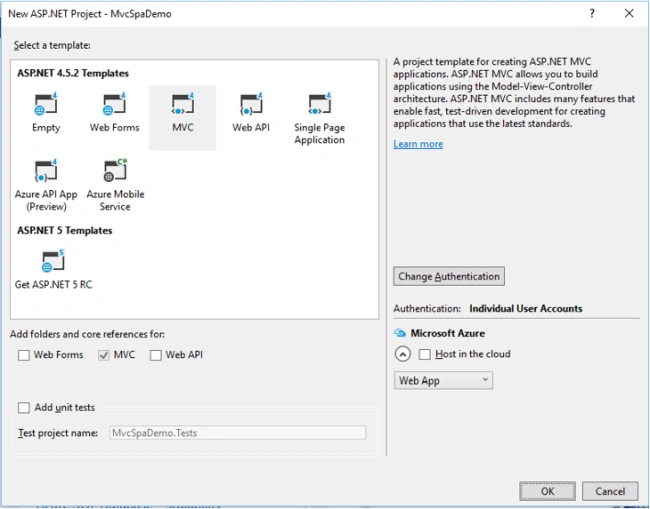
Create a new MVC project.
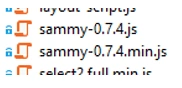
Add jQuery and Sammy.js references to your layout page. Add a div tag (MainContent) in which we render all the partial views.
<head>
    <meta charset="utf-8" />
    <meta name="viewport" content="width=device-width, initial-scale=1.0">
    <title>@ViewBag.Title - My ASP.NET Application</title>
    @Styles.Render("~/Content/css")
    @Scripts.Render("~/bundles/modernizr")
    <script src="~/Scripts/jquery-1.10.2.js"></script>
    <script src="~/Scripts/sammy-0.7.4.js"></script>
</head>
Create layout-routing.js file in your project which contains your application routing structure which is shown as below.
var mainContent;
var titleContent;

$(function () {
    mainContent = $("#MainContent"); // render partial views
    titleContent = $("title"); // render titles
});

var routingApp = $.sammy("#MainContent", function () {
    this.get("#/Student/Index", function (context) {
        titleContent.html("Student Page");
        $.get("/Student/Index", function (data) {
            context.$element().html(data);
        });
    });

    this.get("#/Student/Add", function (context) {
        titleContent.html("Add Student");
        //$("#BigLoader").modal('show'); // If you want to show loader
        $.get("/Student/Add", function (data) {
            //$("#BigLoader").modal('hide');
            context.$element().html(data);
        });
    });

    this.get("#/Student/Edit", function (context) {
        titleContent.html("Edit Student");
        $.get("/Student/Edit", {
            studentID: context.params.id // pass student id
        }, function (data) {
            context.$element().html(data);
        });
    });

    this.get("#/Home/About", function (context) {
        titleContent.html("About");
        $.get("/Home/About", function (data) {
            context.$element().html(data);
        });
    });

    this.get("#/Home/Contact", function (context) {
        titleContent.html("Contact");
        $.get("/Home/Contact", function (data) {
            context.$element().html(data);
        });
    });
});

$(function () {
    routingApp.run("#/Student/Index"); // default routing page
});

function IfLinkNotExist(type, path) {
    if (!(type != null && path != null))
        return false;

    var isExist = true;

    if (type.toLowerCase() == "get") {
        if (routingApp.routes.get != undefined) {
            $.map(routingApp.routes.get, function (item) {
                if (item.path.toString().replace("/#", "#").replace(/\\/g, '').replace("$/", "").indexOf(path) >= 0) {
                    isExist = false;
                }
            });
        }
    } else if (type.toLowerCase() == "post") {
        if (routingApp.routes.post != undefined) {
            $.map(routingApp.routes.post, function (item) {
                if (item.path.toString().replace("/#", "#").replace(/\\/g, '').replace("$/", "").indexOf(path) >= 0) {
                    isExist = false;
                }
            });
        }
    }
    return isExist;
}
IfLinkNotExist() check if url should not repeat, after we will add dynamic url in routing list on page load.
Add layout-routing reference in _layout.cshtml page.
<script src="~/layout-routing.js"></script>
@*@Scripts.Render("~/bundles/jquery")*@
@Scripts.Render("~/bundles/bootstrap")
@RenderSection("scripts", required: false)
Add a new controller ‘WelcomeController’ which has only one action ‘Index’.
namespace MvcSpaDemo.Controllers
{
    public class WelcomeController : Controller
    {
        public ActionResult Index()
        {
            return View();
        }
    }
}
Create the View of ‘Index’ action using right-click.
In that View, attach the layout page link. (We need to render the layout page for the first time).
@{
    ViewBag.Title = "Index";
    Layout = "~/Views/Shared/_Layout.cshtml";
}
<h1>Welcome</h1>
Now, create student Controller which includes student CRUD operation modules. (Add, update, delete, View).
View Students
public ActionResult Index()
{
    return PartialView();
}
public ActionResult _Index()
{
    var students = StudentData.GetStudents();
    return PartialView(students);
}
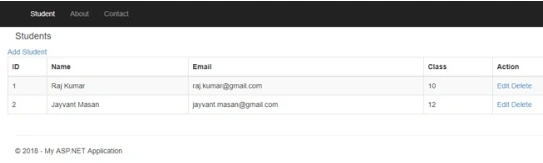
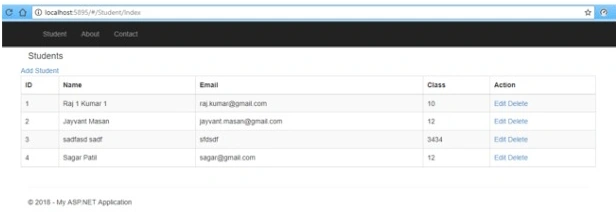
Add two Views without layout page. One for outer student contents like header, add button, etc. and another for student table.
Index.cshtml
@{
    Layout = null;
}
<h4>Students</h4>
<div class="row">
    <a href="#/Student/Add">Add Student</a>
</div>
<div class="row">
    <div id="StudentDiv">
    </div>
</div>
<script>
    $(function () {
        GetStudents();
    });
    function GetStudents() {
        $.get("/Student/_Index/", function (data) {
            $("#StudentDiv").html(data);
        });
    }
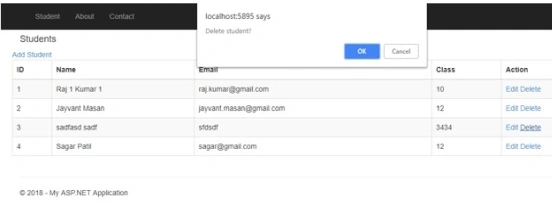
    function DeleteStudent(studentID) {
        if (confirm("Delete student?")) {
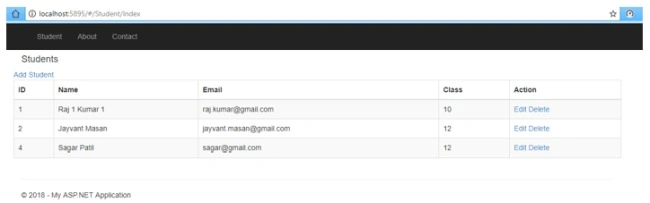
            $.get("/Student/Delete/", { studentID: studentID }, function (data) {
                GetStudents();
            });
        }
    }
</script>
_Index.cshtml
sathiya moorthyPosted Jan 13, 2021, 5:07 AM
JQuery validation not working
Max VidalPosted Sep 21, 2018, 2:10 PM
The CRUD model proposed by Microsoft is interesting but fails in the large number of views that are generated ... This article is great because it allows reducing this number of views while maintaining the essence of the Microsoft's CRUD model. At the moment I am migrating from Webforms to MVC and I think the model proposed in this article is great as a starting point. Thank you very much for your contribution. Max Castro V.Santiago, Chile
Mohit KalaPosted Jul 29, 2018, 9:46 PM
Nice Article Jaywant Sir . And Also Waiting For Your New Articles
Mohsin AzamPosted Jun 8, 2018, 2:51 PM
Great work