
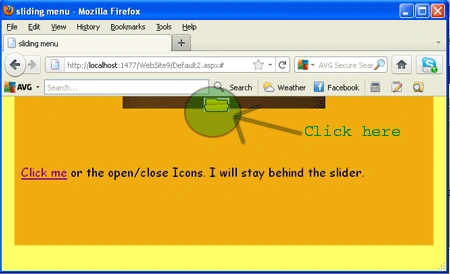
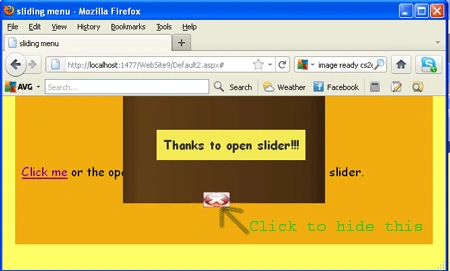
Introduction: In this article we will explore the effect using jQuery. As we know, sliding means how to move something from its actual position to its destination position. In this article, we will create an example of moving an image on a button click.
Step 1: Firstly we have to
take a web Application.
- Go to Visual Studio 2010
- Open the web Application
- Click OK.
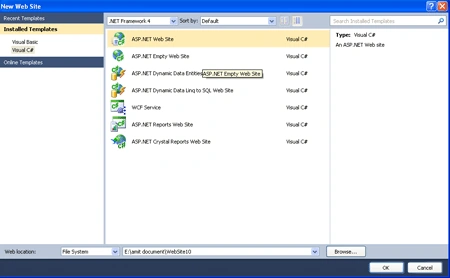
Step 2: Secondly you have to add a new page to the website.
- Go to the Solution Explorer.
- Right Click o Project name.
- Select add new item.
- Add new web page and give it a name.
- Click OK.
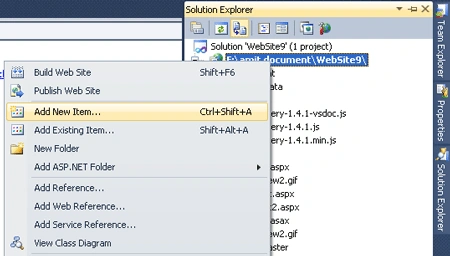
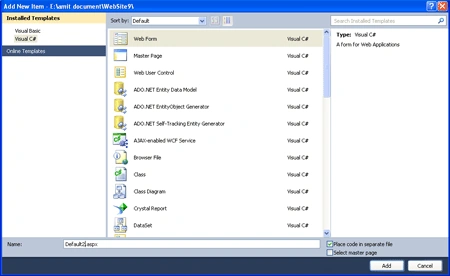
Step 3: In this step you have to
add some images to the project.
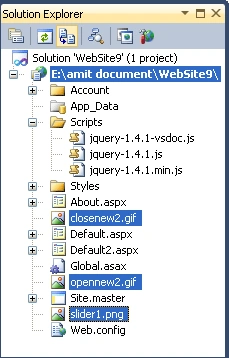
Step 4: In this step you have to
create a style sheet and the code of style sheet is given below. it will set all the margin and position of
the div and header we are taking in the program and also set the width and
height of the div.
Code:
<style
type="text/css">
body
{
margin:
0;
font-size:16px;
color:
#000000;
font-family:Arial,
Helvetica, sans-serif;
}
#s_Wrap
{
margin:
0 auto;
width:
300px;
}
#slider {
position:
absolute;
background-image:url(slider1.png);
background-repeat:no-repeat;
background-position:
bottom;
width:
300px;
height:
159px;
margin-top:
-141px;
}
#slider
img {
border-style: none;
border-color: inherit;
border-width: 0;
width: 38px;
height: 21px;
}
#s_Content
{
margin:
50px 0
0 50px;
position:
absolute;
text-align:center;
background-color:#FFFFCC;
color:#333333;
font-weight:bold;
padding:
10px;
}
#header {
margin:
0 auto;
width:
600px;
background-color:
#F0F0F0;
height:
200px;
padding:
10px;
}
#opclWrap
{
position:absolute;
margin:
143px 0
0 120px;
font-size:12px;
font-weight:bold;
}
</style>
Step 5: In this step we have to add the reference of the js library.
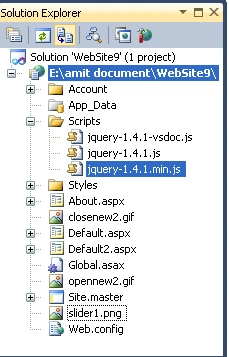
Step 6: Now add the script file references.

Step 7: Now we have to write the code for jQuery to the source file of default2.aspx file which is given below you may write it into either head or body section.
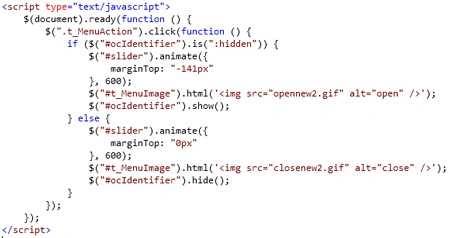
Code Description: Here we are taking a simple a function $(document).ready(function(){}) inside the ready function we are taking the $(".t_MenuAction").click(function () function of jQuery by clicking on that we will see a sliding effect but after taking this we are going to check the condition named as if ($("#ocIdentifier").is(":hidden")) means "#ocIdentifier" is id of the div at which we are checking that if it is hidden then performing the task given $("#slider").animate() whcih is used to animate the slider by setting their margin and how much time it will display and .html() method is used to allows the HTML content to be set by passing in a function. $("#ocIdentifier").show(); will used to move that slider and In the else part of the condition we will hide that slider on their actual position by calling it's hide function.
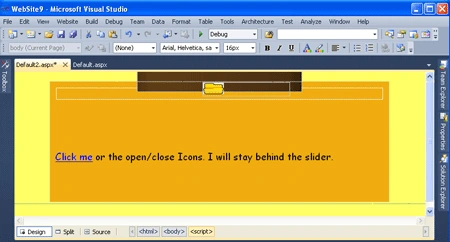
Step 8: In this step we will see the complete code for the whole project which will be write at the source page of the default2.aspx page.
Join the conversation! Your thoughts help the community grow.