

Introduction
In this article, we are going to learn how to use react table in react applications.
In this series, we are learning about basic react js concepts. This article is about how to use react table and sorting column in the table. React table is an open-source library. It is lightweight, easy to use, fast and we can easily use the filters, sorting, grouping, and pagination, etc in react table. In the previous article, We made CRUD operations application in react with mock APIs.
Let's get started with an example. First, we have to install react table package from the below command.
npm i react-table
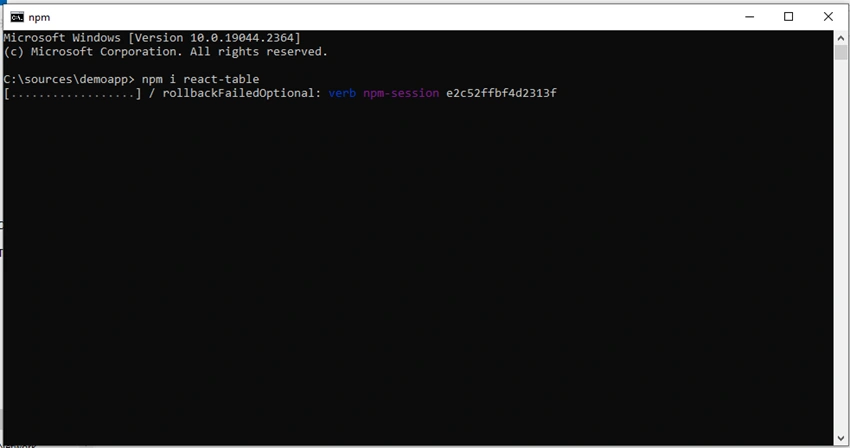
Once react table package is successfully installed in our application. For now, we are using one JSON file which contains some dummy data. If you are calling API then you can use that data.
UsersData.json
 [
    {
      "id": 1,
      "name": "John",
      "country": "India",
      "comment": "I am John",
      "tandc": true
    },
    {
      "id": 2,
      "name": "Andy",
      "country": "US",
      "comment": "This is Andy",
      "tandc": true
    },
    {
      "id": 3,
      "name": "Rozer",
      "country": "India",
      "comment": "I am Rozer",
      "tandc": true
    },
    {
      "id": 4,
      "name": "Daniel",
      "country": "US",
      "comment": "I am Daniel",
      "tandc": true
    },
    {
      "id": "5",
      "name": "Roy",
      "country": "India",
      "comment": "I am Roy",
      "tandc": true
    }
  ]
We have added some dummy data in the JSON file. Now we are adding one file for the defined column. So those columns access the data in the table. In this file, we map the fields by using the accessor and header to display the header name of that field.
Columns.js
const columns = [{
    Header: 'Id',
    accessor: 'id'
}, {
    Header: 'Name',
    accessor: 'name'
}, {
    Header: 'Country',
    accessor: 'country'
}, {
    Header: 'Comment',
    accessor: 'comment',
}, {
    Header: 'Term and Condition',
    accessor: d => d.tandc ? 'Checked' : 'Not checked',
}]
export default columns;
Now we have created one table js file. In this file, we have imported the useTable hook from react table. And also import the usersdata.json file, and coulmns.js file then pass those data into the useTable.
Now we have written the below code for the render react table. By using the map method we iterate the data to display the header and cell content values.
Table.js
import React from 'react'
import { useTable } from "react-table";
import data from './UsersData.json';
import columns from './Columns';
function Table() {
    const ReactTable = useTable({
        columns,
        data,
    })
    const {
        getTableProps,
        getTableBodyProps,
        headerGroups,
        rows,
        prepareRow
    } = ReactTable;
    return (
        <table className='users-table' {...getTableProps()}>
            <thead>
                {headerGroups.map(headerGroup => (
                    <tr {...headerGroup.getHeaderGroupProps()}>
                        {headerGroup.headers.map(column => (
                            <th {...column.getHeaderProps()}>
                                {column.render("Header")}
                            </th>
                        ))}
                    </tr>
                ))}
            </thead>
            <tbody {...getTableBodyProps()}>
                {rows.map((row, i) => {
                    prepareRow(row);
                    return (
                        <tr {...row.getRowProps()}>
                            {row.cells.map(cell => {
                                return <td {...cell.getCellProps()}>{cell.render("Cell")}</td>;
                            })}
                        </tr>
                    );
                })}
            </tbody>
        </table>
    )
}
export default Table;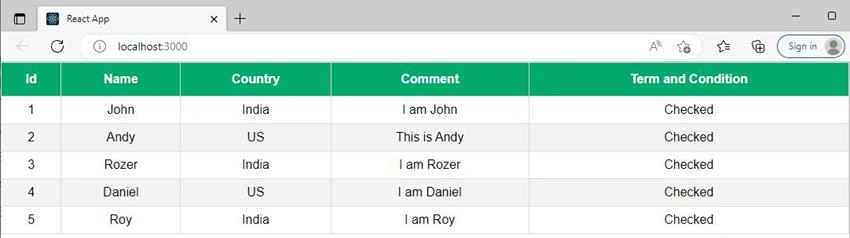
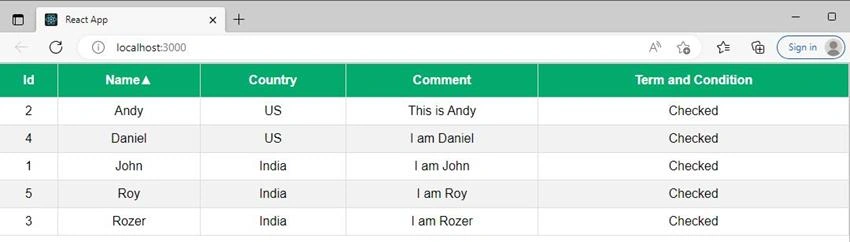
Join the conversation! Your thoughts help the community grow.