

I've read Nipun Tomar's "Sort a Multicolumn ListView in C#" article today and while it was a great article, I feel there is some room for improvement. Mainly some things can be done clearer and more efficiently.
If you've read the article, you know the sorting can be easily done by inheriting IComparer interface.
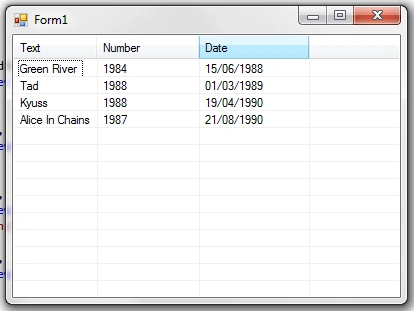
First, let's add some items to the ListView. You can add the following code to the form's constructor:
this.listView.Items.AddRange(new ListViewItem[] {
new ListViewItem(new string[] {
"Green
River",
"1984",
"15/06/1988"}),
new ListViewItem(new string[] {
"Tad",
"1988",
"01/03/1989"}),
new ListViewItem(new string[] {
"Alice
In Chains",
"1987",
"21/08/1990"}),
new ListViewItem(new string[] {
"Kyuss",
"1988",
"19/04/1990"})
});
The built-in enumeration SortOrder is a bit difficult the work with, because the order of items is:
0. None
1. Ascending
2. Descending
We have to multiply IComparer.Compare's return value based on sorting order, which means that the following order of enum items, with interval [-1, 1] instead of [0, 2], is easier to work with:
-1.) Descending (multiply by -1)
0.) None (multiply by 0)
1.) Ascending (multiply by 1)
Here is our enumeration and its variable with initial value "None":
public enum MySortOrder { Descending = -1, None, Ascending };
private MySortOrder
order = MySortOrder.None;
We have to set only one item to a specific value (-1 in this case), the rest will follow automatically.
Of course it's not hard to get proper values from the build-in SortOrder with a mathematical formula, but why add necessary code if we can create our own enumeration.
Let's add a field that keeps track of last clicked column (initial value is -1 because no item has been clicked yet):
private int curr_column
= -1;
Okay, now let's move to creating IComparer-inherited class called "ItemComparer". First we'll add two fields, one is for column's index, the other is for the type of sorting.
private int _index;
private int _order;
The constructor:
public ItemComparer(int
index, int order)
{
_index = index;
_order = order;
}
I'll move step by step through Compare method:
public int Compare(object A, object B)
The method should check whether ordering is set to None (multiply by 0) at the very beginning, because if it is, the return value will always be 0, so the rest of the method is a waste of system resources. Same goes for comparing an object to itself - remember that objects are compared by reference and not by value.
if (_order == 0 || A == B) return 0;
The previous condition being false doesn't only mean that A and B are two separate objects, it also means that at least one of the two objects isn't null.
So the following two statements is all we need to handle null objects properly:
else if (A == null) return -1;
else if (B == null) return 1;
Now that we checked the most necessary things, we can create two objects (references) for each object as a ListViewItem:
ListViewItem itemA = A as ListViewItem;
ListViewItem itemB = B as ListViewItem;
And now we can truly check if the two column items have equal Text property:
if (itemA.SubItems[_index].Text ==
itemB.SubItems[_index].Text)
return 0;
Let's start comparing items as different data-types. First, we'll check if the text we're comparing is a date. If it is, we can return from the function without executing the rest of the code:
DateTime dateA, dateB;
if (DateTime.TryParse(itemA.SubItems[_index].Text,
out dateA) &&
DateTime.TryParse(itemB.SubItems[_index].Text, out
dateB))
{
return _order * DateTime.Compare(dateA,
dateB);
}
Note that we have to multiply DateTime.Compare's return value by _order, which is either 1 or -1.
If it isn't a date, then maybe it's a number:
double doubleA, doubleB;
if (double.TryParse(itemA.SubItems[_index].Text,
out doubleA) &&
double.TryParse(itemB.SubItems[_index].Text,
out doubleB))
{
return
_order * (doubleA > doubleB ? 1 : (doubleA < doubleB ? -1 : 0));
}
And if isn't a number, then we'll just compare the text as string-type:
return _order * String.Compare(itemA.SubItems[_index].Text,
itemB.SubItems[_index].Text);
Now that we're finished with ItemComparer, we can move to adding an event handler to our ListView's ColumnClick event. Since we will use the handler only for this particular event, we can write an anonymous method.
First we'll check if the clicked column is the same as the last clicked column. If it isn't, we'll set the order of sorting to Ascending:
this.listView.ColumnClick += (object sender, ColumnClickEventArgs
e) =>
Isaac HidalgoPosted Mar 28, 2011, 8:33 PM
This is a very interesting article, but im searching a method to sort multiple columns at the same time, I mean, like the Microsoft Excel advanced Sort dialog where you can choose which columns sort, which order and data type. Anyone has seen this already programmed and can share the example?. I'll program the sample and post it back. Meanwhile Im posting my personalized class to be able to choose the type of data, so you can sort values with money sign, numbers, strings and values with an ending percentage symbol. NOTE: variable names are typed in Spanish but is not difficult to translate them: numeros for numbers letras for strings porcentaje for percentage fechas for dates moneda for currency values ------------------------ Public Class Comparador Implements IComparer Private col As Integer Private order As SortOrder Public Enum Comparar numeros letras fechas moneda porcentaje End Enum Public Tipo_Comparacion As Comparar Private _formulario As Form Public Sub New(ByVal column As Integer, ByVal orden As SortOrder, ByVal tipo As Comparar) col = column Me.order = orden Tipo_Comparacion = tipo If IsNothing(_formulario.BackgroundImage) Then _formulario.BackgroundImage = My.Resources.rsRecursos.cacesa_logo _formulario.BackgroundImageLayout = ImageLayout.Center End If End Sub Public Function Compare(ByVal x As Object, ByVal y As Object) As Integer Implements System.Collections.IComparer.Compare Dim returnVal As Integer = -1 If col < CType(x, ListViewItem).SubItems.Count And col < CType(y, ListViewItem).SubItems.Count Then Select Case Tipo_Comparacion Case Comparar.letras If Trim(CType(x, ListViewItem).SubItems(col).Text) = String.Empty Then If Trim(CType(y, ListViewItem).SubItems(col).Text) = String.Empty Then returnVal = 0 Else returnVal = -1 End If Else If Trim(CType(y, ListViewItem).SubItems(col).Text) = String.Empty Then returnVal = 1 Else returnVal = [String].Compare(CType(x, ListViewItem).SubItems(col).Text, CType(y, ListViewItem).SubItems(col).Text) End If End If Case Comparar.numeros If Trim(CType(x, ListViewItem).SubItems(col).Text) = String.Empty Then If Trim(CType(y, ListViewItem).SubItems(col).Text) = String.Empty Then returnVal = 0 Else returnVal = -1 End If Else If Trim(CType(y, ListViewItem).SubItems(col).Text) = String.Empty Then returnVal = 1 Else returnVal = Double.Parse(Trim(CType(x, ListViewItem).SubItems(col).Text)) - Double.Parse(Trim(CType(y, ListViewItem).SubItems(col).Text)) End If End If If returnVal <> 0 Then returnVal *= Math.Abs(1 / returnVal) Case Comparar.fechas If Trim(CType(x, ListViewItem).SubItems(col).Text) = String.Empty Then If Trim(CType(y, ListViewItem).SubItems(col).Text) = String.Empty Then returnVal = 0 Else returnVal = -1 End If Else If Trim(CType(y, ListViewItem).SubItems(col).Text) = String.Empty Then returnVal = 1 Else Dim fecha1 As DateTime = Date.Parse(CType(x, ListViewItem).SubItems(col).Text) Dim fecha2 As DateTime = Date.Parse(CType(y, ListViewItem).SubItems(col).Text) returnVal = DateDiff(DateInterval.Day, fecha1, fecha2) * -1 If returnVal <> 0 Then returnVal *= Math.Abs(1 / returnVal) End If End If Case Comparar.moneda If Trim(CType(x, ListViewItem).SubItems(col).Text) = String.Empty Then If Trim(CType(y, ListViewItem).SubItems(col).Text) = String.Empty Then returnVal = 0 Else returnVal = -1 End If Else If Trim(CType(y, ListViewItem).SubItems(col).Text) = String.Empty Then returnVal = 1 Else Dim uno As String = CType(x, ListViewItem).SubItems(col).Text Dim dos As String = CType(y, ListViewItem).SubItems(col).Text If uno.Substring(0, 1) = "-" Then uno = "$-" & uno.Substring(2) End If If dos.Substring(0, 1) = "-" Then dos = "$-" & dos.Substring(2) End If If uno.Substring(0, 1) = "$" Then uno = uno.Substring(1) End If If dos.Substring(0, 1) = "$" Then dos = dos.Substring(1) End If returnVal = Double.Parse(Trim(uno)) - Double.Parse(Trim(dos)) End If End If If returnVal <> 0 Then returnVal *= Math.Abs(1 / returnVal) Case Comparar.porcentaje If Trim(CType(x, ListViewItem).SubItems(col).Text) = String.Empty Then If Trim(CType(y, ListViewItem).SubItems(col).Text) = String.Empty Then returnVal = 0 Else returnVal = -1 End If Else If Trim(CType(y, ListViewItem).SubItems(col).Text) = String.Empty Then returnVal = 1 Else Dim uno As String = CType(x, ListViewItem).SubItems(col).Text Dim dos As String = CType(y, ListViewItem).SubItems(col).Text If uno.Substring(uno.Length - 1, 1) = "%" Then uno = uno.Substring(0, uno.Length - 1) End If If dos.Substring(dos.Length - 1, 1) = "%" Then dos = dos.Substring(0, dos.Length - 1) End If returnVal = Double.Parse(Trim(uno)) - Double.Parse(Trim(dos)) End If End If If returnVal <> 0 Then returnVal *= Math.Abs(1 / returnVal) End Select If order = SortOrder.Descending Then ' Invert the value returned by String.Compare. returnVal *= -1 End If End If Return returnVal End Function End Class
prema vidhyaPosted Oct 18, 2010, 7:06 AM
hi