

Introduction
This article explains the following points.
- Apply validation on from date and to the date parameter of SSRS. (The From date should be less than the To date.)
- Validation for Numeric number accepted by SSRS parameter. Here we check that the parameter value entered by the user is numeric.
- Specify a parameter value range. Like only 0-10 digit numbers are accepted by the parameter.
- The scenario is that we need to select all rows between FromOrderID and ToOrderID. In that case, we need to maintain fromOrderId should be less than ToOrderID.
Now we start from the first point.
Apply validation on the from-date and the date parameter of SSRS. (The From date should be less than the To date.)
For this, we need to go SSRS report (RDL file), where we need to implement the same validation. Here I am only showing how to implement the validation in a report. If you want to learn about SSRS report creation, go to this link.
Here we see only validation using custom code.
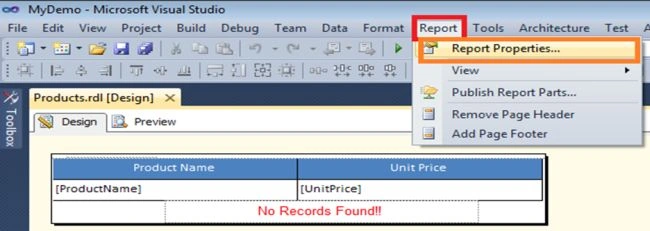
Before starting, we must understand where to write custom code in SSRS. For this, go to any RDL file, go to the top menu bar Report, and select the Report properties option from here.
Then we see this window appear.
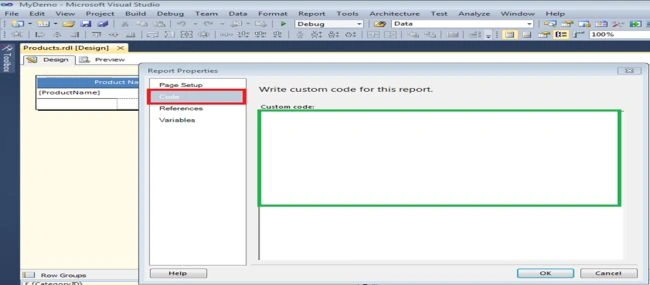
In this window, go to the Code tab. There we can write custom (VB) code only in this window.
Now we will start with our point, which is date parameter validation.
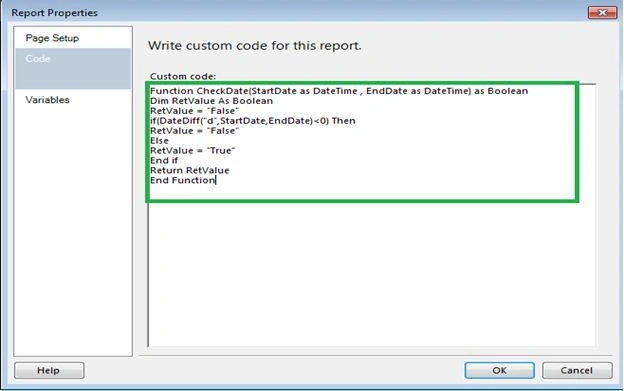
I write simple VB code and place it in the custom code window for this.
Function CheckDate(
  StartDate as DateTime ,  EndDate as DateTime
)  as Boolean :    Dim RetValue As Boolean   RetValue  =   "False"     if(
  DateDiff("d", StartDate, EndDate)< 0
)  Then   RetValue  =   "False"    Else    RetValue  =   "True"    End if   Return RetValue    End Function
Function Description
Here you see, I have written a function CheckDate that accepts a StartDate and EndDate parameter checks the validation against these dates, and returns a true and false Boolean value.
Now we will see how to use this function in an SSRS report for date validation.
Now I will create two parameters for the report one is Order from Date, and the other is Order To Date.
Note. If you use a parametrized Stored Procedure, there is no need to create a parameter in SSRS Reports.
To create a parameter, we need to go to the ReportData window, go to the Parameter folder, right-click on that, and select Add Parameter.
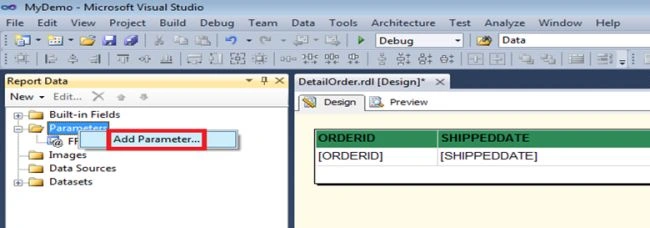
In this manner, we can create any parameters in an SSRS report.
Then provide the parameter name and choose the data type depending on your value. In the same manner, we create another parameter for Order To Date. Here I will choose the DateTime data type and then set the visibility of the parameter to visible, in other words, you want to show the parameter in the SSRS report.
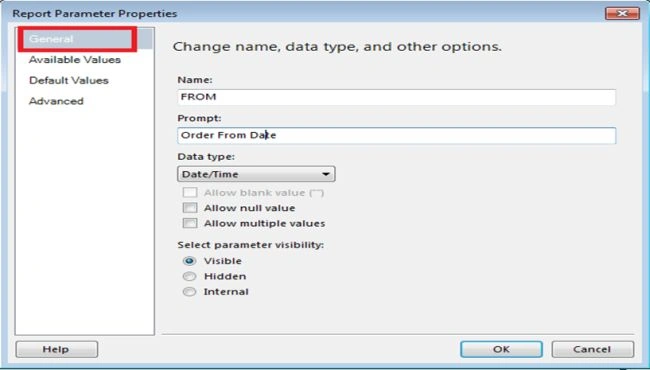
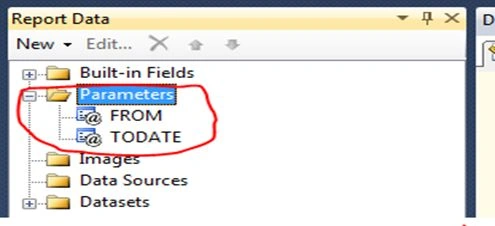
Here you can see the parameter that I created.
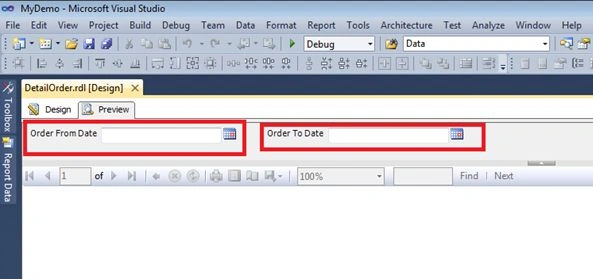
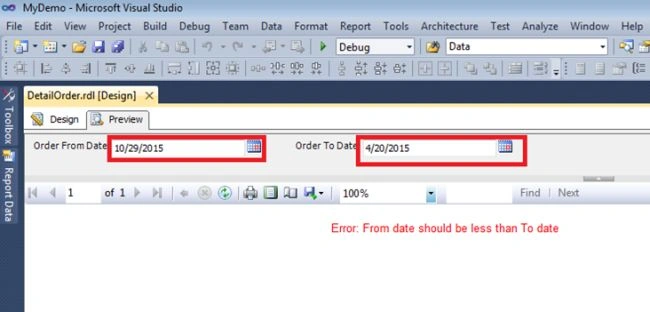
Now when we run the SSRS report, we can see two parameters on the top of the SSRS report window.

Sivaranjan SPosted Nov 15, 2023, 5:36 AM
HI Priti Kumari, thank you so much, your article was a timely help and I was able to configure. The wrong selection of dates work perfectly. But however, when I select the correct dates eg From Date : 1 Nov 23, To Date 10 Nov 23 , the report does not get any data. 0 rows are returned. Can you help me please.
gopal pPosted Apr 19, 2017, 6:31 AM
In my case (FromYear,ToYear). I changed to datatype to INT, i am facing some error. There an error on line 0 of custom code.[BC30002] First statement of method body cannot be on the same line as the method declaration . Function CheckDate(StartDate as Int32 , EndDate as Int32) as Boolean: Dim RetValue As Boolean RetValue = "False" if(DateDiff("yyyy",StartDate,EndDate)<0) Then RetValue = "False" Else RetValue = "True" End if Return RetValue End Function
Sandeep MittalPosted Apr 28, 2016, 3:50 AM
Nice Article and very good information shared, but i see a small issue. The validation error message would be displayed once the report is processed and rendered, ideally the validation should be performed before the request processing.
Santhakumar MunuswamyPosted Jul 19, 2015, 8:13 AM
Good one
Sibeesh VenuPosted Jul 17, 2015, 5:56 AM
Thanks for the information
Gopi ChandPosted Jul 17, 2015, 5:42 AM
Its nice one
SharadPosted Jul 17, 2015, 3:35 AM
good one...
RakeshPosted Jul 17, 2015, 12:21 AM
Good one
Nilesh JadavPosted Jul 17, 2015, 12:07 AM
Thank you for sharing mam!
Pankaj Kumar ChoudharyPosted Jul 16, 2015, 6:42 PM
Nice Explain mam...........