

This article will take you closer to Stored Procedures and functions. Some of you may be already familiar with these two most commonly used terms in SQL Server. This article will explain what Stored Procedures and functions are and how they work and some basic differences among them.
Overview
Sometimes we need to store or access some amount of data or do some DML or DDL operations over our data stored in a specific SQL Server database. So for performing specific set of operations, we need to access and modify the database, again and again, depending on the required functionality.
The requirement is to not perform these operations but maintains efficiency and integrity too in our database.
To increase performance of our database, we need to concern with several aspects during database design. One of the most useful operations for performing those operations as well as maintaining efficiency is as follows:
- Stored Procedure
- Functions
Stored Procedure in SQL Server
If we want to do certain repetitive tasks/operations over our database within the same application and database, then, in this case, the most useful method for this functioning is none other than Stored Procedures.
It is most often called an "S-Proc" or "SP".
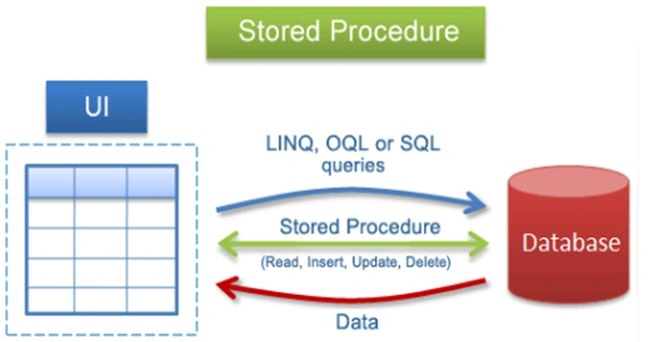
Pros of Stored Procedure
A SQL Server Stored Procedure provides us many advantages like:
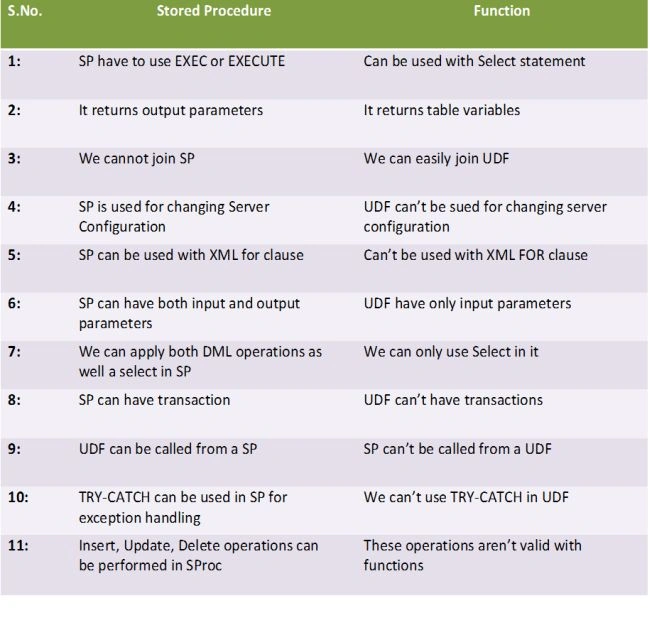
- SP can return zero, single or multiple values
- We can use transaction in SP
- SP has both input and output parameters
- Can be used with XML for clause
- Used in changing server configuration
- SP allows DML statements as well as Selects
- SP can return zero, single or multiple values
- We can use transaction in SP
- SP has both input and output parameters
- Can be used with XML for clause
- Used in changing server configuration
- SP allows DML statements as well as Selects
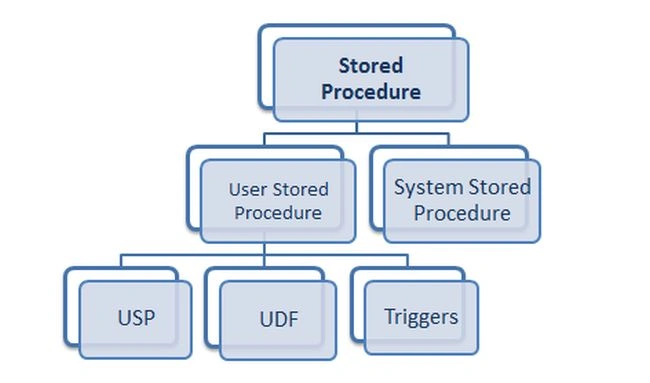
Hierarchy of Stored Procedure
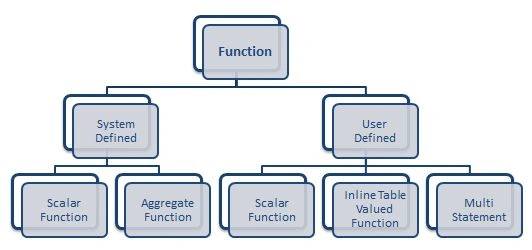
The complete hierarchy of a Stored Procedure is shown below in a reference chart, from the root to the base level:
Types of Stored Procedure
A Stored Procedure is categorized in these two major categories:
System Stored Procedure
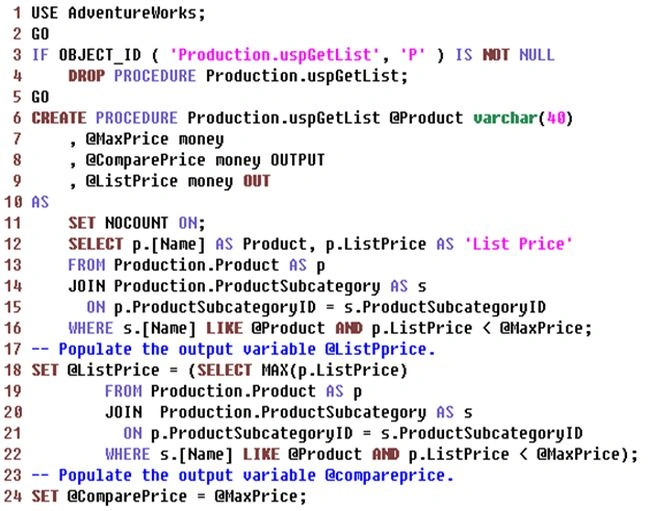
In SQL Server sometimes we need to do many informational or admin level tasks or activities. These sets of tasks can be done very easily using a System Stored Procedure. In this type of Stored Procedure whenever we do any modification or alteration in our database table, we do add a backup or some administrative level functioning in that modified database location.
All this functioning is done under the procedure of a system S-Proc. System Stored Procedures are prefixed by sp_, so it is not available to use sp_ for any other type of the Stored Procedure that we create until or unless they are part of our SQL Server installation.
Sajeeha AnsarPosted Jun 17, 2016, 11:49 AM
awesommmmmmmmmmmmme
vignesh jPosted Apr 21, 2016, 8:23 AM
Nice It's good
rkraju mPosted Nov 16, 2015, 9:52 AM
http://www.dotnetlearners.com/blogs/view/161/Difference-between-stored-procedure-and-function-in-MS-SQL-server.aspx
pramod SinghPosted Nov 2, 2015, 8:51 AM
Difference between Function and Stored Procedure in Single Line of Word------------------------------------------------------------------------------------Function can not changes our Database State but Stored Procedure Can do Anything. Due to This we can not put any SQL Statement in side the Function which modify our database state.Like----insert,update delete,Create etc.
Sudheshwer RaiPosted Aug 20, 2015, 12:26 PM
Very Nice Keep it up.
Abhishek JaiswalPosted May 10, 2015, 4:57 PM
thanks! :)
Gowtham RajamanickamPosted Apr 7, 2015, 6:21 AM
good one..
Abhishek JaiswalPosted Jan 14, 2015, 2:10 AM
Thanks.. for ur kind review. i'll update it soon. :)
pertti jarvaPosted Jan 13, 2015, 4:15 PM
Maybe you should have also listed the cons of UDFs, especially the multi statement ones...
Palle TechnologiesPosted Sep 29, 2014, 10:46 AM
http://skillgun.com/sql/stored-procedures/interview-questions-and-answers