

This article has three parts:
- Introduction to Stored Procedure and LINQ To SQL.
- Simply uses of Stored Procedure with LINQ.
- CRUD operations with uses of Stored Procedure with LINQ To SQL
Introduction to Stored Procedure and LINQ To SQL:
Stored Procedure: Collection and Group of T-SQL commands is called Stored procedure. In this we can write commands of Creation, updation and deletion of parts of Data Definition Language (DDL), Data Manipulation Language (DML).
We all prefer stored procedure writing compared to writing hardcoded query. There are so many reasons to prefer Stored Procedures.
Stored Procedure can do: Input Parameter, Output Parameter and Output the bunch of records.
Why We Should Use Stored Procedure?
- Compile one time only.
- Executing fast as compare to hardcoded query.
- User level protection.
- Reduce network traffic.
LINQ to SQL:
Language Integrated Query (LINQ), Linq to SQL works as ORD (Object Relational Designer). Before starting to work on LINQ To SQL you should understood the ORD.
ORD is a canvas where you can create or drag and drop the table or entity on it from Server Explorer. Linq to sql designer can be created with Add New Item and Select LINQ to SQL classes template and you can see that creating a DBML extension kind of file.
Thats DBML is called Object Relational Designer (O/R Designer).
This DBML is used to create entity classes that map to database tables or views and other important things.
Naming Convention of tables you should take care.. Singular or Pluralisation.
There two way to change table or entity name in DBML.
- You can change either from database itself.
- Tools - Options Database Tools and select O/R Designer then select False from the Enabled Drop Down list in the Pluralisation of Names group.
Simple Uses of Stored Procedure with LINQ To SQL:
Herewith we are going to use Stored Procedure with Linq To Sql step by step.
Stored Procedure returning the list of friends.
stpGetAllFriends code
- SET ANSI_NULLS ON
- GO
- SET QUOTED_IDENTIFIER ON
- GO
- -- =============================================
- -- Author: Manoj kalla
- -- Create date: 28-March-2016
- -- Description: To Get All Friends.
- -- =============================================
- CREATE PROCEDURE stpGetAllFriends
- AS
- BEGIN
- -- SET NOCOUNT ON added to prevent extra result sets from
- -- interfering with SELECT statements.
- SET NOCOUNT ON;
- Select * From tblFriends
- END
- GO
- Database name is MemberCDAC its having tblFriends and stpGetAllFriends,
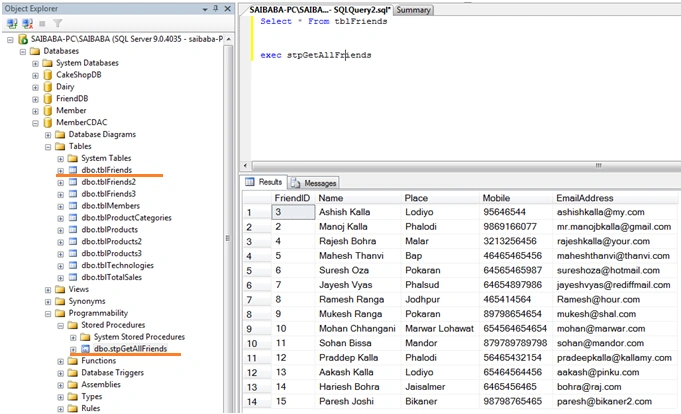
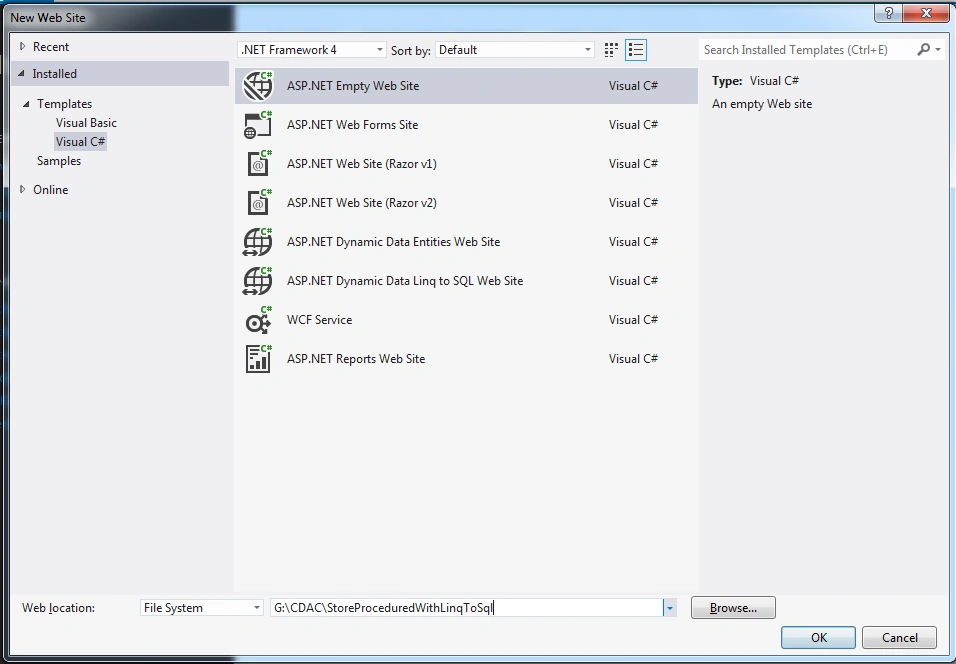
- Create a new Asp.Net Web Site project named : StoreProceduredWithLinqToSql,
- Right click on solution explorer and select Add New Item,
or press CTRL + SHIFT + A,
Select LINQ to SQL Classes item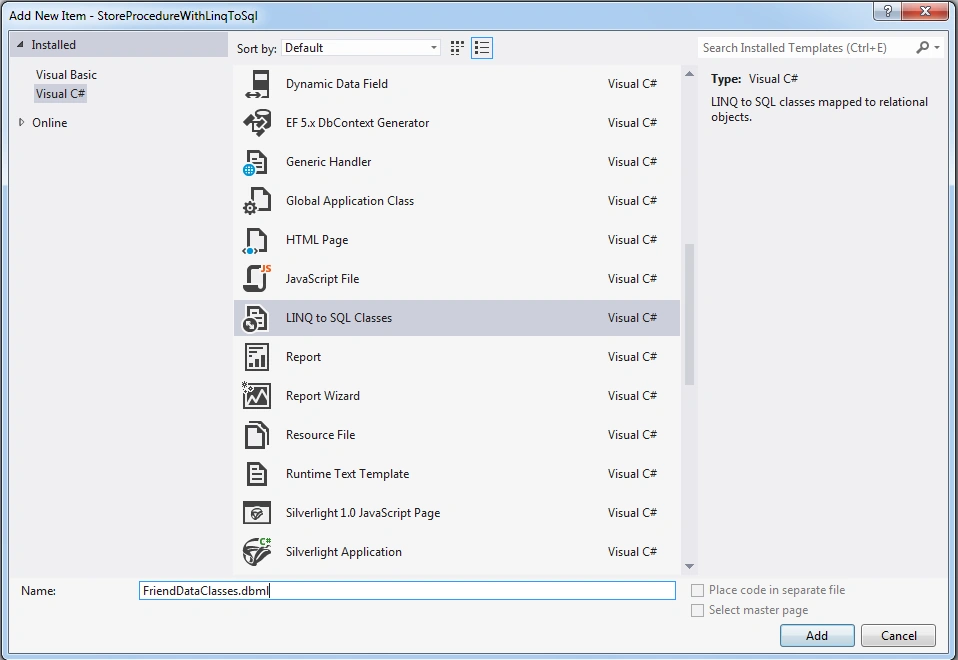
Named item as FriendDataClasses.dbml,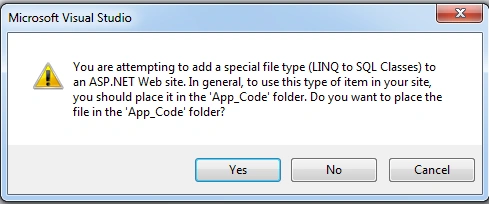
Press Yes on above dialogue box. - Select VIEW option from Visual Studio and select SERVER EXPLORER option or press simply CTRL + W + L,
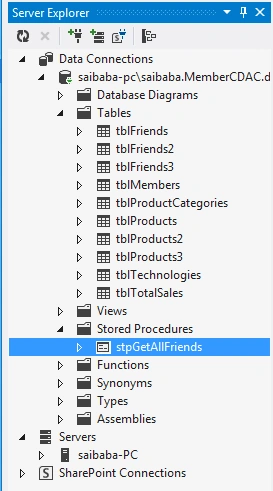
You can see and compare previous screen shots of SQL Server with SERVER EXPLORER its same with contents. - Drag N Drop stpGetAllFriends object which inside under section of Stored Procedures.
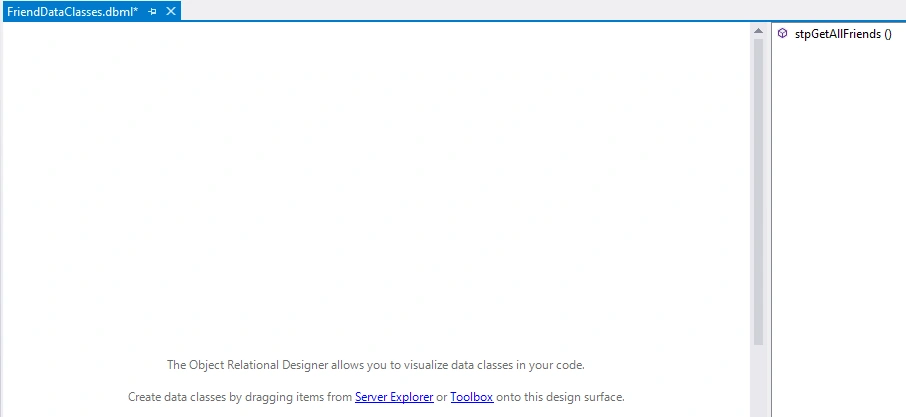
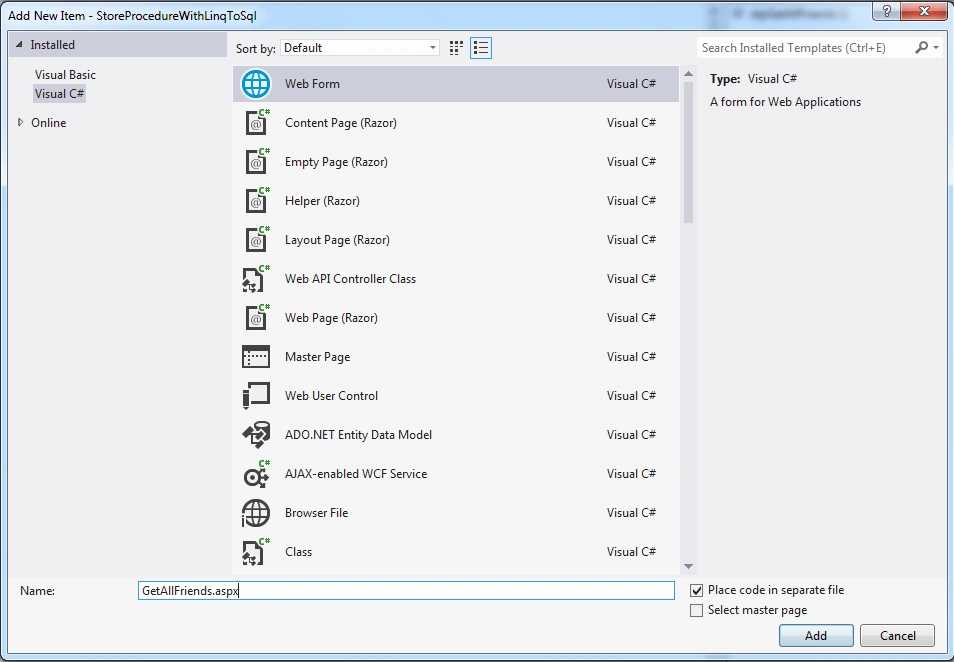
After draging and dropping our DBML will look like like the above image. - Now right click on solution explorer and add new item and add WEB FORM named it : GetAllFriends.aspx
- From toolbox select Data group/section under there is a GRIDVIEW control.
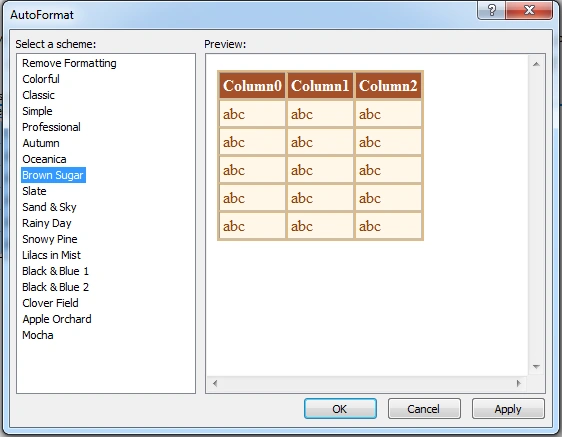
Select GridView’s smart tag option select AUTO FORMAT,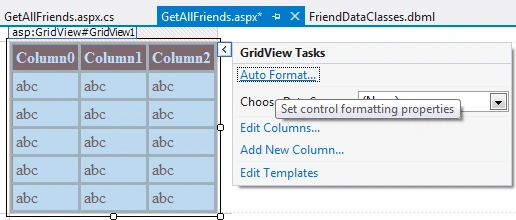
- GetAllFriends.aspx code
- <%@ Page Language="C#" AutoEventWireup="true" CodeFile="GetAllFriends.aspx.cs" Inherits="GetAllFriends" %>
- <!DOCTYPE html>
- <html xmlns="http://www.w3.org/1999/xhtml">
- <head runat="server">
- <title></title>
- </head>
- <body>
- <form id="form1" runat="server">
- <div>
- <asp:GridView ID="GridView1" runat="server" BackColor="#DEBA84" BorderColor="#DEBA84" BorderStyle="None" BorderWidth="1px" CellPadding="3" CellSpacing="2">
- <FooterStyle BackColor="#F7DFB5" ForeColor="#8C4510" />
- <HeaderStyle BackColor="#A55129" Font-Bold="True" ForeColor="White" />
- <PagerStyle ForeColor="#8C4510" HorizontalAlign="Center" />
- <RowStyle BackColor="#FFF7E7" ForeColor="#8C4510" />
- <SelectedRowStyle BackColor="#738A9C" Font-Bold="True" ForeColor="White" />
- <SortedAscendingCellStyle BackColor="#FFF1D4" />
- <SortedAscendingHeaderStyle BackColor="#B95C30" />
- <SortedDescendingCellStyle BackColor="#F1E5CE" />
- <SortedDescendingHeaderStyle BackColor="#93451F" />
- </asp:GridView>
- </div>
- </form>
- </body>
- </html>
- GetAllFriends.aspx.cs code
- using System;
- using System.Collections.Generic;
- using System.Linq;
- using System.Web;
- using System.Web.UI;
- using System.Web.UI.WebControls;
- public partial class GetAllFriends: System.Web.UI.Page
- {
- protected void Page_Load(object sender, EventArgs e)
- {
- FriendDataClassesDataContext _db = new FriendDataClassesDataContext();
- GridView1.DataSource = _db.stpGetAllFriends();
- GridView1.DataBind();
- }
- }
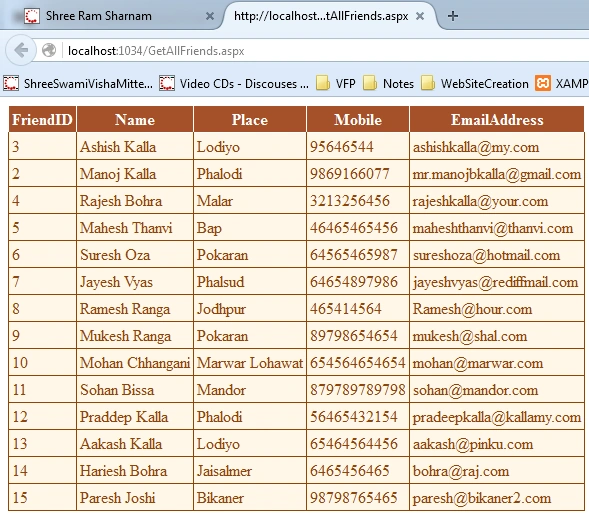
- Output
CRUD operations with uses of Stored Procedure with LINQ To SQL
Now in this section we are implementing CRUD (Create, Retrieve, Update, Delete) operations against table of database with uses of Stored Procedure running with the help of LINQ TO SQL.
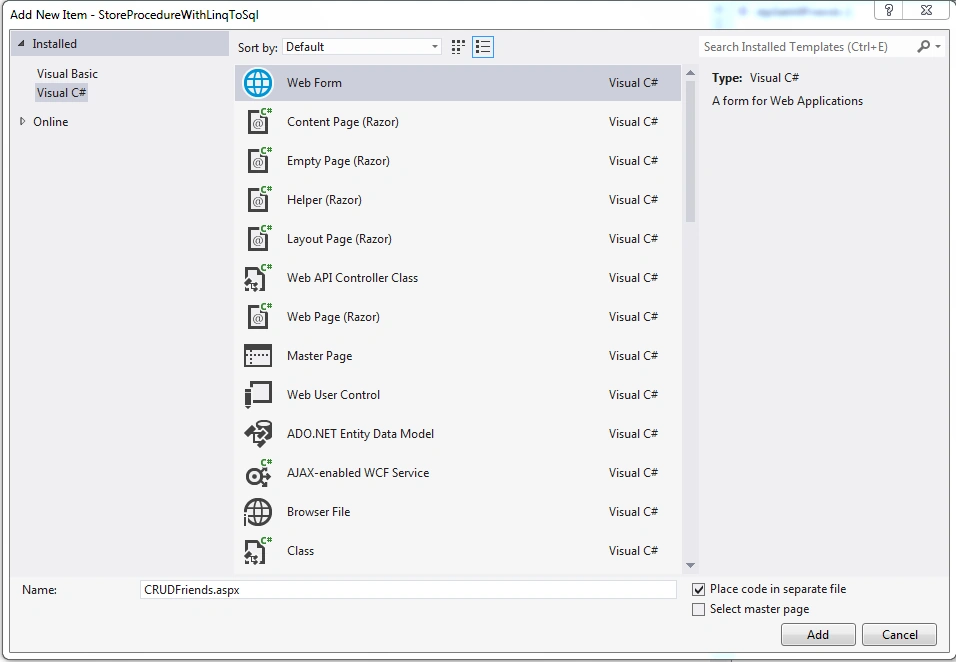
- Add new item WEB FORM, named form : CRUDFriends.aspx,
- Now see following are items:
a. Table Structure
b. Insert Friend Stored Procedure
c. Update Friend Stored Procedure
d. Delete Friend Stored Proceudre
a. Table Structure:b. Insert Friend Stored Procedure- USE [MemberCDAC]
- GO
- /****** Object: Table [dbo].[tblFriends] Script Date: 03/29/2016 08:57:56 ******/
- SET ANSI_NULLS ON
- GO
- SET QUOTED_IDENTIFIER ON
- GO
- SET ANSI_PADDING ON
- GO
- CREATE TABLE [dbo].[tblFriends](
- [FriendID] [int] IDENTITY(1,1) NOT NULL,
- [Name] [varchar](50) NULL,
- [Place] [varchar](25) NULL,
- [Mobile] [varchar](15) NULL,
- [EmailAddress] [varchar](150) NULL
- ) ON [PRIMARY]
- GO
- SET ANSI_PADDING OFF
c. Update Friend Stored Procedure- SET ANSI_NULLS ON
- GO
- SET QUOTED_IDENTIFIER ON
- GO
- -- =============================================
- -- Author: Manoj Kalla
- -- Create date: 28-March-2016
- -- Description: Insert a new Friend Detail.
- -- =============================================
- CREATE PROCEDURE stpInsertFriend
- -- Add the parameters for the stored procedure here
- @Name varchar(50),
- @Place varchar(25),
- @Mobile varchar(15),
- @EmailAddress varchar(150)
- AS
- BEGIN
- -- SET NOCOUNT ON added to prevent extra result sets from
- -- interfering with SELECT statements.
- SET NOCOUNT ON;
- Insert into tblFriends (Name,Place,Mobile,EmailAddress) Values(@Name,@Place,@Mobile,@EmailAddress)
- END
- GO
d. Delete Friend Stored Proceudre- SET ANSI_NULLS ON
- GO
- SET QUOTED_IDENTIFIER ON
- GO
- -- =============================================
- -- Author: Manoj Kalla
- -- Create date: 28-March-2016
- -- Description: Update a Friend Detail.
- -- =============================================
- CREATE PROCEDURE stpUpdateFriend
- -- Add the parameters for the stored procedure here
- @FriendID int,
- @Name varchar(50),
- @Place varchar(25),
- @Mobile varchar(15),
- @EmailAddress varchar(150)
- AS
- BEGIN
- -- SET NOCOUNT ON added to prevent extra result sets from
- -- interfering with SELECT statements.
- SET NOCOUNT ON;
- Update tblFriends set
- Name = @Name,Place = @Place,Mobile =@Mobile ,EmailAddress =@EmailAddress
- Where FriendID = @FriendID
- END
- GO
- SET ANSI_NULLS ON
- GO
- SET QUOTED_IDENTIFIER ON
- GO
- -- =============================================
- -- Author: Manoj Kalla
- -- Create date: 28-March-2016
- -- Description: Delete a Friend Detail.
- -- =============================================
- CREATE PROCEDURE stpDeleteFriend
- -- Add the parameters for the stored procedure here
- @FriendID int
- AS
- BEGIN
- -- SET NOCOUNT ON added to prevent extra result sets from
- -- interfering with SELECT statements.
- SET NOCOUNT ON;
- Delete From tblFriends Where FriendID = @FriendID
- END
- GO
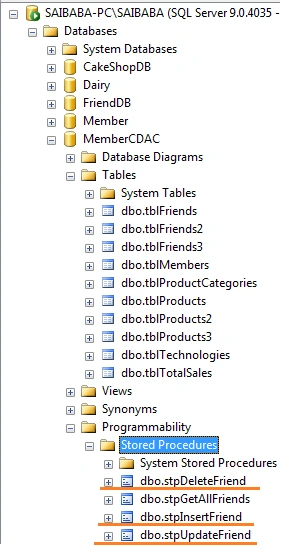
As you can see we have created three stored procedures as shown above. - Now switch to Visual Studio and click on App_Code folder then Double click on FriendDataClasses.dbml file.
- Click on Server Explorer which is left hand side.
Drag n drop tblFriends on DBML canvas.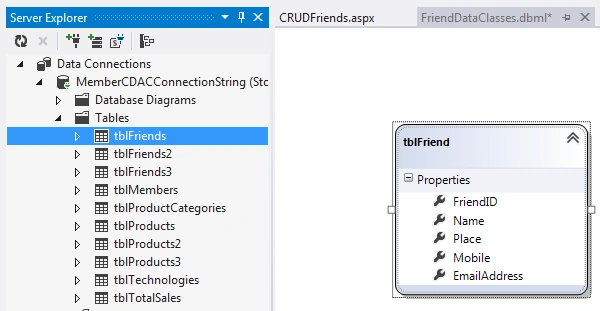
- Drag n drop stored procedure on DBML canvas.
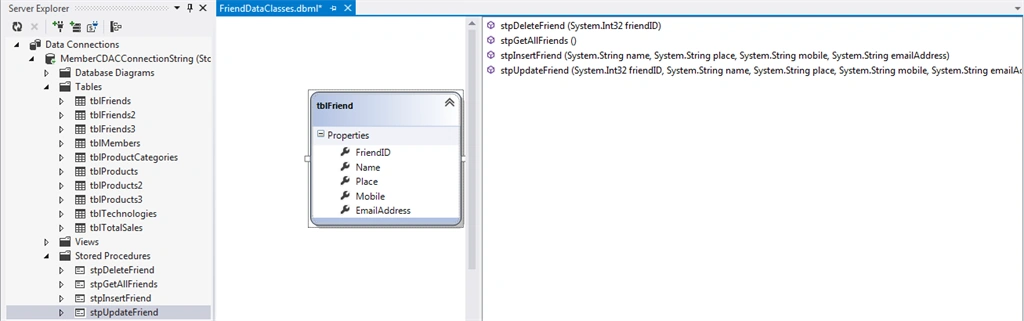
- After draggin and dropping stored procedure we have to attach stored procedure with tblFriend entity.
Right click on tblFriend entity and select Configure Behaviour,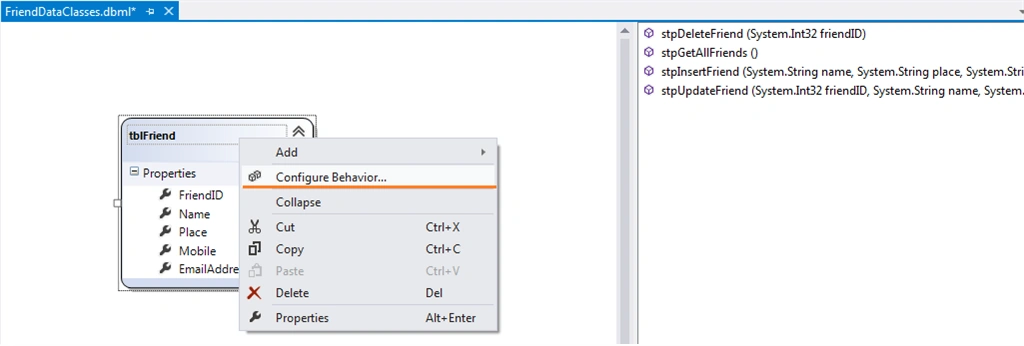
- As you click on Configure Behavior option , Now time to Select BEHAVIOR and CUSTOMISE option to configure Stored Procedure with DBML.
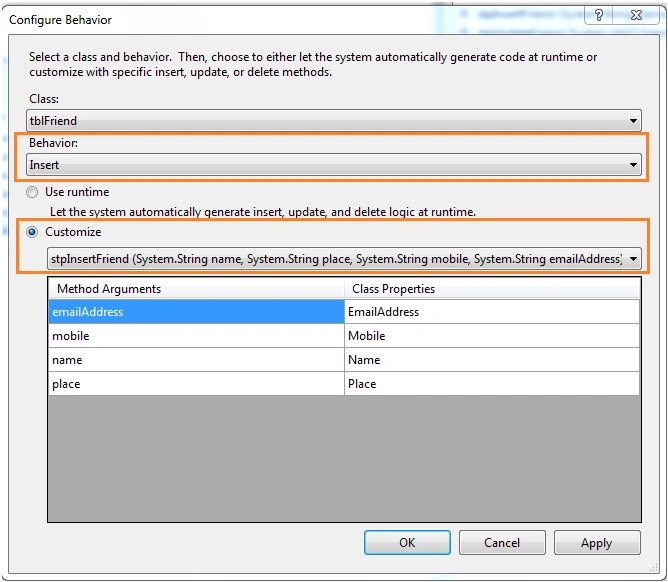
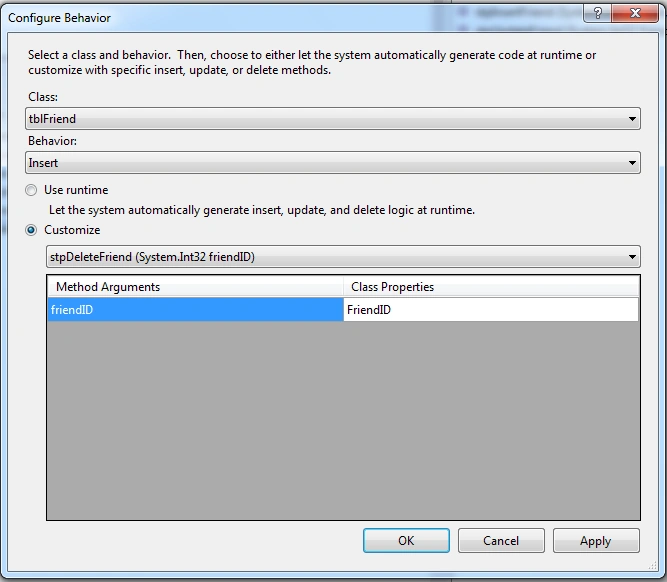
In the above screen shot we had configured stpInsertFriend same way we have to do Mapping for all CRUD base stored procedures.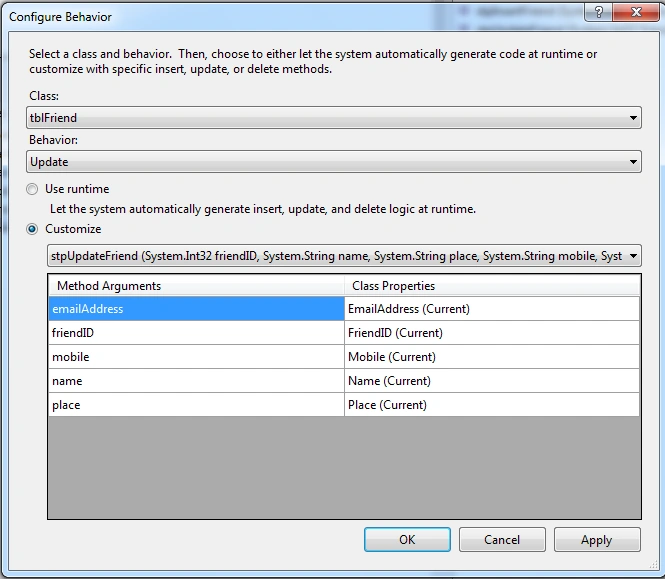
- CRUDFriends.aspx code
- <%@ Page Language="C#" AutoEventWireup="true" CodeFile="CRUDFriends.aspx.cs" Inherits="CRUDFriends" %>
- <!DOCTYPE html>
- <html xmlns="http://www.w3.org/1999/xhtml">
- <head runat="server">
- <title></title>
- <style type="text/css">
- .auto-style1 {
- text-align: center;
- }
- </style>
- </head>
- <body>
- <form id="form1" runat="server">
- <div>
- <table style="width: 47%;">
- <tr>
- <td>Friend ID</td>
- <td>
- <asp:Label ID="lblFriendID" runat="server" Text="[ID]"></asp:Label>
- </td>
- </tr>
- <tr>
- <td>Name</td>
- <td>
- <asp:TextBox ID="txtName" runat="server" Width="312px"></asp:TextBox>
- </td>
- </tr>
- <tr>
- <td>Place</td>
- <td>
- <asp:TextBox ID="txtPlace" runat="server"></asp:TextBox>
- </td>
- </tr>
- <tr>
- <td>Mobile</td>
- <td>
- <asp:TextBox ID="txtMobile" runat="server"></asp:TextBox>
- </td>
- </tr>
- <tr>
- <td>Email Address</td>
- <td>
- <asp:TextBox ID="txtEmailAddress" runat="server" Width="313px"></asp:TextBox>
- </td>
- </tr>
- <tr>
- <td class="auto-style1" colspan="2">
- <asp:Button ID="btnSaveUpdate" runat="server" Text="Save" Width="136px" OnClick="btnSaveUpdate_Click" />
- </td>
- </tr>
- </table>
- <br />
- <asp:GridView ID="GridView1" runat="server" CellPadding="4" ForeColor="#333333" Width="50%" AutoGenerateDeleteButton="True" AutoGenerateSelectButton="True" OnRowDeleting="GridView1_RowDeleting" OnSelectedIndexChanged="GridView1_SelectedIndexChanged" DataKeyNames="FriendID">
- <AlternatingRowStyle BackColor="White" />
- <FooterStyle BackColor="#990000" Font-Bold="True" ForeColor="White" />
- <HeaderStyle BackColor="#990000" Font-Bold="True" ForeColor="White" />
- <PagerStyle BackColor="#FFCC66" ForeColor="#333333" HorizontalAlign="Center" />
- <RowStyle BackColor="#FFFBD6" ForeColor="#333333" />
- <SelectedRowStyle BackColor="#FFCC66" Font-Bold="True" ForeColor="Navy" />
- <SortedAscendingCellStyle BackColor="#FDF5AC" />
- <SortedAscendingHeaderStyle BackColor="#4D0000" />
- <SortedDescendingCellStyle BackColor="#FCF6C0" />
- <SortedDescendingHeaderStyle BackColor="#820000" />
- </asp:GridView>
- </div>
- </form>
- </body>
- </html>
- CRUDFriends.aspx.cs code
- using System;
- using System.Collections.Generic;
- using System.Linq;
- using System.Web;
- using System.Web.UI;
- using System.Web.UI.WebControls;
- public partial class CRUDFriends: System.Web.UI.Page
- {
- protected void Page_Load(object sender, EventArgs e)
- {
- if (!IsPostBack)
- {
- btnSaveUpdate.Text = "Save";
- GetAllFriends();
- }
- }
- private void GetAllFriends()
- {
- FriendDataClassesDataContext _friendContext = new FriendDataClassesDataContext();
- GridView1.DataSource = _friendContext.stpGetAllFriends();
- GridView1.DataBind();
- _friendContext.Dispose();
- }
- protected void GridView1_RowDeleting(object sender, GridViewDeleteEventArgs e)
- {
- FriendDataClassesDataContext _friendContext = new FriendDataClassesDataContext();
- _friendContext.stpDeleteFriend(Convert.ToInt16(GridView1.DataKeys[e.RowIndex].Value));
- GetAllFriends();
- ClearTextBox();
- }
- protected void GridView1_SelectedIndexChanged(object sender, EventArgs e)
- {
- FriendDataClassesDataContext _friendContext = new FriendDataClassesDataContext();
- lblFriendID.Text = Convert.ToString(GridView1.SelectedRow.Cells[1].Text);
- txtName.Text = Convert.ToString(GridView1.SelectedRow.Cells[2].Text);
- txtPlace.Text = Convert.ToString(GridView1.SelectedRow.Cells[3].Text);
- txtMobile.Text = Convert.ToString(GridView1.SelectedRow.Cells[4].Text);
- txtEmailAddress.Text = Convert.ToString(GridView1.SelectedRow.Cells[5].Text);
- btnSaveUpdate.Text = "Update";
- _friendContext.Dispose();
- }
- protected void btnSaveUpdate_Click(object sender, EventArgs e)
- {
- FriendDataClassesDataContext _friendContext = new FriendDataClassesDataContext();
- if (btnSaveUpdate.Text == "Save")
- {
- _friendContext.stpInsertFriend(txtName.Text, txtPlace.Text, txtMobile.Text, txtEmailAddress.Text);
- } else
- {
- _friendContext.stpUpdateFriend(Convert.ToInt16(lblFriendID.Text), txtName.Text, txtPlace.Text, txtMobile.Text, txtEmailAddress.Text);
- }
- ClearTextBox();
- GetAllFriends();
- _friendContext.Dispose();
- }
- private void ClearTextBox()
- {
- lblFriendID.Text = "";
- txtName.Text = string.Empty;
- txtPlace.Text = string.Empty;
- txtMobile.Text = string.Empty;
- txtEmailAddress.Text = string.Empty;
- btnSaveUpdate.Text = "Save";
- }
- }
So, we completed the following things.
- Introduction to Stored Procedure and LINQ To SQL.
- Simply uses of Stored Procedure with LINQ.
- CRUD operations with uses of Stored Procedure with LINQ To SQL.
You can view my articles for Linq To Sql:
Ramzanali MominPosted Sep 10, 2018, 6:53 AM
Very nice for beginner
Rahul Kumar SaxenaPosted Apr 4, 2016, 7:43 AM
Good one
Humayun Kabir MamunPosted Apr 4, 2016, 6:17 AM
Nice...
Vignesh ManiPosted Mar 31, 2016, 8:55 AM
Good one
Rahul SharmaPosted Mar 31, 2016, 5:24 AM
any article or book on starting with stored procedure
Jaipal ReddyPosted Mar 31, 2016, 12:06 AM
nice one sir. .
Roshan MulePosted Mar 30, 2016, 2:07 PM
Good Article Sir. Very Useful.