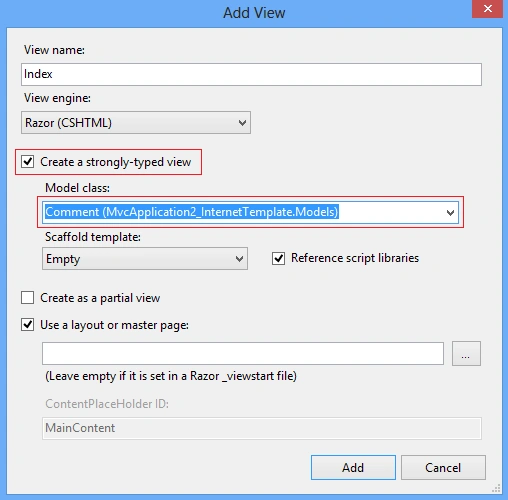
When you add a new View in MVC, you get an opportunity to create it strongly typed. In the image given below, when you check "Create a strongly-typed view" and select the "Model class" you get the following code snippet on the view page.
@model MvcApplication2_InternetTemplate.Models.Comment
The above piece of code is just a fully qualified name of the model, now we need to supply the type name to get intellisense on the view page.
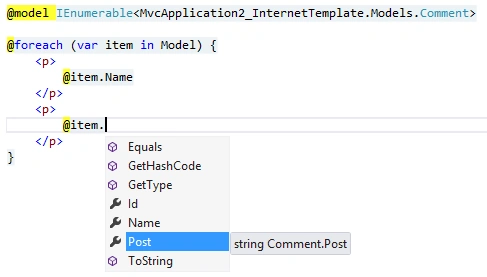
@model IEnumerable<MvcApplication2_InternetTemplate.Models.Comment>
And now, try iterating over the model "Comment", you will have intellisense support (aka Strong Typed View Page).
Here is the controller that passes the model instance to the view page:
public ActionResult Index()
var comments = new List<Comment>();
comments.Add(new Comment {
Post = "Good post my friend."
comments.Add(new Comment {
Post = "Hey, you are doing great."
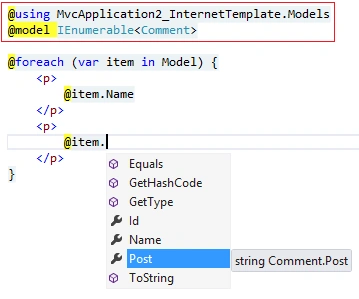
Alternatively, in the view page, to avoid needing to specify a fully qualified type name for the model, we can use @using declarations.
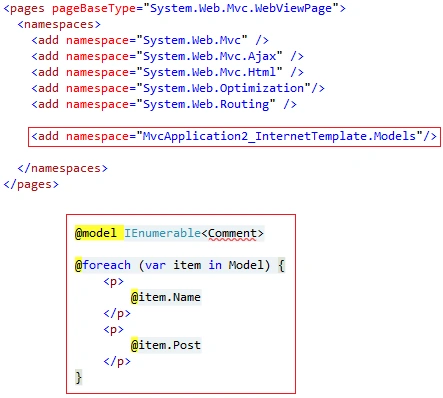
One more better approach when working on a really large application is to declare the namespace in the web.config file within the Views directory, but this will not guarantee you the intellisense.
Now, suppose the controller returns a model via a view data dictionary (aka ViewBag), as the one given below.
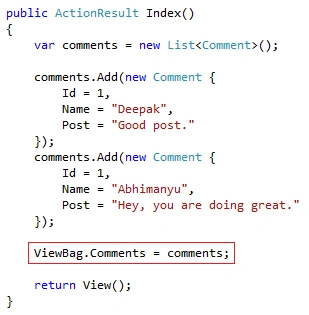
Now to to deal with ViewBag, on the view page we can iterate and display the comment, you will notice intellisense here too.
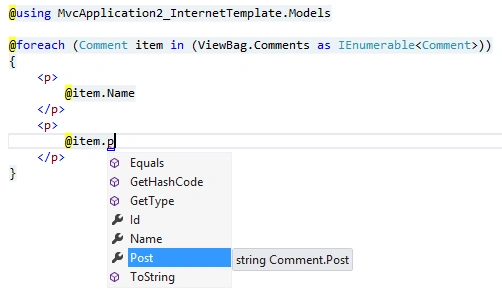
You can notice we cast ViewBag.Comments to an IEnumerable<> interface. We can also use a dynamic keyword but it will lose the benefits of intellisense.
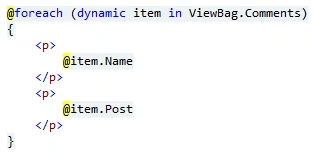
Now, you can clearly see how difficult it is to keep the code clean with an intellisense feature and this is where strongly typed views are used.


Rajeev PunhaniPosted Jun 1, 2016, 1:35 AM
Nice.
Pravin MarathePosted Feb 21, 2016, 5:46 AM
Good one..
Sthitaprajnya Debasis NayakPosted Feb 11, 2016, 12:41 PM
Nice Article !!!