

Adding new features to your React project? Most probably you would be rewriting or copy-pasting the boilerplate code if I am not wrong. Wait, you don’t need to do all this stuff every time when adding new features. Generally, the steps that we need to follow to set up a component are to write at least a few lines of code such as the imports and declaration of the component that can be either a functional, stateful, or pure component. So, we can say that adding a new feature to our project usually involves following a bunch of repetitive steps such as adding the styles, components, test suites, and other existing configurations.
Problems faced while copying the code is selecting the ideal component from the project so that modifications can be done to make the component as per the new features. But it would be overhead to rename all the things that do reference the existing features and basic configuration. Or let's assume we are creating new files from scratch -- it would be very time-consuming in setting up all the files with similar naming conventions and importing the related files. Of course, that can affect the developer’s productivity.
Let’s note down the steps that we might need to follow when adding a new component/feature in our project.
- Creating a folder with the name of the component (keeping in mind the case to use).
- Creating an index file with the basic content for the component.
- Creating a file for adding the stylings to the component.
- Creating a JSON file for mock data for the component.
- Creating a test file for the component.
Yeah, these are the basic required steps to start working on the new component. And other important steps include finding an ideal file for every new feature to be added so that the code can be copy-pasted from that file and importing the related files.
So, how about an idea of setting up a template that contains the basic configurations and the boilerplate code to start with? A process known as scaffolding can be used to generate boilerplate code by creating templates. For example, if you have worked with any of the .NET project with MVC architecture visual studio provides you the basic files created when we select the template for the MVC architecture. Here comes hygen in light.
Create React App
Create React App is a package provided by Facebook when you want to focus on your code rather than focusing on configuring a React application with tools like Webpack or Babel in your code. Every basic and necessary thing to start working on react application is preconfigured so that we can focus on the code rather than spending time in development and production builds configuration of the project.
So, we can say that Create react app is not mandatory for creating react applications but using it would make it a lot easier for us to focus on code rather than spending time to configure the solution.
In simple language, we can say that hygen is a code generator that can generate code in any language. Hygen basically uses EJS for writing templates and JS for prompts. Hygen helps to generate code and avoid the manual work needed for the codebase.
I have used the npm to work with hygen in my project, but you can also use yarn to work with it. Let's have a look at the steps for installing hygen in our solution.
Stepping towards installation
To install hygen we use the command shown below,
- npm install -g hygen
Initialize hygen using the command given below, initialize hygen only once in your project i.e. below command needs to be run once for a project.
- npx hygen init self
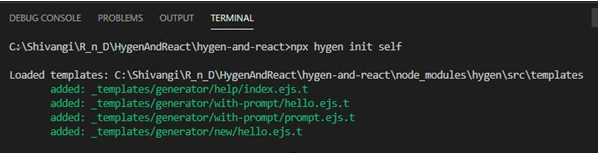
On initializing hygen a folder “_templates” is created at the root level. _templates contains a folder generator that includes three subfolders with the names Help, new, and with-prompt including some examples.
Understanding the code
The component.ejs.t file has the code for generating the component, in our case it is a functional component with the name of the component dependent on the name provided by the user.
Here the formatter section contains the name and path of the file that we want to generate using our templates. Matching lines “---” is included to the top and the bottom, in between we can define our metadata.
For example,
We have used the command
- hygen components new --name FirstComponent
Our formatter will be built as,
to: src/components/FirstComponent/DemoComponent.js
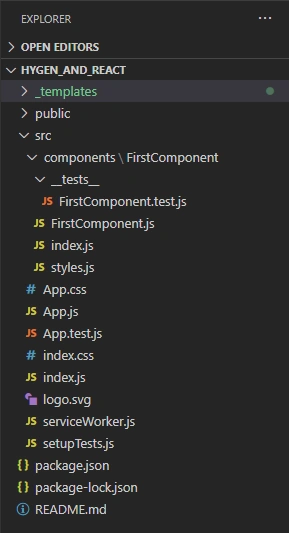
Let's run the command for generating the code using the templates that we have created. Command is for generating the component inside the “new” folder with the name provided in the command.
Command
- hygen components new –name FirstComponent
Join the conversation! Your thoughts help the community grow.