

Introduction
In modern API-driven architectures—especially microservices and distributed systems—clear, interactive, and standardized API documentation is critical. This is where Swagger UI becomes essential.
Swagger UI is an open-source tool that provides a web-based, interactive interface for exploring and testing RESTful APIs defined using the OpenAPI Specification (OAS).
It allows developers to:
Visualize API endpoints
Test API calls directly from the browser
Understand request/response schemas
Share API documentation with stakeholders
Swagger UI is part of the broader Swagger/OpenAPI ecosystem.
OpenAPI and Swagger Ecosystem
Before understanding Swagger UI, we must understand its foundation.
OpenAPI Specification (OAS)
The OpenAPI Initiative maintains the OpenAPI Specification, which defines a standard, language-agnostic interface for REST APIs.
OpenAPI documents are typically written in:
JSON
YAML
Example snippet:
openapi: 3.0.0
info:
  title: Employee API
  version: 1.0.0
paths:
  /employees:
    get:
      summary: Get all employees
      responses:
        '200':
          description: Successful response
Swagger UI consumes this OpenAPI file and renders it into an interactive web interface.
What is Swagger UI?
Swagger UI is a JavaScript-based tool that dynamically generates interactive API documentation from an OpenAPI definition.
Key Capabilities
Interactive "Try it out" feature
Schema visualization
Request/response examples
Authentication support
Model inspection
Automatic generation from OpenAPI spec
Architecture of Swagger UI
High-Level Flow
API developer writes OpenAPI specification.
Swagger UI loads the OpenAPI document.
Swagger UI renders HTML interface dynamically.
User interacts with endpoints.
Requests are sent to backend API.
OpenAPI Spec (YAML/JSON)- Swagger UI - Browser UI - REST APIInstalling and Using Swagger UI
Standalone Installation
You can download Swagger UI from GitHub or from https://swagger.io/
Using Swagger UI with FastAPI
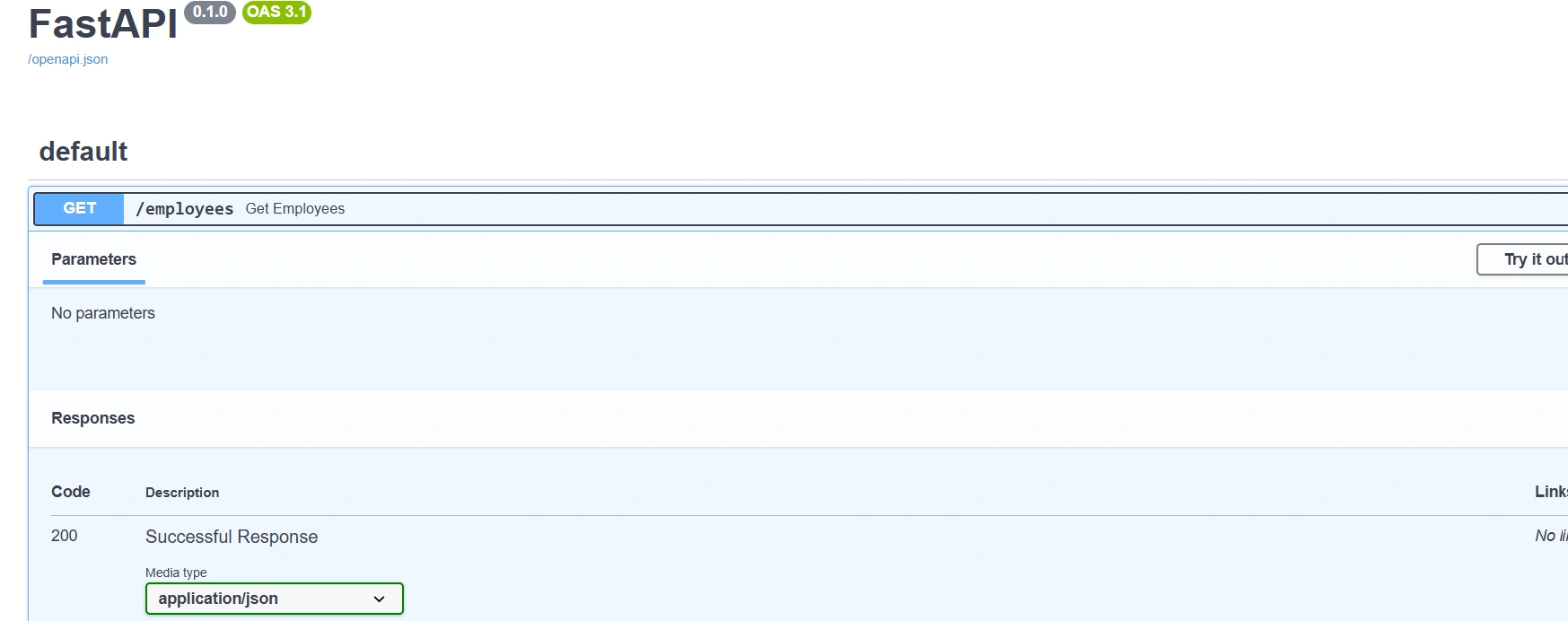
If you're working with APIs and Python, this is highly relevant. FastAPI automatically integrates Swagger UI.
Example:
from fastapi import FastAPI

app = FastAPI()

@app.get("/employees")
def get_employees():
    return [{"id": 1, "name": "Jayant"}]
Run:
uvicorn main:app --reload (main is the filename like main.py)Visit:
http://localhost:8000/docsFastAPI auto-generates:
/docs→ Swagger UI/redoc→ ReDoc UI/openapi.json→ OpenAPI spec
Swagger UI Features in Depth
Endpoint Grouping (Tags)
tags:
  - name: Employee
Swagger UI groups endpoints by tags for better organization.
Request Body & Schema Visualization
Swagger UI automatically:
Renders input forms
Shows JSON schema
Displays required vs optional fields
Example:
requestBody:
  content:
    application/json:
      schema:
        $ref: '#/components/schemas/Employee'
Authentication Support
Supports:
API Key
Bearer Token (JWT)
OAuth2
Example:
components:
  securitySchemes:
    bearerAuth:
      type: http
      scheme: bearer
Swagger UI adds an Authorize button automatically.
Try It Out Feature
This feature allows:
Entering parameters
Executing API calls
Viewing live response
Checking status codes
This is extremely helpful for frontend-backend integration testing.
Customization of Swagger UI
Theming
You can override:
CSS
Layout
Fonts
Logo
Custom Config Options
SwaggerUIBundle({
  url: "openapi.yaml",
  deepLinking: true,
  displayOperationId: true,
  defaultModelsExpandDepth: 1,
})
Important configurations:
| Option | Purpose |
|---|---|
| deepLinking | Enables URL linking |
| filter | Enables search filter |
| displayRequestDuration | Shows API response time |
| docExpansion | Controls default expansion |
Swagger UI vs ReDoc
ReDoc is another OpenAPI renderer.
| Feature | Swagger UI | ReDoc |
|---|---|---|
| Try API | Yes | No |
| Clean UI | Moderate | Very Clean |
| Interactive | Highly | Less |
| Best For | Developers | API consumers |
Swagger UI in Production
Security Considerations
Avoid exposing Swagger UI publicly in production
Disable
/docsin sensitive environmentsProtect with authentication
In FastAPI:
app = FastAPI(docs_url=None)Reverse Proxy Setup
Often deployed behind:
Nginx
API Gateway
Kubernetes Ingress
CI/CD Integration
Swagger UI works well in:
GitHub Actions
Azure DevOps
Jenkins pipelines
Common practice:
Validate OpenAPI spec
Generate documentation
Deploy static Swagger UI
Swagger UI and API-First Development
In API-first architecture:
Define OpenAPI spec first.
Generate server stubs.
Implement logic.
Use Swagger UI for validation.
This improves:
Contract clarity
Cross-team collaboration
Reduced integration errors
Advantages of Swagger UI
Open standard
Language agnostic
Interactive documentation
Easy integration
Auto-generation from frameworks
Improves developer experience
Limitations
Large APIs may become cluttered
Not ideal for business users
UI customization requires effort
Does not replace API versioning strategy
Best Practices
Keep OpenAPI spec version controlled
Add examples for request/response
Use schema components for reusability
Enable authentication documentation
Validate spec using CI pipeline
Use tags effectively
Real-World Use Cases
Microservices documentation
Public API portals
Internal enterprise APIs
SDK generation
API testing during development
Swagger UI in Modern AI Systems
In AI-powered APIs (LLM endpoints, embedding services, MCP servers):
Swagger UI helps:
Validate input schema
Test inference endpoints
Document model metadata
Share API contracts with frontend
For example, if you expose an LLM service using FastAPI, Swagger UI automatically documents:
Prompt input schema
Response format
Error responses
Conclusion
Swagger UI is more than just documentation—it is an interactive API exploration tool that bridges backend and frontend teams.
Built on the OpenAPI Specification and supported by modern frameworks like FastAPI, it enables:
Rapid API development
Clear contract definition
Seamless collaboration
Interactive testing
In today’s API-first world, Swagger UI is an essential component of any production-grade REST architecture.
Join the conversation! Your thoughts help the community grow.