Term Store Manangement
How to access SharePoint Site Term Store Management?
Go to SharePoint Site, then Site Settings and select Term Store Management.
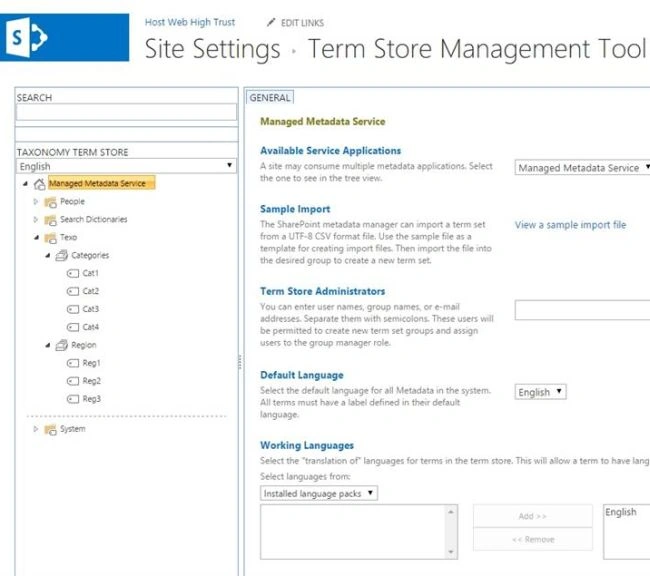
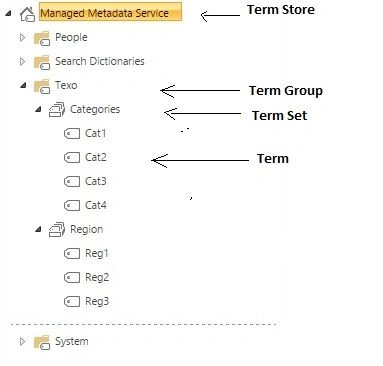
Term Store Management Concept
SharePoint APP Model
Step 1: Add Permission in AppManifest.xml file to read Taxonomy as follows.

Step 2: User Interface Design Page.
Taxonomy.aspx
- <%@ Page Language="C#" AutoEventWireup="true" CodeBehind="Texonomy.aspx.cs" Inherits="SP_TexonomyProWeb.Pages.Texonomy" %>
-
- <!DOCTYPE html>
-
- <html xmlns="http://www.w3.org/1999/xhtml">
- <head runat="server">
- <title></title>
- </head>
- <body>
- <form id="form1" runat="server">
- <div>
-
- <table>
- <tr>
-
- <td>
- <asp:Label ID="Label1" runat="server" Text="Region"></asp:Label></td>
- <td>
- <asp:DropDownList ID="ddlDepartment" runat="server"></asp:DropDownList></td>
- </tr>
- <tr>
- <td colspan="2"> </td>
- </tr>
- <tr>
- <td>
- <asp:Label ID="Label2" runat="server" Text="Division"></asp:Label></td>
- <td>
- <asp:DropDownList ID="ddlJobTitle" runat="server"></asp:DropDownList></td>
- </tr>
- </table>
-
- </div>
- </form>
- </body>
- </html>
Taxonomy.aspx.cs
- using Microsoft.SharePoint.Client.Taxonomy;
- using System;
- using System.Collections.Generic;
- using System.Data;
- using System.Linq;
- using System.Web;
- using System.Web.UI;
- using System.Web.UI.WebControls;
-
- namespace SP_TexonomyProWeb.Pages
- {
- public partial class Texonomy : System.Web.UI.Page
- {
- protected void Page_Load(object sender, EventArgs e)
- {
- string TermStoreName = "Managed Metadata Service";
-
- string TermGroupName = "Texo";
-
- BindTermstoDropdown(TermStoreName, TermGroupName, "Region", ddlDepartment);
-
- BindTermstoDropdown(TermStoreName, TermGroupName, "Categories", ddlJobTitle);
- }
-
- protected void BindTermstoDropdown(string TermStoreName, string TermGroupName, string TermSetName, DropDownList ddl)
- {
- var spContext = SharePointContextProvider.Current.GetSharePointContext(Context);
-
- using (var clientContext = spContext.CreateUserClientContextForSPHost())
- {
- clientContext.Load(clientContext.Web, web => web.Title);
- clientContext.ExecuteQuery();
- Response.Write(clientContext.Web.Title);
-
-
- TaxonomySession taxonomySession = TaxonomySession.GetTaxonomySession(clientContext);
-
-
- TermStore termStore = taxonomySession.TermStores.GetByName(TermStoreName);
-
-
- TermGroup termGroup = termStore.Groups.GetByName(TermGroupName);
-
-
- TermSet termSet = termGroup.TermSets.GetByName(TermSetName);
-
-
- TermCollection termColl = termSet.Terms;
-
- clientContext.Load(termColl);
-
-
- clientContext.ExecuteQuery();
-
-
-
- DataTable dt = new DataTable();
- dt.Columns.Add("TermName");
- DataRow row = null;
-
- foreach (Term term in termColl)
- {
-
- row = dt.NewRow();
- row["TermName"] = term.Name;
- dt.Rows.Add(row);
- }
-
- ddl.DataSource = dt;
- ddl.DataTextField = "TermName";
- ddl.DataValueField = "TermName";
- ddl.DataBind();
- }
- }
-
- }
- }

Thank you! If you have any query, then please mention it in the comment section.


F MoserPosted Aug 21, 2019, 9:57 AM
What would the assembly or name space be for SharePointContextProvider?
Venkatesh KumarPosted Apr 25, 2016, 7:31 AM
is it possible to build/get term group data as tree structure or parent/child relationship using CSOM?
Santhakumar MunuswamyPosted Oct 18, 2015, 3:17 AM
Good one
Rupali ShindePosted Oct 14, 2015, 12:18 AM
Thanks
Nilesh JadavPosted Oct 14, 2015, 12:10 AM
Good Share mam !!
RakeshPosted Oct 13, 2015, 10:17 AM
Good article Share
Rahul SuryawanshiPosted Oct 13, 2015, 8:46 AM
Nice share!
Harshad PansuriyaPosted Oct 13, 2015, 8:42 AM
Nice one