Table of Contents
Introduction
What Is a Multi-Modal AI Assistant?
Real-World Scenario: Enterprise Field Service Assistant for Telecom Towers
Architectural Components & Tool Integration
Complete Implementation with Tool-Calling and Streaming
Best Practices for Enterprise Deployment
Conclusion
1. Introduction
As an enterprise cloud architect building GenAI systems at scale, I often field questions like: “How do you stitch vision, speech, and document understanding into a single agentic assistant that actually works in production?”
The answer isn’t just about models—it’s about orchestration, tool reliability, and secure, observable pipelines. In this article, we’ll build a multi-modal AI assistant that ingests images, text, and structured data to solve real problems—using only production-grade, open tools (FastAPI, LangChain, OpenAI-compatible APIs, and Azure Blob Storage).
2. What Is a Multi-Modal AI Assistant?
A multi-modal AI assistant processes and reasons over multiple input types—images, text, audio, PDFs—and uses external tools (APIs, databases, vision models) to act on the world. Unlike chatbots, it:
Chooses which tools to invoke based on user intent
Fuses modalities (e.g., “What’s wrong with this image of a telecom tower?”)
Returns structured, actionable outputs
This requires tool-aware reasoning, state management, and fail-safe execution—all essential for enterprise use.
3. Real-World Scenario: Telecom Field Service Assistant
Problem: Field engineers inspect remote cell towers. They snap photos of damaged antennas or corroded mounts and ask, “Is this urgent? What parts do I need?”
Solution: A multi-modal assistant that:
Accepts an image + text query
Calls a vision tool to detect component damage
Queries a parts inventory API
Returns repair recommendations + part SKUs
This reduces truck rolls, accelerates resolution, and integrates with existing SAP/ServiceNow workflows.
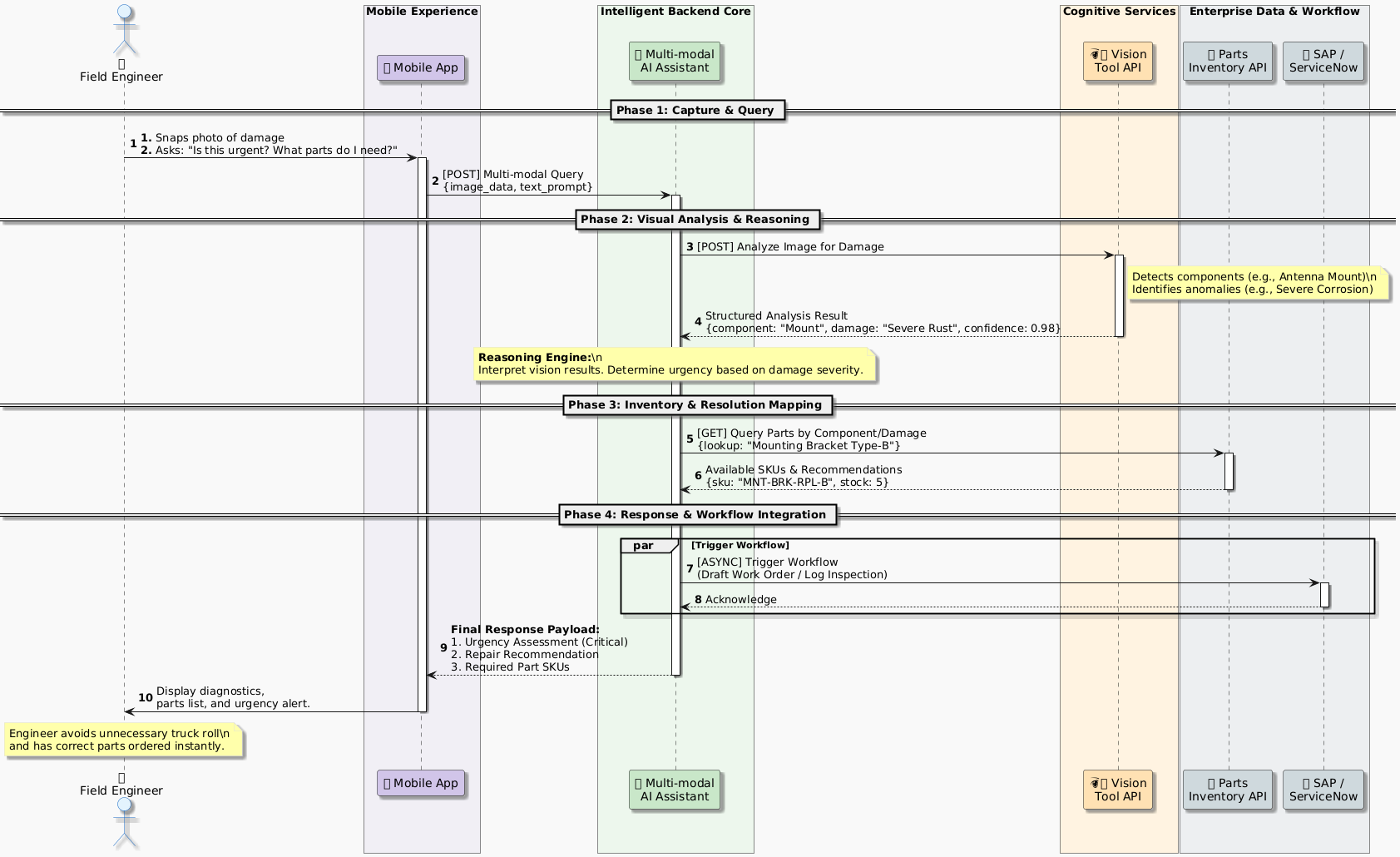
4. Architectural Components & Tool Integration
We’ll use:
FastAPI: Enterprise-ready Python server
LangChain + LangGraph: For agentic orchestration
Azure Blob Storage: Secure image ingestion
OpenAI-compatible vision model (e.g., GPT-4o or Azure OpenAI)
Mock inventory API: Simulates backend ERP
Key design principles:
Stateless image uploads → signed URLs
Tool schemas strictly typed via Pydantic
Streaming responses for UX responsiveness
5. Complete Implementation with Tool-Calling and Streaming
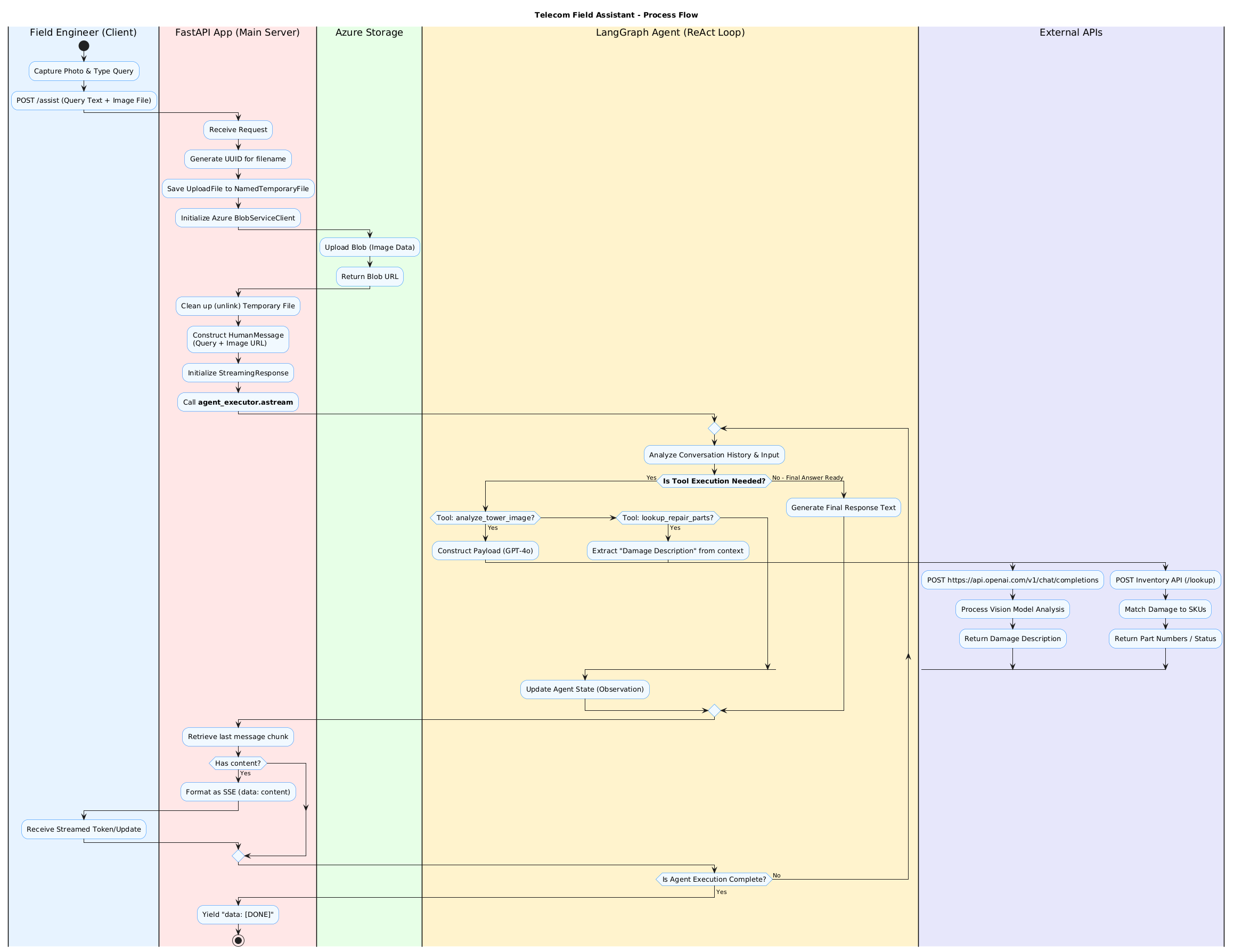
# main.py
from fastapi import FastAPI, File, UploadFile, HTTPException, BackgroundTasks
from fastapi.responses import StreamingResponse
from pydantic import BaseModel
import aiohttp
import asyncio
import uuid
import os
from azure.storage.blob import BlobServiceClient
from langchain_openai import ChatOpenAI
from langchain_core.tools import tool
from langgraph.prebuilt import create_react_agent
from langchain_core.messages import HumanMessage
import tempfile

# ----------------------------
# Config (in real prod: Azure Key Vault)
# ----------------------------
AZURE_CONN_STR = os.getenv("AZURE_STORAGE_CONNECTION_STRING")
OPENAI_API_KEY = os.getenv("OPENAI_API_KEY")
INVENTORY_API_URL = "https://api.enterprise-inventory.local/parts"

# ----------------------------
# Tools
# ----------------------------
@tool
async def analyze_tower_image(image_url: str) -> str:
    """Analyze telecom tower image for damage using vision model."""
    async with aiohttp.ClientSession() as session:
        payload = {
            "model": "gpt-4o",
            "messages": [
                {
                    "role": "user",
                    "content": [
                        {"type": "text", "text": "Analyze this telecom tower component. List any visible damage, corrosion, or misalignment. Be concise."},
                        {"type": "image_url", "image_url": {"url": image_url}}
                    ]
                }
            ],
            "max_tokens": 300
        }
        headers = {"Authorization": f"Bearer {OPENAI_API_KEY}"}
        async with session.post("https://api.openai.com/v1/chat/completions", json=payload, headers=headers) as resp:
            if resp.status != 200:
                raise Exception(f"Vision API failed: {await resp.text()}")
            data = await resp.json()
            return data["choices"][0]["message"]["content"]

@tool
async def lookup_repair_parts(damage_description: str) -> str:
    """Look up required repair parts based on damage description."""
    async with aiohttp.ClientSession() as session:
        async with session.post(
            f"{INVENTORY_API_URL}/lookup",
            json={"damage": damage_description},
            headers={"Content-Type": "application/json"}
        ) as resp:
            if resp.status == 200:
                parts = await resp.json()
                return f"Required parts: {', '.join(parts['skus'])}"
            else:
                return "No matching parts found. Escalate to senior engineer."

# ----------------------------
# Agent Setup
# ----------------------------
tools = [analyze_tower_image, lookup_repair_parts]
llm = ChatOpenAI(model="gpt-4o", api_key=OPENAI_API_KEY, temperature=0)
agent_executor = create_react_agent(llm, tools)

# ----------------------------
# FastAPI App
# ----------------------------
app = FastAPI(title="Telecom Field Assistant", version="1.0")

blob_service = BlobServiceClient.from_connection_string(AZURE_CONN_STR)
container_name = "tower-images"

@app.post("/assist")
async def assist_engineer(
    query: str,
    image: UploadFile = File(...),
    background_tasks: BackgroundTasks = None
):
    # Upload image securely
    blob_name = f"{uuid.uuid4()}.jpg"
    blob_client = blob_service.get_blob_client(container=container_name, blob=blob_name)

    with tempfile.NamedTemporaryFile(delete=False) as tmp:
        tmp.write(await image.read())
        tmp_path = tmp.name

    try:
        with open(tmp_path, "rb") as data:
            blob_client.upload_blob(data)
        image_url = blob_client.url  # SAS token should be added in prod
    finally:
        os.unlink(tmp_path)

    # Stream agent response
    async def event_stream():
        inputs = {"messages": [HumanMessage(content=[
            {"type": "text", "text": query},
            {"type": "image_url", "image_url": {"url": image_url}}
        ])]}
        async for chunk in agent_executor.astream(inputs, stream_mode="values"):
            last_msg = chunk["messages"][-1]
            if hasattr(last_msg, 'content') and last_msg.content:
                yield f"data: {last_msg.content}\n\n"
            await asyncio.sleep(0.1)
        yield "data: [DONE]\n\n"

    return StreamingResponse(event_stream(), media_type="text/event-stream")

Key Features
Secure image handling: Uploaded to Azure Blob with unique names
Async tool calling: Non-blocking I/O for high throughput
Streaming SSE: Real-time UX without waiting for full response
Modular tools: Easy to replace vision or inventory APIs
6. Best Practices for Enterprise Deployment
Security
Observability
Log tool calls with correlation IDs (e.g., Azure Monitor)
Track latency per modality (image vs. text)
Resilience
Cost Control
7. Conclusion
Multi-modal assistants aren’t sci-fi—they’re solving real field service, insurance, and manufacturing problems today. But success hinges on robust tool integration, not just prompt engineering.
This architecture scales: swap Azure Blob for S3, GPT-4o for Claude 3.5 Sonnet, or add speech-to-text for voice queries. The core—agentic orchestration over reliable tools—remains unchanged.


Join the conversation! Your thoughts help the community grow.