
Software Testing  

Test Automation Best Practices with Microsoft Playwright

Overview

 Automation of testing has become a fundamental part of the software development lifecycle as organizations embrace Agile, DevOps, and Continuous Delivery. When deploying changes to production, high-quality test automation provides fast feedback, reduces manual effort, and increases confidence.

Among the many end-to-end (E2E) testing frameworks available today, Microsoft Playwright has established itself as one of the most powerful and reliable solutions for modern web application testing. With Playwright, developers and testers can automate Chromium, Firefox, and WebKit browsers using a single, consistent API.

Unlike traditional browser automation frameworks that often require extensive synchronization logic, Playwright features intelligent auto-waiting, built-in assertions, isolated browser contexts, powerful debugging capabilities, and first-class parallel execution support. Developer productivity is significantly improved by these features, while flaky tests are significantly reduced.

Also included in Playwright are enterprise-grade tools such as:

  • Cross-browser automation

  • Code generation

  • Trace Viewer

  • Playwright Inspector

  • Browser Context isolation

  • Network interception

  • API testing

  • Playwright CLI

  • Rich HTML reports

  • Seamless CI/CD integration

With these capabilities, engineering teams can build enterprise-ready automation frameworks that are scalable, maintainable, and reliable.

This article explores the most important Playwright best practices that every Software Engineer, QA Engineer, Automation Tester, SDET, and Engineering Lead should follow when building modern automation solutions.

Why Choose Microsoft Playwright?

 Playwright has become the preferred choice for many engineering teams, before diving into best practices.

The Playwright provides the following services:

  • Reliable end-to-end browser automation

  • Cross-browser testing from a single codebase

  • Automatic waiting for elements

  • Built-in retry mechanisms

  • Fast parallel execution

  • Isolated browser sessions

  • Excellent debugging tools

  • Rich reporting

  • Strong TypeScript, JavaScript, Python, Java, and .NET support

Playwright is particularly well suited for enterprise applications that require reliability, scalability, and maintainability.

1. Use User-Centric Locators

 Fragile selectors are one of the most common causes of flaky UI tests.

Don't rely on:

  • Deep CSS selectors

  • XPath expressions

  • Auto-generated element IDs

  • DOM hierarchy selectors

Whenever the layout of an application changes, these locator strategies often fail.

Rather, Microsoft recommends using accessibility-focused locators that reflect how real users interact with the application.

Among the preferred locator methods are:

  • getByRole()

  • getByLabel()

  • getByPlaceholder()

  • getByText()

  • getByTestId()

Rather than relying on presentation details, these locators rely on semantic information.

Code Example

await page
    .GetByRole(
        AriaRole.Button,
        new() { Name = "Submit" })
    .ClickAsync();

Benefits

  • Improved readability

  • Better accessibility compliance

  • Reduced maintenance

  • Fewer broken tests

Best Practice:

Automated tests are usually better when an application is designed with accessibility in mind.

2. Never Use Hard-Coded Waits

 Arranged delays are one of the biggest anti-patterns in UI automation.

Don't do:

await page.WaitForTimeoutAsync(5000);

Tests become less reliable as a result of hard waits.

Use Playwright's intelligent auto-waiting feature instead.

await Expect(page
    .GetByText("Success"))
    .ToBeVisibleAsync();

When elements are ready, Playwright automatically waits:

  • Visible

  • Stable

  • Enabled

  • Ready for interaction

Tests become faster and more reliable as a result.

Best Practice

Wait for business outcomes rather than elapsed time.

3. Implement the Page Object Model (POM)

 Code organization becomes increasingly important as automation projects grow.

UI interaction logic is separated from test logic in the Page Object Model.

The structure of a typical project might look like this:

Tests/
Pages/
Components/
Fixtures/
TestData/
Utilities/
Configurations/

Code Example:

public class LoginPage
{
    private readonly IPage _page;

    public LoginPage(IPage page)
    {
        _page = page;
    }

    public Task LoginAsync(string email, string password)
    {
        return Task.WhenAll(
            _page.GetByLabel("Email").FillAsync(email),
            _page.GetByLabel("Password").FillAsync(password),
            _page.GetByRole(AriaRole.Button,
                new() { Name = "Login" }).ClickAsync());
    }
}

Benefits

  • Centralized locators

  • Reduced duplication

  • Improved readability

  • Easier maintenance

  • Better scalability

4. Ensure Every Test Is Independent

Automated tests should be able to run independently.

There should never be a dependency between a test and another test.

A poor example is:
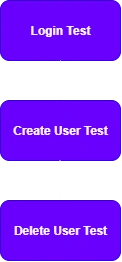
Test Automation Best Practices with Microsoft Playwright by Ziggy Rafiq

Better approach:

Each test:

  • Creates its own data

  • Performs its own login

  • Cleans up afterwards

Benefits include:

  • Reliable execution

  • Easier debugging

  • Parallel execution support

  • Reduced cascading failures

5. Use BrowserContext for Complete Test Isolation

BrowserContext is one of Playwright's most powerful features.

BrowserContexts represent isolated browser sessions.

var context = await browser.NewContextAsync();

var page = await context.NewPageAsync();

Contexts maintain their own:

  • Cookies

  • Cache

  • Local Storage

  • Session Storage

Parallel testing is made possible by this isolation, which prevents tests from interfering with one another.

6. Execute Tests in Parallel

 Continuous Integration environments require fast feedback.

Parallel execution is built into Playwright.

Among the benefits are:

  • Reduced pipeline duration

  • Faster feedback

  • Improved resource utilization

  • Earlier defect detection

When parallelized effectively, a suite that takes 60 minutes to run sequentially can be completed in under 15 minutes.

Best Practice

Before enabling parallel execution, ensure that tests are isolated.

7. Use Trace Viewer for Debugging

 It is extremely difficult to debug failed UI tests without diagnostic information.

The Playwright's Trace Viewer records the following:

  • Screenshots

  • DOM snapshots

  • Network traffic

  • Console logs

  • User interactions

  • Timeline

  • Source code

Engineers can replay step-by-step the entire execution when a test fails.

Benefits include:

  • Faster root cause analysis

  • Easier reproduction

  • Reduced troubleshooting time

To balance diagnostics and storage costs, enable tracing in your test configuration for failed retries or selected environments.

8. Use Code Generation as a Starting Point

 The code generation tool provided by Playwright is excellent.

npx playwright codegen https://www.c-sharpcorner.com/

The generated code can be used for the following purposes:

  • Learning Playwright

  • Exploring applications

  • Rapid prototyping

  • Creating initial locator strategies

Before adding generated code to production test suites, generated code should always be reviewed.

Refactor it to:

  • Follow coding standards

  • Remove duplication

  • Use Page Objects

  • Improve readability

9. Implement Robust Test Data Management

 Unstable automation is often caused by test data.

Among the most common issues are:

  • Shared accounts

  • Static usernames

  • Dirty environments

  • Conflicting test data

Best practices:

  • Generate unique test data

  • Use dedicated test environments

  • Clean up created records

  • Avoid shared resources

  • Seed predictable baseline data where appropriate

Data management improves reliability and supports parallel processing.

10. Integrate Playwright into CI/CD Pipelines

Continuous automation delivers the greatest value.

Playwright can be integrated into:

  • Pull Request validation

  • Continuous Integration pipelines

  • Nightly regression suites

  • Release validation

  • Production smoke tests (where appropriate)

Publication recommendations:

  • HTML reports

  • Screenshots

  • Videos (if enabled)

  • Trace files

  • Test logs

Provide rapid, actionable feedback by combining these with intelligent retry strategies and quality gates.

11. Eliminate Flaky Tests

Automated delivery is slowed by flaky tests that undermine trust in automation.

Among the most common causes are:

  • Hard waits

  • Poor locator strategies

  • Shared browser state

  • Environmental instability

  • Race conditions

  • External system dependencies

The following strategies can be used to reduce flakiness:

  • Use accessibility-first locators

  • Rely on Playwright's auto-waiting

  • Isolate tests with BrowserContext

  • Manage test data carefully

  • Capture traces for failures

  • Mock or virtualize unstable external services where appropriate

Remember:

Tests that are reliable are more valuable than tests that are fast.

12. Embrace Playwright CLI and AI-Assisted Testing

 Automation and AI-assisted development are becoming increasingly common in modern software engineering.

While Playwright CLI supports rapid browser automation, AI tools like GitHub Copilot and ChatGPT can assist with:

  • Test generation

  • Locator suggestions

  • Refactoring

  • Debugging

  • Exploratory testing

  • Documentation

The following commands are useful in Playwright:

playwright open
playwright codegen
playwright test
playwright show-report
playwright install

 Playwright enables teams to accelerate test development while maintaining high quality through human review and engineering standards when combined with AI-assisted engineering practices.

Enterprise Best Practices Summary

Architecture

  • Implement the Page Object Model

  • Keep tests independent

  • Follow the Single Responsibility Principle

  • Organize tests by business functionality

  • Use reusable fixtures and helper classes

Reliability

  • Prefer accessibility-based locators

  • Avoid hard waits

  • Use auto-waiting

  • Eliminate shared state

  • Use BrowserContext isolation

Performance

  • Run tests in parallel

  • Reuse browser instances where appropriate

  • Optimize test execution time

  • Minimize unnecessary setup

Maintainability

  • Centralize locators

  • Remove duplicated code

  • Keep test methods focused

  • Apply consistent naming conventions

  • Review generated code before committing

CI/CD

  • Execute tests on every Pull Request

  • Publish HTML reports and traces

  • Archive screenshots and logs

  • Configure intelligent retries

  • Monitor trends in test failures over time

Summary

 As a result of its reliability, speed, and outstanding developer experience, Microsoft Playwright has become one of the leading frameworks for enterprise end-to-end testing. With intelligent auto-waiting, robust browser isolation, cross-browser support, powerful debugging tools, and seamless CI/CD integration, it is ideal for modern software teams.

The practices outlined in this article can help you build resilient, scalable, and easy-to-maintain test suites, such as using user-centric locators, avoiding hard-coded waits, implementing the Page Object Model, isolating tests with BrowserContext, managing test data effectively, and integrating automation into your delivery pipeline.

Ultimately, successful test automation is not measured by the number of automated tests, but by the confidence they provide. In the future, organizations that invest in strong automation foundations today will be well positioned to deliver high-quality software faster, more consistently, and at enterprise scale as Playwright continues to evolve alongside AI-assisted engineering tools.

 Happy Coding!