Introduction
This is the fourth article of a series of articles related to the Test-driven development (TDD) approach in Microsoft.NET. My intention is to illustrate this approach with several real-world examples.
In this article, I will show how programmers can use the test-driven development approach to test enterprise solutions and its underlying data layer which should also support transactions in order to manage persistent data and leave the database systems incorrect states. The data access layer components are implemented using ADO.NET technologies.
Getting started with the solution
It's remarkable to say that we have to face several challenges when testing applications with a data access layer. In the first place, it takes longer to run tests associated with persistent data in a database than it does to run tests on in-memory data. Secondly, database systems ensure that persistent data is consistent with the schema definition. This consistency checking is an issue when writing tests when we want to test each business entity without having to create all the supporting entities and finally we have to create all the supporting entities just to test the individual entity. Thirdly, you should not rely on existing data on the database (it might be manipulated by other developers).
Thus, for each test, you should insert into the database whatever is needed for the test, run the test, and then remove anything that was inserted before. And finally, you should not run your test in the production database. You should take a snapshot of the production database and run the test against
it.
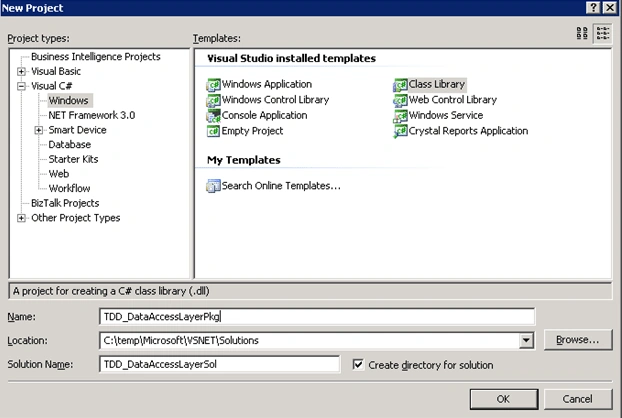
As an illustrative example, we're going to develop the data access layer as a Class Library project and the underlying data access components using ADO.NET and strongly typed data set object model (see Figure 1).
Figure 1
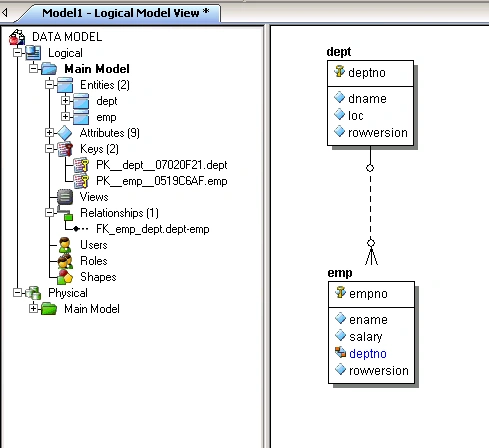
You're going to use a very simple database schema for testing purposes. The database schema is made up of the dept and emp tables and an optional non-identifying relationship between these tables. These tables store the state of the department and employee business entities as shown in Figure 2.
Figure 2
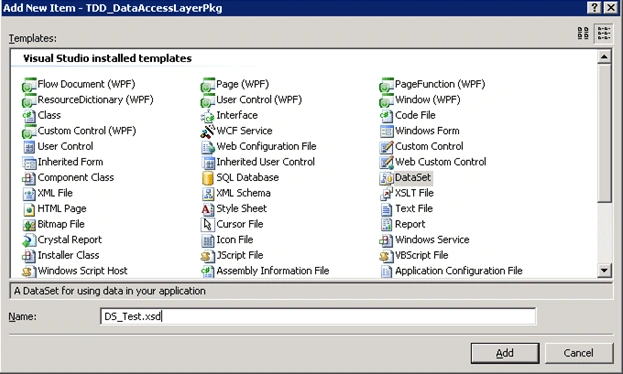
Now we're going to add a DataSet item to represent the underlying business entities and the logic to access the data in the database systems (see Figure 3).
Figure 3
The first step in the test-driven development approach is, of course as its name implies, the formulation of a list of tests. One important thing to keep in mind is that the list of tests is dynamic in order to add or remove tests for testing in different environments.
In this case, the list test case is as follows:
- To connect to the database.
- To test CRUD operations for the tables.
- To test the relationship between them.
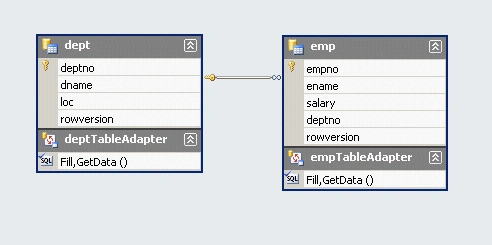
In order to implement these test cases, we have to define the strongly typed data set for the employee and department business entities (see Figure 4).
Figure 4
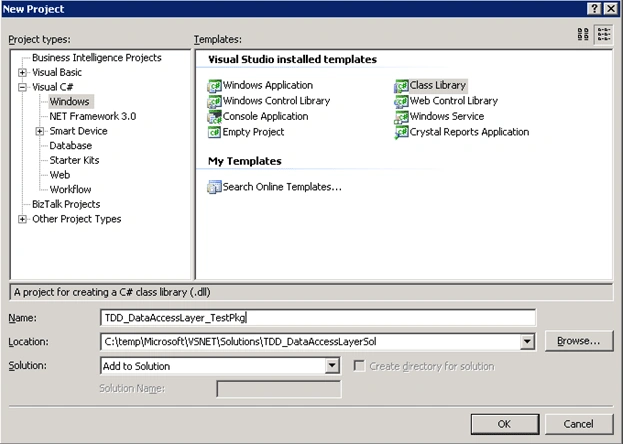
Now let's add the test project as a Class Library project (see Figure 5).
Figure 5
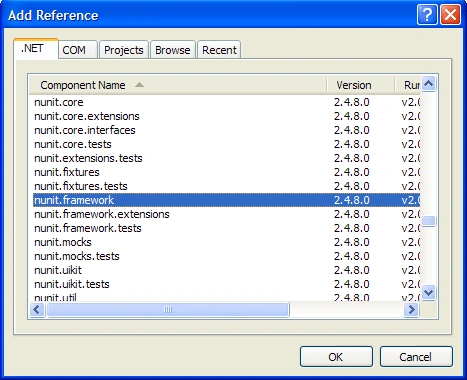
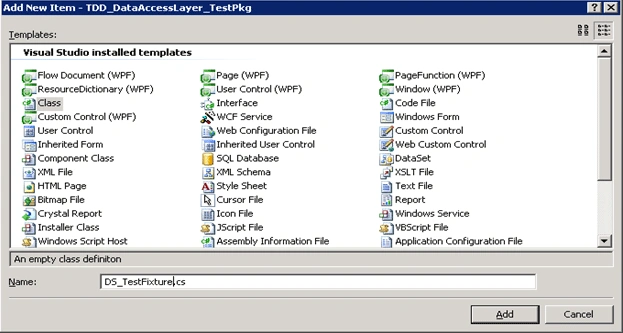
Then, you have to add a reference to the NUnit framework (see Figure 6) and a fixture class (see Figure 7).
Figure 6
Figure 7
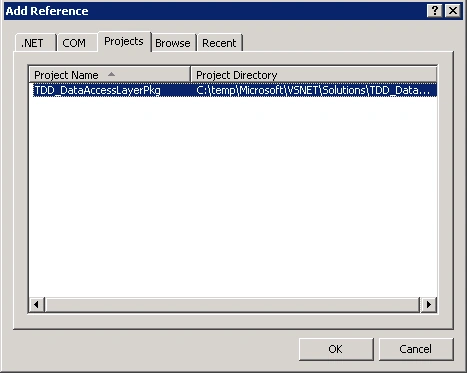
Then you must also add a reference to the TDD_DataAccessLayerPkg assembly (see Figure 8).
Figure 8
If you don't want to hard code the connection string in order to be used in the test library in several environments, you have to add a configuration file with the following configuration (see Listing 1).
- <?xml version="1.0" encoding="utf-8" ?>
- <configuration>
- <configSections>
- </configSections>
- <connectionStrings>
- <add name="TDD_DataAccessLayerPkg.Properties.Settings.TestDBConnectionString"
- connectionString="Data Source=localhost;Initial Catalog=TestDB;Integrated Security=True"
- providerName="System.Data.SqlClient" />
- </connectionStrings>
- </configuration>
Listing 1
Once you have the configuration, and one way is to pass this external information to the application using the ConfigurationSettings class. In order to not duplicate the retrieval of the connection string from the configuration file, we need to write the underlying code to a method annotated with the SetUp Attribute which ensures that this code is called prior to each test.
In order to test each persistent business entity, we need to firstly add an entity into the database, retrieve it (check that's the same entity), and then delete it after we are finished. To retrieve a particular entity from the database, we need to add a new method to the table adapter with the necessary SQL code.
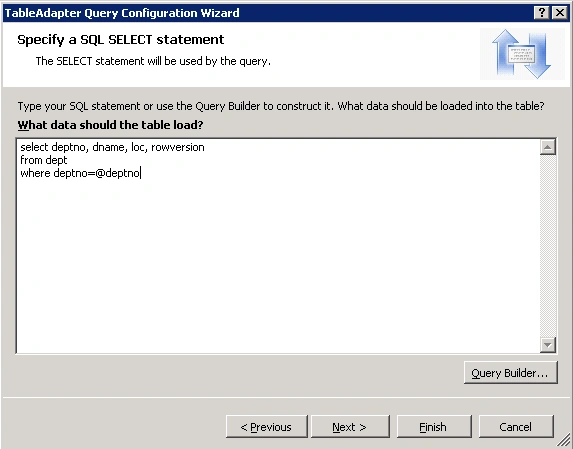
The SQL code for the dept table is shown in Figure 9.
Figure 9
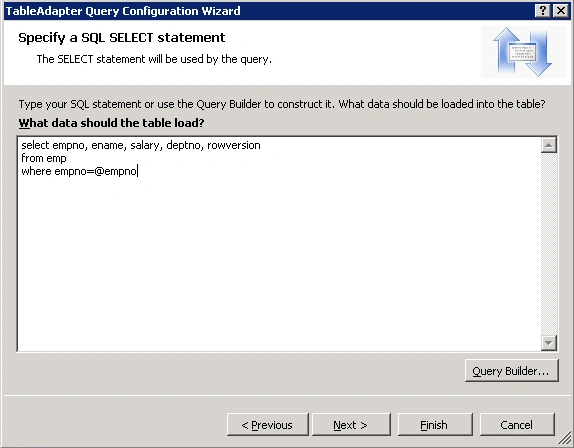
The SQL code for the emp table is shown in Figure 10.
Figure 10
Now it's time to write code for the test cases (to test the CRUD operations) using the test methods TestEmployee and TestDepartment annotated with Test attribute. We also need to add helper methods that are invoked from the test cases (see Listing 2).
- using System;
- using System.Collections.Generic;
- using System.Text;
- using System.Configuration;
- using System.Data;
- using System.Data.SqlClient;
- using NUnit.Framework;
- using TDD_DataAccessLayerPkg;
- using TDD_DataAccessLayerPkg.DS_TestTableAdapters;
-
- namespace TDD_DataAccessLayer_TestPkg {
- [TestFixture]
- public class DS_TestFixture {
- private string m_strConnString = null;
-
- [SetUp]
- public void GetConnectionString() {
- this.m_strConnString = ConfigurationManager.ConnectionStrings["TDD_DataAccessLayerPkg.Properties.Settings.TestDBConnectionString"].ConnectionString;
- }
-
- [Test]
- public void ConnectionIsOpen() {
- SqlConnection objConn = new SqlConnection(this.m_strConnString);
- objConn.Open();
- Assert.AreEqual(ConnectionState.Open, objConn.State);
- objConn.Close();
- }
-
- public static void TestInsertEmployee(int nEmpNo, string strName, decimal dSalary, SqlConnection objConn) {
- DS_Test dsInstance = new DS_Test();
- DS_Test.empRow objEmp = dsInstance.emp.NewempRow();
- objEmp.empno = nEmpNo;
- objEmp.ename = strName;
- objEmp.salary = dSalary;
- dsInstance.emp.AddempRow(objEmp);
-
- empTableAdapter taEmp = new empTableAdapter();
- taEmp.Connection = objConn;
- taEmp.Update(dsInstance);
- }
- public static void TestSelectEmployee(int nEmpNo, string strName, decimal dSalary, SqlConnection objConn) {
- DS_Test dsInstance = new DS_Test();
- empTableAdapter taEmp = new empTableAdapter();
- taEmp.Connection = objConn;
- taEmp.FillBy(dsInstance.emp, nEmpNo);
- DS_Test.empRow objEmp = dsInstance.emp[0];
-
- Assert.AreEqual(nEmpNo, objEmp.empno);
- Assert.AreEqual(strName, objEmp.ename);
- Assert.AreEqual(dSalary, objEmp.salary);
- }
- public static void TestDeleteEmployee(int nEmpNo, SqlConnection objConn) {
- DS_Test dsInstance = new DS_Test();
- empTableAdapter taEmp = new empTableAdapter();
- taEmp.Connection = objConn;
- taEmp.FillBy(dsInstance.emp, nEmpNo);
- DS_Test.empRow objEmp = dsInstance.emp[0];
-
- Assert.AreEqual(nEmpNo, objEmp.empno);
-
- objEmp.Delete();
- taEmp.Update(dsInstance);
- }
-
- public static void TestInsertDepartment(int nDeptNo, string strName, string strLocation, SqlConnection objConn) {
- DS_Test dsInstance = new DS_Test();
- DS_Test.deptRow objDept = dsInstance.dept.NewdeptRow();
- objDept.deptno = nDeptNo;
- objDept.dname = strName;
- objDept.loc = strLocation;
- dsInstance.dept.AdddeptRow(objDept);
-
- deptTableAdapter taDept = new deptTableAdapter();
- taDept.Connection = objConn;
- taDept.Update(dsInstance);
- }
- public static void TestSelectDepartment(int nDeptNo, string strName, string strLocation, SqlConnection objConn) {
- DS_Test dsInstance = new DS_Test();
- deptTableAdapter taDept = new deptTableAdapter();
- taDept.Connection = objConn;
- taDept.FillBy(dsInstance.dept, nDeptNo);
- DS_Test.deptRow objDept = dsInstance.dept[0];
-
- Assert.AreEqual(nDeptNo, objDept.deptno);
- Assert.AreEqual(strName, objDept.dname);
- Assert.AreEqual(strLocation, objDept.loc);
- }
- public static void TestDeleteDepartment(int nDeptNo, SqlConnection objConn) {
- DS_Test dsInstance = new DS_Test();
- deptTableAdapter taDept = new deptTableAdapter();
- taDept.Connection = objConn;
- taDept.FillBy(dsInstance.dept, nDeptNo);
- DS_Test.deptRow objDept = dsInstance.dept[0];
-
- Assert.AreEqual(nDeptNo, objDept.deptno);
-
- objDept.Delete();
- taDept.Update(dsInstance);
- }
-
- [Test]
- public void TestEmployee() {
- SqlConnection objConn = new SqlConnection(this.m_strConnString);
- objConn.Open();
-
- TestInsertEmployee(7380, "John Charles", 100, objConn);
- TestSelectEmployee(7380, "John Charles", 100, objConn);
- TestDeleteEmployee(7380, objConn);
-
- objConn.Close();
- }
-
- [Test]
- public void TestDepartment() {
- SqlConnection objConn = new SqlConnection(this.m_strConnString);
- objConn.Open();
-
- TestInsertDepartment(50, "IT", "Baltimore", objConn);
- TestSelectDepartment(50, "IT", "Baltimore", objConn);
- TestDeleteDepartment(50, objConn);
-
- objConn.Close();
- }
- }
- }
Listing 2
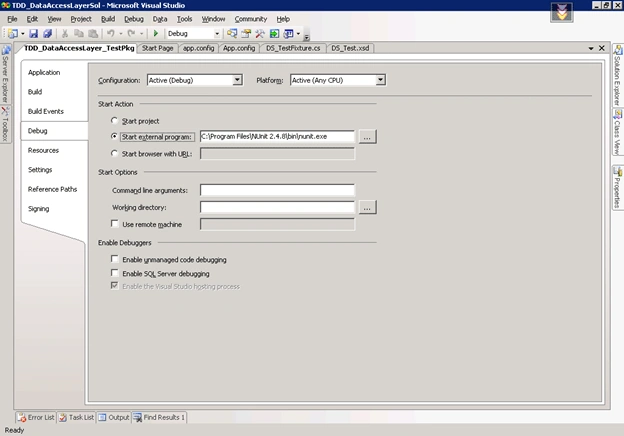
Now let's test the cases using the GUI NUnit test runner. Right-click on the project and select Properties from the context menu. In the Debug tab, set the GUI NUnit test runner (see Figure 11).
Figure 11
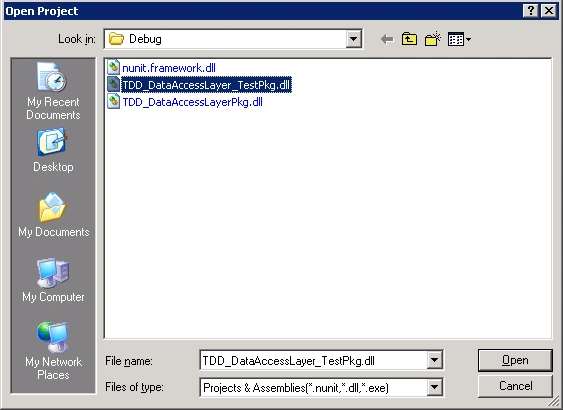
Now let's build the solution and run the test. When the GUI NUnit test runner is run for the first time, we need to load the test project (see Figure 7).
Figure 12
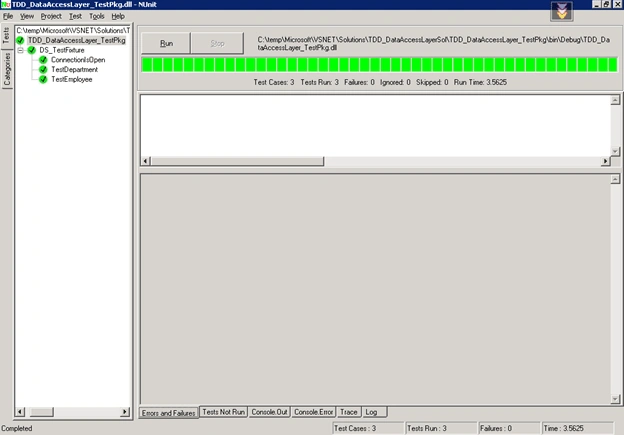
In the GUI NUnit test runner window, click on the Run button to start the test, and finally, you can see that all the test cases have passed (see Figure 13).
Figure 13
Conclusion
In this article, I've illustrated how programmers can use the test-driven development approach to implement and test database applications. Now you can apply this approach to your own business solutions.


 The SQL code for the emp table is shown in Figure 10.
 Now it's time to write code for the test cases (to test the CRUD operations) using the test methods TestEmployee and TestDepartment annotated with Test attribute. We also need to add helper methods that are invoked from the test cases (see Listing 2).
Join the conversation! Your thoughts help the community grow.