

Introduction
Many times it is necessary to test the web APIs that have been produced. Sometimes it is necessary to test these web APIs in environments other than the development environment. There are various tools for this such as Postman, cURL, Swagger and many more. But among all these tools, one tool with all, has attractive differences. This tool is HTTPRepl.
What is HTTPREPL?
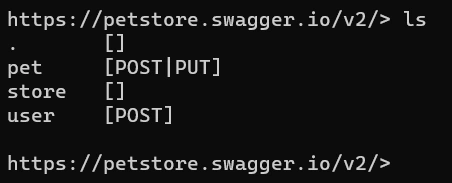
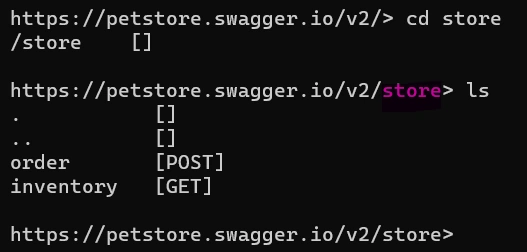
The HTTP Read-Eval-Print Loop (REPL) is a lightweight and cross-platform command-line tool that's supported everywhere .NET Core is supported. Using this tool you can start discovering and exploring web APIs just like as you are exploring files and folders in command prompt. HTTPRepl used for making HTTP requests to test ASP.NET Core web APIs and also non-ASP.NET Core web APIs and view their results. This tool is capable of testing web APIs hosted in any environment, including localhost and Azure App Service. HTTPRepl has great functionality when is used with web APIs having directory structure based on OpenAPI description.
How to work with HTTPREPL
In the following, we will get to know some HTTPRepl commands:
Install
Install HTTPRepl using following command:
dotnet tool install -g Microsoft.dotnet-httprepl
Using the above command HTTPRepl is being installed globally(using -g switch), allows you to run it from everywhere, however, it is not necessary to install it globally.
Suppose that there is OpenAPI friendly web APIs located at the https://petstore.swagger.io address. Also, the OpenAPI description file is accessible using https://petstore.swagger.io/v2/swagger.json url.
Connect
The first step in using HTTPRepl is to connect to the web APIs. In order to connect to web API, which has OpenAPI description file, you can use the following commands:
httprepl
connect https://petstore.swagger.io --openapi https://petstore.swagger.io/v2/swagger.json
After executing httprepl command in first line, you will enter the httprepl. By executing the connect command you are attempting to connect to web API. The first argument for this command is the root url.

You can ignore --openapi switch if your web APIs do not have any OpenAPI description.
Join the conversation! Your thoughts help the community grow.