Introduction
In this article, you will see the Complete Reference - Table Scan, Index Scan, and Index Seek in MSSQL.
Article Overview
- Background
- Prerequisites
- Difference between Scan and Seek Operation
- Table and Index Access
- Table Scan
- Index Scan
- Index Seek
- Difference between Table Scan, Index Scan, and Index Seek
- Summary
Background
While working with MS SQL database and SQL, a good knowledge of how the index works and how to use them to improve the SQL query performance is very important.
Prerequisites
- Preliminary understanding is required about what the index is and how to create and drop an index.
Difference between Scan and Seek Operation
| |
Scan Operation |
Seek Operation |
| 1. Fetches |
All the rows from the table |
Selective rows from the table |
| 2. Touches |
Every single row of the table is either required or not |
Only the required or matching row |
| 3. CPU Consumption |
More |
Less |
| 4. I/O Component Usage |
More |
Less |
| 5. Executes with |
SELECT statement |
WHERE clause |
Table and Index Access
Now, let us understand each one, one by one, with practical examples.
Table Scan
- It is a very simple process. While performing table scan, the query engine starts from the physical beginning of the table and it goes through every row into the table. If a row matches with the criteria then it includes that into the result set.
- It is the fastest way to retrieve the data especially when there is quite a small table.
- For a small table, a query engine can load all the data in a one-shot but from a large table it is not possible i.e. more IO and more time will be required to process those large data.
- Generally, a full table scan is used when a query doesn’t have a WHERE clause i.e. all data.
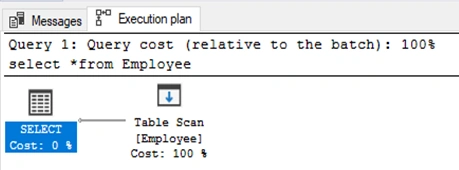
For example, an Employee table with no index and the following query will use the Table scan.
SELECT * FROM Employee
Index Scan
- When you have a clustered index and your query needs all or most of the records (i.e. query without where or having clause) then it uses an index scan.
- Index scan works similar to the table scan during the query optimization process. The query optimizer takes look at the available index and chooses one of the best, based on JOINs and WHERE clauses.
- As the right index is being chosen, the SQL query processing engine will navigate the tree structure to the pointer of the data which matches the criteria and further extracts only the needed/required records.
- The key difference between Table Scan and Index Scan is that data is stored in the index tree, the query processor knows it when reaches the end of the current it is looking for. Then it can send the query or move on to the next range of data.
- An index scan is slightly faster than the Table scan but significantly slower than an Index.
For example, Employee table with clustered index and the following query will use the Index scan,
SELECT * FROM Employee

Index Seek
- When the search criterion matches the index well enough which can navigate directly to particular points into the data, this is known as the Index seek.
- The index seeks the fastest way to retrieve the data in the database.
- For example, the following query will use the Index seek which can be confirmed by checking the execution plan of the query
- The query optimizer can use an index directly to go to the 3rd employee id and fetch the data.
Query execution plan can show the same as it uses an index seek through created EmployeeId index,
SELECT name FROM Employee WHERE id=5

Difference between Table Scan, Index Scan and Index Seek
| Table Scan |
Index Scan |
Index Seek |
| 1. Used when? |
Used when we need to retrieve all the data such as 90% to 100% |
Used when we need to retrieve some data based on some condition such as 10% of data |
| 2. WHERE clause |
The query doesn’t have a WHERE clause and the Table doesn't have clustered index then a full Table Scan is used |
The query doesn’t have a WHERE clause and the Table have clustered index then Index Scan is used |
| 3. Table and Index |
The table is slower than the Index |
The index is faster than Table |
| 4. Scan and Seek |
The scan is slower than Seek |
Seek is faster than Scan |
Summary
Now, I hope you understand the key important things about Table Scan, Index Scan, and Index Seek in MSSQL.
Index ScanTable ScanDifference between Scan and Seek OperationDifference between Table Scan and Index Scan and Index SeekIndex See


Rushang VoraPosted Nov 14, 2022, 6:31 AM
Its Very Helpful, I crack one of the interview by using the same article.
Venkatasubbarao PolisettyPosted Sep 16, 2021, 2:22 PM
Thank you Pankaj Patel for writing this up, I used Table scan and Index Scan earlier, have to explore Index Seek.