Introduction
Modern applications don’t use the Thread class from the System.Threading directly. If you see it in one of your projects, it indicates that you are maintaining a legacy code. Is it worth to learn Thread API? Well, it is another topic to discuss. As we already know, .NET 1.0 introduced the Thread API but using it was not so easy. So, why it is better not to use it?
- Thread API is the underlying API that directly allows you to manage everything. This option sounds good but having more control over something that you don’t know well may end up with frustration.
- It wasn’t an easy task to master Thread API. It has a lot of background history that requires you to dive into the details of OS to fully cover it. Well, sounds a bit scary )
- Thread API forces you to think in terms of Threads, not tasks. You as a developer, should think about making your code concurrent, rather than thinking about creating Threads. Thread is a physical concept that is an implementation detail.
- Thread creation is an expensive operation.
- Using Thread API adds additional complexity from an understandability and maintainability perspective.
In .NET 2.0, Microsoft introduced ThreadPool class which is better than Thread API. The major improvement forward to Threading was isolating us from the Thread concept. You don’t need to think in terms of Threads. You, as a developer, should think in terms of Tasks to be parallelized.
ThreadPool is a wrapper over your threads.
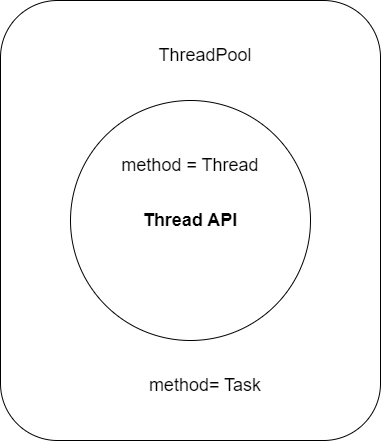
Why it is a better option?
- Via ThreadPool, you’re no longer “the owner” of Threads. There is no manual creation, no complex operations, no problems related to Thread management, deadlock, etc. Guess what? The biggest problem wasn’t a thread but you :)
- ThreadPool manages when and why to create Threads. In simple terms, say we have 5 methods. You want to run them in a multithreading mode. You need 5 methods to run them, but ThreadPool may use 2 or 3 Thread to complete your tasks. The limit is up to the thread count you use in a classical thread API.
internal class Program
{
    static void Main(string[] args)
    {
        new Thread(ComplexTask).Start();
        Thread.Sleep(1000);
        new Thread(ComplexTask).Start();
        Thread.Sleep(1000);
        new Thread(ComplexTask).Start();
        Thread.Sleep(1000);
        new Thread(ComplexTask).Start();
        Thread.Sleep(1000);
        Console.ReadLine();
    }

    static void ComplexTask()
    {
        Console.WriteLine($"Running complex task in Thread={Environment.CurrentManagedThreadId}");
        //Thread.Sleep(40);
        Console.WriteLine($"Finishing complex task in Thread={Environment.CurrentManagedThreadId}");
    }
}
Here is the result

Every operation is a Thread, and it is not an optimized way of using it.
ThreadPool isolates us from The Thread stuff and provides a simple API to enter multithreading mode. Let’s modify our code and try to understand the value of using ThreadPool instead of Thread directly.
internal class Program
{
    static void Main(string[] args)
    {
        ThreadPool.QueueUserWorkItem((x) => ComplexTask());
        Thread.Sleep(1000);
        ThreadPool.QueueUserWorkItem((x) => ComplexTask());
        Thread.Sleep(1000);
        ThreadPool.QueueUserWorkItem((x) => ComplexTask());
        Thread.Sleep(1000);
        ThreadPool.QueueUserWorkItem((x) => ComplexTask());
        Thread.Sleep(1000);

        Console.ReadLine();
    }
    static void ComplexTask()
    {
        Console.WriteLine($"Running complex task in Thread={Environment.CurrentManagedThreadId}");
        //Thread.Sleep(40);
        Console.WriteLine($"Finishing complex task in Thread={Environment.CurrentManagedThreadId}");
    }
}

Well, as you realized, ThreadPool uses Thread but in an optimized way. If any of the existing threads are free, ThreadPool will use an already existing one instead of creating a new thread. Wait a second... Is it possible for us to do the same operation? I mean, can we run the same Thread twice? Let’s try.

You can’t run the same Thread twice but somehow ThreadPool can. ThreadPool can reuse Threads and it helps not to create a Thread every time when you have a block of code to run in multithreading mode. In classical .NET, depending on its version and your CPU architecture the capacity of Worker threads is different.

In my case, I’m using the latest .NET ( .NET 8) with an x64 intel processor, and I have 32767 worker Threads with 1000 completion post Threads.
ThreadPool usually starts with 1 Thread in the pool. Depending on the context, it may automatically increase Threads. You can Check available threads in ThreadPool.
internal class Program
{
    static void Main(string[] args)
    {
        ThreadCalculator();
        for (int i = 0; i < 10; i++)
        {
            ThreadPool.QueueUserWorkItem((x) => ComplexTask());
        }
        Thread.Sleep(15);
        ThreadCalculator();
        Console.ReadLine();
    }
    static void ThreadCalculator()
    {
        ThreadPool.GetAvailableThreads(out int workerThreads, out int completionPortThreads);
        Console.WriteLine($"worker threads = {workerThreads}, " +
            $"and completion Port Threads = {completionPortThreads}");
    }
    static void ComplexTask()
    {
        Console.WriteLine($"Running complex task in Thread={Environment.CurrentManagedThreadId}");
        //Thread.Sleep(40);
        Console.WriteLine($"Finishing complex task in Thread={Environment.CurrentManagedThreadId}");
    }
}
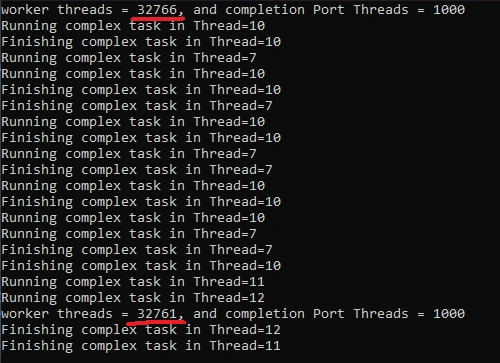
The most used API in ThreadPool is, of course, QueueUserWorkItem. It has a generic version, also.
Well, we have another great concept called completion post Threads that we need to cover.
ThreadPool.QueueUserWorkItem is a method in C# that allows you to schedule tasks for execution in a thread pool. Here's a breakdown of its functionality:
Purpose
- Schedule tasks to run asynchronously without creating and managing individual threads.
- Leverages a pool of pre-created threads, improving performance and resource management.
How it works
You provide a delegate (like Action or WaitCallback) that represents the work you want to be done.
Optionally, you can pass an object containing data to be used by the delegate.
ThreadPool.QueueUserWorkItem adds the delegate and data (if provided) to the thread pool's queue.
When a thread from the pool becomes available, it picks up the first item from the queue and executes the delegate with the provided data.
Benefits or Why to Use It
- Performance Boost: Reusing threads avoids the overhead of creating and destroying them for each task.
- Resource Optimization: Maintains a controlled number of threads, preventing system overload.
- Simplified Concurrency Management: The thread pool handles scheduling and ensures tasks are executed efficiently.
Additional notes
The thread pool can dynamically adjust the number of threads based on workload.
Tasks are queued if all threads are busy, ensuring none are dropped.
ThreadPool.QueueUserWorkItem has overloads, including a generic version for type safety and an option to influence thread selection.
Ok, but what about completion port Threads?
The concept of completionPortThreads within the ThreadPool class in C# might not be directly exposed as you might expect.
The ThreadPool class internally manages two types of threads.
- Worker Threads: These handle general-purpose tasks submitted through QueueUserWorkItem.
- I/O Completion Port Threads (Completion Port Threads): These are specialized threads optimized for processing asynchronous I/O operations.
Purpose of completion port threads
Asynchronous I/O operations typically involve waiting for network requests, file access, or other external events. Completion port threads efficiently wait for these events using a system mechanism called I/O Completion Ports (IOCP).
When an I/O operation completes, the corresponding completion port thread is notified, and it can then dequeue and process the completed task.
What is the value?
- Improved performance for asynchronous I/O bound tasks.
- Completion port threads avoid busy waiting, reducing CPU usage while waiting for I/O events.
- Dedicated threads for I/O operations prevent worker threads from being blocked, improving overall responsiveness.
Important Notes
You don't directly control completionPortThreads. The ThreadPool class manages its number dynamically based on the system workload.
Methods like ThreadPool.SetMinThreads and ThreadPool.GetAvailableThreads allow you to indirectly influence the minimum number of worker and completion port threads, but there's no separate control for each type.
Who Uses the ThreadPool in C#?
The ThreadPool is a fundamental mechanism in C# for efficiently managing threads. It provides a pool of worker threads that can be reused by various parts of your application, including:
- Task Parallel Library (TPL): When you create Task or Task<TResult> objects, the TPL typically schedules them to run on ThreadPool threads by default. This enables parallel execution of tasks without the need to explicitly manage threads.
- Asynchronous Programming: Asynchronous operations like those using the async and await keywords often rely on the ThreadPool to execute the actual work in the background while the main thread remains responsive.
- Parallel Programming: Libraries like the Parallel For loop (Parallel.For) and PLINQ (Parallel LINQ) often leverage the ThreadPool to distribute work items across multiple threads.
Benefits of Using the ThreadPool
- Reduced Thread Creation Overhead: Creating threads can be expensive. The ThreadPool eliminates this overhead by creating a pool of threads upfront and reusing them as needed.
- Improved Performance: By efficiently managing threads, the ThreadPool can enhance the responsiveness and throughput of your application, especially when dealing with concurrent tasks.
- Simplified Thread Management: The ThreadPool handles thread creation, destruction, and idle thread management, freeing you from these complexities.
When to consider alternatives
- Long-Running Operations: If your work items are long-running (e.g., several seconds or more), use dedicated threads or the TaskFactory.StartNew method with a custom thread creation option might be more suitable to avoid saturating the ThreadPool and affecting overall application performance.
- Specialized Thread Requirements: If your tasks require specific thread priority or affinity, you might need to create dedicated threads with the desired settings.
Conclusion
The ThreadPool is a valuable tool for concurrent programming in C#. It offers a convenient and efficient way to manage threads, especially for short-lived, CPU-bound tasks. By understanding how the ThreadPool works and its appropriate use cases, you can create well-structured and performant C# applications.


Join the conversation! Your thoughts help the community grow.