

Introduction
Today, in this article let's play around with one of the interesting and most useful concepts in SharePoint 2010.
Question: What is a theme?
In simple terms "A theme is a collection of property settings that allow you to define the look of pages and controls, and then apply the look consistently across pages in a Web application, across an entire Web application, or across all Web applications on a server".
I think we are now good to go and implement this wonderful concept.
Step 1: Open SharePoint 2010 Central Administration and navigate to aspecific site.
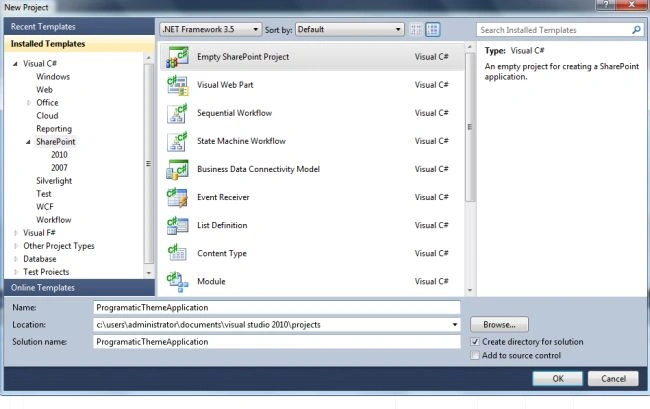
Step 2: Open up Visual Studio 2010 and create an "Empty Sharepoint Project":
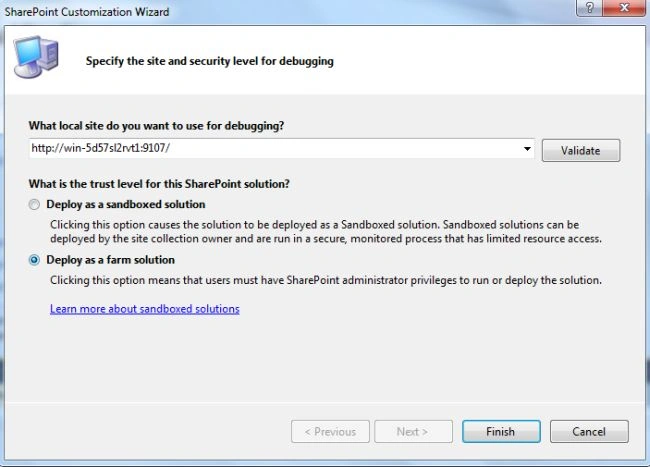
Step 3: Select "Deploy as a farm solution" and click on the "Finish" button. Now an empty project will be created:
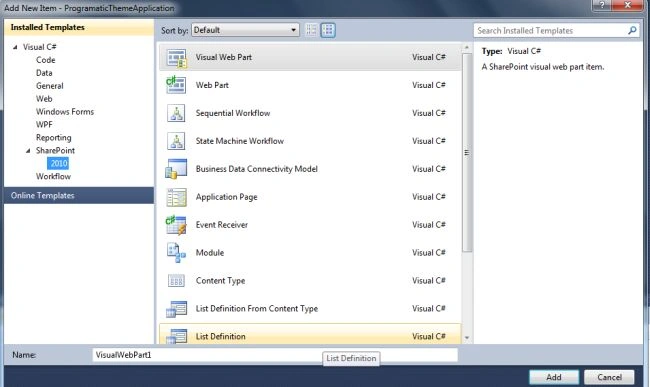
Step 4: Add a new visual webpart for that project.
Step 5: The complete code of visualwebpart1usercontrol.ascx looks like this:
<%@ Assembly Name="$SharePoint.Project.AssemblyFullName$" %>
<%@ Assembly Name="Microsoft.Web.CommandUI, Version=14.0.0.0, Culture=neutral, PublicKeyToken=71e9bce111e9429c" %>
<%@ Register TagPrefix="SharePoint" Namespace="Microsoft.SharePoint.WebControls"
Assembly="Microsoft.SharePoint, Version=14.0.0.0, Culture=neutral, PublicKeyToken=71e9bce111e9429c" %>
<%@ Register TagPrefix="Utilities" Namespace="Microsoft.SharePoint.Utilities" Assembly="Microsoft.SharePoint, Version=14.0.0.0, Culture=neutral, PublicKeyToken=71e9bce111e9429c" %>
<%@ Register TagPrefix="asp" Namespace="System.Web.UI" Assembly="System.Web.Extensions, Version=3.5.0.0, Culture=neutral, PublicKeyToken=31bf3856ad364e35" %>
<%@ Import Namespace="Microsoft.SharePoint" %>
<%@ Register TagPrefix="WebPartPages" Namespace="Microsoft.SharePoint.WebPartPages"
Assembly="Microsoft.SharePoint, Version=14.0.0.0, Culture=neutral, PublicKeyToken=71e9bce111e9429c" %>
<%@ Control Language="C#" AutoEventWireup="true" CodeBehind="VisualWebPart1UserControl.ascx.cs"
Inherits="ProgramaticThemeApplication.VisualWebPart1.VisualWebPart1UserControl" %>
<div align="center" style="font-family: Verdana; font-weight: bold">
<table>
<tr>
<td>
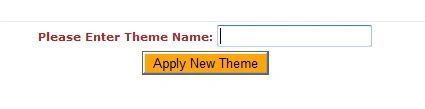
<asp:label id="Label1" runat="server" text="Please Enter Theme Name: " forecolor="Brown"></asp:label>
</td>
<td>
Join the conversation! Your thoughts help the community grow.