

Introduction
In this article we will show how to pin tiles and the uses of tiles in Metro Style applications. Here, we will show how to pin and unpin a tile. In this example we will determine whether a tile is pinned or not and pin/unpin from the application bar.
So, all these points shows in a list box and shows the following output with the help of the following steps.
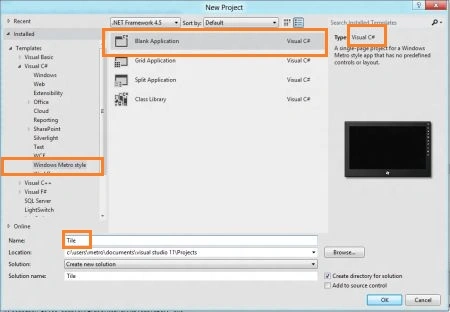
Step 1 : First of all you will create a new Metro Style Application. Let us see the description with images of how you will create it.
- Open Visual Studio 2011
- File -> New -> Project
- Choose Template -> Visual C# ->Metro Style Application
- Rename this Application :
Step 2 : In the Solution Explorer there are two files that we will primarily work with; MainPage.xaml and MainPage.xaml.cs files.
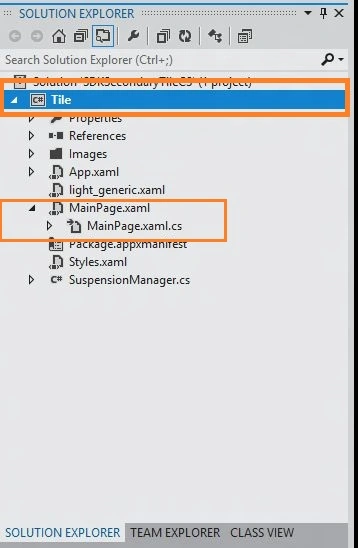
Step 3 : The MainPage.xaml file is as in the following code.
Code : Let us see the code which is given below.
<Page x:Class="Tile.MainPage"
xmlns="http://schemas.microsoft.com/winfx/2006/xaml/presentation"
xmlns:x="http://schemas.microsoft.com/winfx/2006/xaml"
xmlns:d="http://schemas.microsoft.com/expression/blend/2008"
xmlns:mc="http://schemas.openxmlformats.org/markup-compatibility/2006"
mc:Ignorable="d"
d:DesignHeight="768" d:DesignWidth="1366">
<!--This enables the AppBar to show up in the bottom of the app-->
<Page.BottomAppBar>
<AppBar x:Name="BottomAppBar" Padding="10,0,10,0" Opened="BottomAppBar_Opened" >
<Grid>
<Grid.ColumnDefinitions>
<ColumnDefinition Width="30*"/>
</Grid.ColumnDefinitions>
<StackPanel x:Name="RightPanel" Orientation="Horizontal" Grid.Column="1" HorizontalAlignment="Right">
<Button x:Name="PinToAppBar" Style="{StaticResource PinAppBarButtonStyle}" Tag="Pin to Start" Click="PinToAppBar_Click"/>
</StackPanel>
</Grid>
</AppBar>
</Page.BottomAppBar>
<Grid x:Name="LayoutRoot" Background="Pink">
<!--App Orientation States-->
<VisualStateManager.VisualStateGroups>
<VisualStateGroup x:Name="OrientationStates">
<VisualState x:Name="Full"/>
<VisualState x:Name="Fill">
<Storyboard>
<ObjectAnimationUsingKeyFrames Storyboard.TargetProperty="(FrameworkElement.Margin)" Storyboard.TargetName="ContentRoot">
<DiscreteObjectKeyFrame KeyTime="0">
<DiscreteObjectKeyFrame.Value>
<Thickness>40,20,40,20</Thickness>
</DiscreteObjectKeyFrame.Value>
</DiscreteObjectKeyFrame>
</ObjectAnimationUsingKeyFrames>
<ObjectAnimationUsingKeyFrames Storyboard.TargetProperty="(StackPanel.Orientation)" Storyboard.TargetName="InputPanel">
<DiscreteObjectKeyFrame KeyTime="0">
<DiscreteObjectKeyFrame.Value>
<Orientation>Horizontal</Orientation>
</DiscreteObjectKeyFrame.Value>
</DiscreteObjectKeyFrame>
</ObjectAnimationUsingKeyFrames>
<ObjectAnimationUsingKeyFrames Storyboard.TargetProperty="(FrameworkElement.MaxWidth)" Storyboard.TargetName="Description">
<DiscreteObjectKeyFrame KeyTime="0" Value="700">
</DiscreteObjectKeyFrame>
</ObjectAnimationUsingKeyFrames>
</Storyboard>
</VisualState>
<VisualState x:Name="Portrait">
<Storyboard>
<ObjectAnimationUsingKeyFrames Storyboard.TargetProperty="(FrameworkElement.Margin)" Storyboard.TargetName="ContentRoot">
<DiscreteObjectKeyFrame KeyTime="0">
<DiscreteObjectKeyFrame.Value>
<Thickness>40,20,40,20</Thickness>
</DiscreteObjectKeyFrame.Value>
</DiscreteObjectKeyFrame>
</ObjectAnimationUsingKeyFrames>
<ObjectAnimationUsingKeyFrames Storyboard.TargetProperty="(FrameworkElement.MaxWidth)" Storyboard.TargetName="Description">
<DiscreteObjectKeyFrame KeyTime="0" Value="700">
</DiscreteObjectKeyFrame>
</ObjectAnimationUsingKeyFrames>
</Storyboard>
</VisualState>
<VisualState x:Name="Snapped">
<Storyboard>
<ObjectAnimationUsingKeyFrames Storyboard.TargetProperty="(FrameworkElement.Margin)" Storyboard.TargetName="ContentRoot">
<DiscreteObjectKeyFrame KeyTime="0">
<DiscreteObjectKeyFrame.Value>
<Thickness>20,20,20,20</Thickness>
</DiscreteObjectKeyFrame.Value>
</DiscreteObjectKeyFrame>
</ObjectAnimationUsingKeyFrames>
<ObjectAnimationUsingKeyFrames Storyboard.TargetProperty="(StackPanel.Orientation)" Storyboard.TargetName="InputPanel">
<DiscreteObjectKeyFrame KeyTime="0">
<DiscreteObjectKeyFrame.Value>
<Orientation>Vertical</Orientation>
</DiscreteObjectKeyFrame.Value>
</DiscreteObjectKeyFrame>
</ObjectAnimationUsingKeyFrames>
<ObjectAnimationUsingKeyFrames Storyboard.TargetProperty="(FrameworkElement.MaxWidth)" Storyboard.TargetName="Description">
<DiscreteObjectKeyFrame KeyTime="0" Value="250">
</DiscreteObjectKeyFrame>
</ObjectAnimationUsingKeyFrames>
<ObjectAnimationUsingKeyFrames Storyboard.TargetProperty="(FrameworkElement.Margin)" Storyboard.TargetName="LegalPanel">
<DiscreteObjectKeyFrame KeyTime="0">
<DiscreteObjectKeyFrame.Value>
<Thickness>0,0,10,0</Thickness>
</DiscreteObjectKeyFrame.Value>
</DiscreteObjectKeyFrame>
</ObjectAnimationUsingKeyFrames>
</Storyboard>
</VisualState>
</VisualStateGroup>
</VisualStateManager.VisualStateGroups>
<Grid x:Name="ContentRoot" Background="Pink" Margin="100,20,100,20">
<Grid.RowDefinitions>
<RowDefinition Height="Auto"/>
<RowDefinition Height="*"/>
<RowDefinition Height="Auto"/>
</Grid.RowDefinitions>
<!-- Content -->
<ScrollViewer VerticalScrollBarVisibility="Auto" HorizontalScrollBarVisibility="Auto" Grid.Row="1" ZoomMode="Disabled">
<StackPanel x:Name="ContentPanel">
<StackPanel x:Name="InputPanel" Orientation="Horizontal" HorizontalAlignment="Left">
<StackPanel>
<TextBlock Text="Input" Style="{StaticResource H2Style}"/>
<TextBlock Text="Select Scenario:" Style="{StaticResource H3Style}"/>
<ListBox x:Name="ScenarioList" Margin="0,0,20,0" HorizontalAlignment="Left">
<ListBox.ItemTemplate>
<DataTemplate>
<TextBlock Text="{Binding Name}"/>
</DataTemplate>
</ListBox.ItemTemplate>
<ListBoxItem x:Name="Scenario1PinSecondaryTile">
<TextBlock Text="1) Pin Tile" Style="{StaticResource ListBoxTextStyle}"/>
</ListBoxItem>
<ListBoxItem x:Name="Scenario2RemoveSecondaryTile">
<TextBlock Text="2) Unpin Tile" Style="{StaticResource ListBoxTextStyle}"/>
</ListBoxItem>
<ListBoxItem x:Name="Scenario3EnumerateSecondaryTile">
<TextBlock Text="3) Enumerate Tiles" Style="{StaticResource ListBoxTextStyle}"/>
</ListBoxItem>
<ListBoxItem x:Name="Scenario4DoesSecondaryTileExists">
<TextBlock Text="4) Is Tile Pinned?" Style="{StaticResource ListBoxTextStyle}"/>
</ListBoxItem>
<ListBoxItem x:Name="Scenario5AppBarIntegration">
<TextBlock Text="5) Pin/Unpin from AppBar" Style="{StaticResource ListBoxTextStyle}"/>
</ListBoxItem>
</ListBox>
</StackPanel>
<StackPanel Margin="0,31,0,0" >
<TextBlock Text="Description:" Style="{StaticResource H3Style}"/>
<StackPanel x:Name="Description" MaxWidth="500">


SubashPosted Sep 19, 2016, 8:44 AM
Nice
Sujith K SPosted Jul 11, 2012, 1:35 AM
Perfectly copied from microsoft samples. The foreground color change is awesome. keep on copying.. all the best..
Sam HobbsPosted Apr 26, 2012, 3:55 PM
The code works for me in Google Chrome. It works somewhat in Seamonkey 2.8; I think Seamonkey is Fiorefox. It does not work for me iin IE 9 and in Safari 5.1.5. So if ohters get those results then perhaps we are enering the sample code incorrectly but if so then I did too.