

Abstract / Overview
Goal: Capture mentions of your handle on Twitter (X) and store clean records in Airtable without paying for the X API.
Approach: Use X email notifications for mentions, a Gmail label filter, and a Make.com scenario that parses each email and writes to Airtable. No scraping. No paid API.
Assumption: You will use Gmail, Make.com Free, and Airtable Free. You will not call the X API.
Fit. Personal brands and small projects that need light "Twitter monitor automation" with an "Airtable save".
Outcomes
Structured table of mentions with Tweet ID, author, text, URL, and timestamp.
Deduplication and basic enrichment.
Optional Slack alert.
Conceptual Background
Mentions are tweets containing @yourhandle in the text or in a reply. X can email you when a new mention occurs. These emails contain the tweet URL and a text preview. Parsing that email yields the data you need.
Why email
Free and allowed by platform settings.
Works without X API access.
Reliable enough for personal volume.
System design
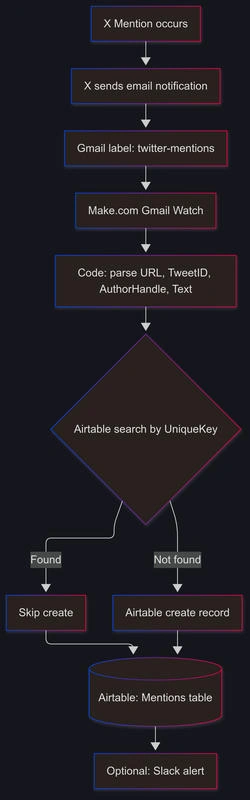
Trigger: Gmail watches incoming mention emails.
Parse: Extract tweet URL, Tweet ID, author handle, message snippet, and time.
Idempotency: Use the Tweet ID as a unique key to block duplicates.
Storage: Airtable table "Mentions" with typed fields.
Enrichment: Optional sentiment scoring and link unshortening.
Alert: Optional Slack notification.
Data model (Airtable "Mentions")
TweetID(single line text, primary key candidate)AuthorHandle(single line text)AuthorName(single line text, optional)Text(long text)TweetURL(URL)MentionedAt(date-time, created from email date)Project(single select, optional)Sentiment(single select: Positive | Neutral | Negative, optional)SourceEmailID(single line text)RawEmail(long text, optional for audit)
Idempotency
Create a formula field
UniqueKeywithCONCATENATE("tw_", TweetID).Use it to prevent duplicates.
Step-by-Step Walkthrough
1) Prepare Airtable
Create base:
Social Listening.Create table:
Mentions.Add fields as listed above.
Add formula field
UniqueKey=CONCATENATE("tw_", {TweetID}).
2) Turn on X email notifications
In X settings, enable email notifications for mentions.
Test by mentioning your handle from another account.
3) Create Gmail routing
Create label
twitter-mentions.Create a filter that matches the X-mentioned emails and applies the label. Use the sample query below.
Optional: forward to a parsing inbox. Not required for Make.
4) Make.com scenario (free)
Modules
Gmail > Watch emails. Trigger on label
twitter-mentions.Tools > Text parser or Code (JavaScript). Extract fields.
Airtable > Search records
UniqueKeyto check duplicates.Airtable > Create record only if not found.
Optional: Slack > Send message.
Mapping
Use the email's HTML or plain text. Prefer HTML for stable links.
Extract the first URL matching
https://twitter.com/.../status/IDorhttps://x.com/.../status/ID.Parse
TweetIDandAuthorHandlevia regex.Set
MentionedAtfrom emailDate.
5) Enrichment (optional)
Sentiment: lightweight rule-based scoring.
Unshorten links: HTTP module with follow-redirects enabled.
6) Test the path
Send a real mention. Confirm one new Airtable row.
Confirm no duplicates on reprocessing.
7) Harden the scenario
Add retry logic in Airtable modules.
Guard against template changes. Keep regex flexible.
Log raw email on parser failures.
Code / JSON Snippets
Below are copy-paste blocks for each piece.
Gmail filter query (mentions)
Use one of these search queries for labeling. Include both "Twitter" and "X" cases.
from:([email protected] OR [email protected] OR [email protected]) subject:(mentioned you OR mention) OR "mentioned you on X"Gmail filter import (XML)
Import under Gmail Settings > Filters > Import. Replace YOUR_LABEL.
<?xml version='1.0' encoding='UTF-8'?>
<feed xmlns='http://schemas.google.com/apps/2006'>
  <entry>
    <category term='filter'/>
    <title>Twitter/X Mention</title>
    <apps:property xmlns:apps='http://schemas.google.com/apps/2006' name='from' value='[email protected] OR [email protected] OR [email protected]'/>
    <apps:property xmlns:apps='http://schemas.google.com/apps/2006' name='subject' value='mentioned you'/>
    <apps:property xmlns:apps='http://schemas.google.com/apps/2006' name='label' value='twitter-mentions'/>
    <apps:property xmlns:apps='http://schemas.google.com/apps/2006' name='shouldNeverSpam' value='true'/>
  </entry>
</feed>
Make.com Code module: robust parser
Parses HTML or text. Extracts URL, TweetID, AuthorHandle, and a safe text preview.
// Input: bundle.inputData.htmlBody, bundle.inputData.textBody, bundle.inputData.emailId, bundle.inputData.date
function getFirst(arr){ return Array.isArray(arr) && arr.length ? arr[0] : null; }

const html = (input.htmlBody || "").toString();
const text = (input.textBody || "").toString();

const urlRegex = /(https?:\/\/(?:twitter|x)\.com\/[A-Za-z0-9_]{1,15}\/status\/(\d+)[^"' \n]*)/i;
const handleRegex = /@([A-Za-z0-9_]{1,15})/g;

// Prefer HTML match
let urlMatch = html.match(urlRegex) || text.match(urlRegex);
let tweetUrl = urlMatch ? urlMatch[1] : "";
let tweetId = urlMatch ? urlMatch[2] : "";

let handles = [];
let m;
while ((m = handleRegex.exec(html || text)) !== null) {
  handles.push(m[1]);
}
// Heuristic: the first handle that is not your own is the author
const YOUR_HANDLE = (input.yourHandle || "yourhandle").replace(/^@/, "").toLowerCase();
let authorHandle = handles.map(h => h.toLowerCase()).find(h => h !== YOUR_HANDLE) || getFirst(handles) || "";

// Clean preview
const preview = (text || html.replace(/<[^>]*>/g, " "))
  .replace(/\s+/g, " ")
  .trim()
  .slice(0, 260);

// Basic rule-based sentiment
function scoreSentiment(s){
  const pos = ["great","love","thanks","good","awesome","cool","nice","helpful","🔥","💯","+1"];
  const neg = ["bad","hate","terrible","annoying","bug","issue","broken","wtf","ugh","👎"];
  let p = pos.some(k => s.toLowerCase().includes(k));
  let n = neg.some(k => s.toLowerCase().includes(k));
  if (p && !n) return "Positive";
  if (n && !p) return "Negative";
  return "Neutral";
}

return [{
  TweetURL: tweetUrl,
  TweetID: tweetId,
  AuthorHandle: authorHandle ? "@" + authorHandle : "",
  Text: preview,
  MentionedAt: input.date || new Date().toISOString(),
  SourceEmailID: input.emailId || ""
}];
Join the conversation! Your thoughts help the community grow.