

The Entity Framework team has announced the new version of Entity Framework 6 beta pro. I describe in this article series of new features introduced in Entity Framework 6.
My last article was a Code First Stored Procedure in Entity Framework 6. You can see this from:
Code First Insert Update and Delete Stored Procedure in Entity Framework 6 Pre
Now, through this article, I provide another new specification of Entity Framework 6. The new APIs make it the developer easy to work with transactions in Entity Framework.
Transaction
Transaction is used to ensure that everything in the unit of work is either successful or failed. A transaction is a series of operations performed as a single unit of work. Entity Framework transactions are a part of its internal architecture. The "SaveChanges()" method operates within a transaction and saves the results of the work. It is designed to ensure data integrity.
First, we need to install the Entity Framework 6 Pre in Visual Studio 2012,
How to Install the Entity Framework 6 Beta version in .NET Framework 4.5
From the Tools menu, select "Library Package Manager" and then click "Package Manager Console".
 To install Entity Framework, run the following command in the Package Manager Console.
PM> Install-Package Entity Framework -Pre
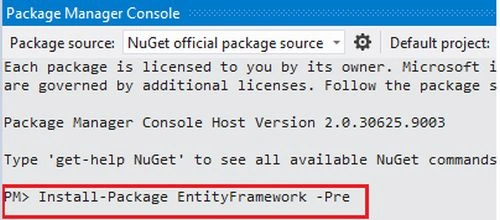 In Entity Framework 6 we can now add the two new APIs to DbContext.Database that makes working with transactions easier.
"UseTransaction" and "BeginTransaction"
BeginTransaction()
This method returns a "DbContextTransaction" object and will open the underlying database connection if necessary. This method has two overridden constructors. Both the overrides take the "IsolationLevel" for the transaction.
1. The first one is the default constructor that takes no arguments, which means it uses the default for the transaction.
2. The second takes an explicit "IsolationLevel" for the transaction.
2. The second takes an explicit "IsolationLevel" for the transaction.
DbContextTransaction
It provides the two methods "Commit()" and "Rollback()" that perform Rollback and Commit on the transaction.
Now, let's start code to see how to use Transaction in Entity Framework 6.
Here, I'll use a console application in VS2012 using C#.
I am using Code First to use the Transaction. When using Code First development you usually begin by writing .NET Framework classes that define your conceptual (domain) model.
The code below defines a set of model classes. Open the Program.cs file and paste the following class definitions.
- public class PostInformation
- {
- [Key]
- public int PostId { get; set; }
- public string Title { get; set; }
- public string Content { get; set; }
- }
- public class PostAdditionalInformation
- {
- [Key]
- public int PostId { get; set; }
- [Required]
- public string PostName { get; set; }
- }
To use the appropriate annotations, include the Namespaces in the file.
- using System.ComponentModel.DataAnnotations;
- using System.Data.Entity;
Define the DbContext Derived Type
In addition to defining entities, you need to define a class that derives from DbContext and exposes DbSet<TEntity> properties. The DbSet<TEntity> properties.
An instance of the DbContext derived type manages the entity objects during run time, which includes populating objects with data from a database, change tracking, and persisting data to the database.
In the Program.cs add the context definition.
- public partial class PostEntityContainer : DbContext
- {
- public PostEntityContainer() : base("name=EntitieConnectionString")
- {
- }
- protected override void OnModelCreating(DbModelBuilder modelBuilder)
- {
- }
- public DbSet<PostInformation> Post_Details { get; set; }
- public DbSet<PostAdditionalInformation> PostAddtional_Details { get; set; }
- }

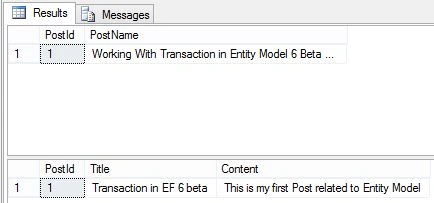

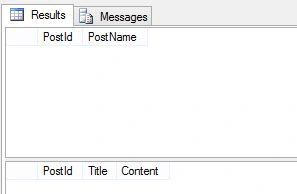
Dhanik SahniPosted Jul 17, 2013, 9:59 AM
very Informative.
Vishnujeet KumarPosted Jul 16, 2013, 10:52 AM
very nice Dear .