

Introduction
To traverse the DOM, the access always starts from the document.
The root: documentElement and body
The root of the DOM is always document.documentElement.
This special property will provide access to the topmost HTML tag.
Another starting point can be the document.body, which represents the BODY tag.
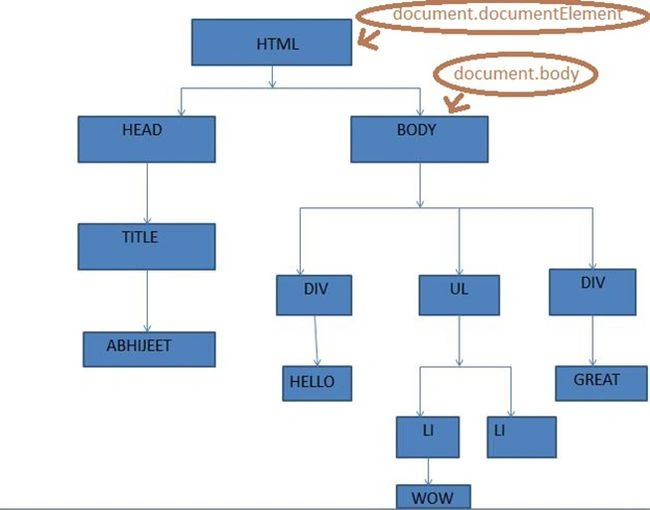 Both entry points are valid. But document.body can be null.
For example, we access document.body from an inline script in the HEAD, prepare to see null instead. That’s natural, because there is no BODY yet.
Both entry points are valid. But document.body can be null.
For example, we access document.body from an inline script in the HEAD, prepare to see null instead. That’s natural, because there is no BODY yet.
On the contrary, document.documentElement is always available.- <html>
- <head>
- <script>
- alert("Body from HEAD: "+document.body) // null
- </script>
- </head>
- <body>
- <div>ABHIJEET</div>
- <script>
- // for different browsers ,output is different text,
- // because of different implementations of toString
- alert("Body from inside body: " + document.body)
- </script>
- </body>
- </html>
Asfend YarPosted Mar 5, 2016, 9:32 AM
and my dear you've not type any url of this page ????
Asfend YarPosted Mar 5, 2016, 9:31 AM
what's the process in charp