

Introduction
In Part 1, we built a knowledge graph from company documents using Microsoft GraphRAG and Azure OpenAI. We ended up with 40 entities, 45 relationships, and the ability to answer complex multi-hop questions, but only through scripts.
Here's the problem: that knowledge graph is locked inside your machine. No agent can discover it, no external tool can query it, and scaling it means copying scripts around.
In this article, we'll fix that. We'll expose GraphRAG as a Model Context Protocol (MCP) server, the emerging standard for connecting AI agents to external tools. By the end, any MCP-compatible client (Inspector, Copilot, custom agents) can discover and query your knowledge graph automatically, no integration code required.
What You'll Build
An MCP server with 5 tools powered by FastMCP and GraphRAG
Server-Sent Events (SSE) transport for real-time communication
Tested and verified through MCP Inspector and Jupyter notebooks
What Changed Since Part 1
Before diving in, a few things evolved:
| Change | Part 1 | Part 2 |
|---|---|---|
| GraphRAG version | 1.2.0 | 3.0.1 (breaking API changes) |
| Dependency management | pip + requirements.txt | Poetry (lock files, dev/prod separation) |
| Documents | 3 files | 10 files (expanded corpus) |
| Knowledge graph | 40 entities, 45 relationships | 147 entities, 263 relationships, 32 communities |
| Config format | settings.yaml v1.x keys | settings.yaml v3.x (completion_models/embedding_models) |
We migrated to GraphRAG 3.0.1 because version 1.2.0 had limitations we'd hit later, and the API is more mature. The migration was non-trivial (more on that in the lessons learned section).
Prerequisites
Completed Part 1 (or have a working GraphRAG knowledge graph)
Python 3.11+
Poetry installed (
pip install poetry)Azure OpenAI resource with GPT-4o and text-embedding-3-small
Node.js (for MCP Inspector)
What is MCP and Why Should You Care?
Model Context Protocol (MCP) is an open standard created by Anthropic that defines how AI agents discover and use external tools. Think of it as a USB-C port for AI, a universal interface that lets any agent plug into any tool.
Without MCP, connecting an agent to your knowledge graph means writing custom integration code for each agent framework. With MCP, you expose tools once and any MCP-compatible client can discover and use them automatically.
Here's why that matters for GraphRAG:
| Without MCP | With MCP |
|---|---|
| Custom Python scripts per agent | One server, any client |
| Manual function wiring | Automatic tool discovery |
| Tight coupling to one framework | Works with Inspector, Copilot, custom agents |
| No schema validation | JSON Schema enforced on every call |
MCP supports multiple transports — ways for clients to talk to servers. We'll use SSE (Server-Sent Events) over HTTP, which means our server runs on localhost:8011 and any client can connect by pointing to the SSE endpoint.
Architecture
Here's what we're building:
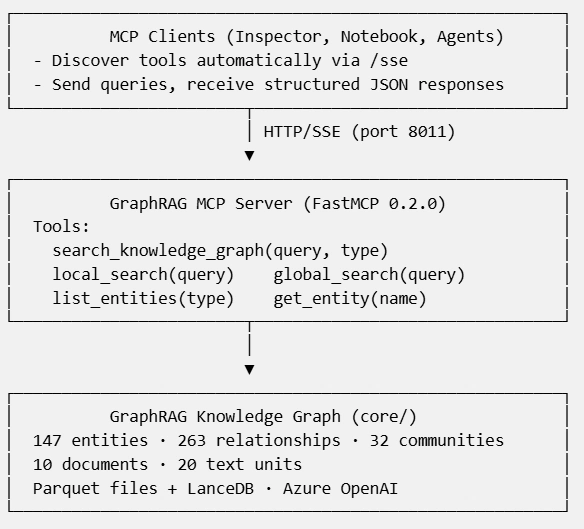
The key insight: the MCP server is a thin layer. It doesn't contain business logic — it just translates MCP tool calls into GraphRAG API calls. The heavy lifting stays in core/.
Project Structure
maf-graphrag-series/
├── core/                      # GraphRAG wrapper (from Part 1, upgraded)
│   ├── config.py              # Settings + env validation
│   ├── data_loader.py         # GraphData dataclass + parquet loading
│   ├── search.py              # Async search functions
│   └── indexer.py             # Knowledge graph indexing
├── mcp_server/                # NEW — MCP server layer
│   ├── config.py              # Server config (host, port, CORS)
│   ├── server.py              # FastMCP server + tool registration
│   └── tools/
│       ├── local_search.py    # Entity-focused search
│       ├── global_search.py   # Thematic search
│       ├── entity_query.py    # list_entities + get_entity
│       └── source_resolver.py # Resolves text unit IDs → document titles
├── notebooks/
│   └── 02_test_mcp_server.ipynb   # Tool testing notebook
├── run_mcp_server.py          # Convenience startup script
├── settings.yaml              # GraphRAG config (v3.x format)
└── pyproject.toml             # Poetry dependencies
Setting Up Poetry
Part 1 used pip install and requirements.txt. For a multi-part series with growing dependencies, that approach breaks down fast; no lock files, no dev/prod separation, no conflict detection.
We switch to Poetry:
# Install Poetry (if you haven't)
pip install poetry

# Clone the repo and install
git clone https://github.com/cristofima/maf-graphrag-series.git
cd maf-graphrag-series
poetry config virtualenvs.in-project true
poetry install
Poetry generates a poetry.lock file that guarantees identical installations across machines — critical when Azure SDK versions matter.
Building the MCP Server
Step 1: The Data Foundation
GraphRAG stores its knowledge graph as Parquet files. We need a clean way to load them for every search request. The GraphData dataclass wraps all the DataFrames:
@dataclassclass GraphData:
    entities: pd.DataFrame          # 147 entities (people, projects, orgs)
    relationships: pd.DataFrame     # 263 connections between entities
    communities: pd.DataFrame       # 32 detected clusters
    community_reports: pd.DataFrame # AI-generated summaries per cluster
    text_units: pd.DataFrame        # Source text chunks
    documents: pd.DataFrame | None = None  # Source document metadata
    covariates: pd.DataFrame | None = None
The documents DataFrame is key for source traceability, it maps text unit chunks back to their original document filenames (e.g., project_alpha.md). More on this when we discuss tool responses.
The load_all() function loads everything from output/ and returns a GraphData instance. Each MCP tool calls this per-request, not the most efficient, but it guarantees fresh data without caching issues.
Step 2: Registering MCP Tools
FastMCP makes tool registration trivial. Decorate an async function with @mcp.tool() and it becomes discoverable via MCP:
from mcp.server.fastmcp import FastMCP

mcp = FastMCP(name="graphrag-mcp-server")

@mcp.tool()async def local_search(
    query: str,
    community_level: int = 2,
    response_type: str = "Multiple Paragraphs") -> dict:
    """
    Perform entity-focused search on the knowledge graph.

    Best for specific questions about entities and relationships:
    - "Who leads Project Alpha?"
    - "What technologies are used in Project Beta?"
    """
    return await local_search_tool(query, community_level, response_type)
That docstring isn't just documentation, MCP sends it to clients so agents understand when to use each tool. Write them like you're explaining the tool to a colleague.
We register 5 tools total:
| Tool | Purpose | Best For |
|---|---|---|
| search_knowledge_graph | Router — dispatches to local or global | General queries |
| local_search | Entity-focused search | "Who leads X?", "What tech does Y use?" |
| global_search | Thematic/community search | "What are the main projects?", "Summarize the org" |
| list_entities | Browse entities by type | "Show me all people", "List projects" |
| get_entity | Look up a specific entity | "Tell me about Emily Harrison" |
Step 3: SSE Transport + CORS
FastMCP supports multiple transports. We use SSE (Server-Sent Events) because it works over plain HTTP, no WebSocket complexity, firewalls love it:
# Create the Starlette app with SSE transport
app = mcp.sse_app()

# Add CORS so MCP Inspector (browser-based) can connectfrom starlette.middleware.cors import CORSMiddleware
app.add_middleware(
    CORSMiddleware,
    allow_origins=["*"],
    allow_methods=["*"],
    allow_headers=["*"],
)
Two things to note about FastMCP 0.2.0:
FastMCP()only acceptsname, noversionparameter (later versions add it)mcp.sse_app()is a method call. Writingmcp.sse_appreturns the bound method, not the app. This cost us some debugging time.
Step 4: The Tool Implementation
Each tool follows the same pattern — load data, call the core search function, structure the response:
async def local_search_tool(query, community_level=2, response_type="Multiple Paragraphs"):
    data = load_all()
    response, context = await local_search(query=query, data=data, ...)

    # GraphRAG 3.x returns context as dict[str, pd.DataFrame]
    ctx = context if isinstance(context, dict) else {}
    sources_df = ctx.get("sources")

    # Resolve text unit IDs to document titles and text previews
    resolved_sources = resolve_sources(sources_df, data)

    return {
        "answer": response,
        "context": {
            "entities_used": len(ctx.get("entities", [])),
            "relationships_used": len(ctx.get("relationships", [])),
            "reports_used": len(ctx.get("reports", [])),
            "documents": get_unique_documents(resolved_sources),
        },
        "sources": resolved_sources,
        "search_type": "local"
    }
Notice the resolve_sources() call. GraphRAG's context returns sources as a DataFrame with opaque human_readable_id values ('0', '7', '11'), meaningless to an agent. The resolver traces the full chain:
context["sources"]["id"] → text_units.human_readable_id → text_units.document_id → documents.titleThis gives agents actual document names and text previews instead of numeric IDs.
The separation is intentional: mcp_server/tools/ handles MCP concerns (error formatting, response structure, source resolution), while core/search.py handles GraphRAG concerns (API calls, data loading). This way, adding a new search type means writing one file in tools/ and one function in core/.
Understanding Tool Responses
Local and global search return different response structures because they work differently under the hood.
Local search finds relevant entities via vector similarity, then traverses the graph to gather connected information. It has access to the original text units, so it provides full source traceability, which documents contributed to the answer:
{
  "answer": "Dr. Emily Harrison leads Project Alpha...",
  "context": {
    "entities_used": 19,
    "relationships_used": 47,
    "reports_used": 2,
    "documents": ["project_alpha.md", "team_members.md", "company_org.md"]
  },
  "sources": [
    {
      "text_unit_id": "0",
      "document": "project_alpha.md",
      "text_preview": "# Project Alpha - Next-Generation AI Assistant Platform..."
    },
    {
      "text_unit_id": "7",
      "document": "team_members.md",
      "text_preview": "# TechVenture Inc. - Team Member Profiles..."
    }
  ],
  "search_type": "local"
}
Global search synthesizes answers from community reports (pre-aggregated summaries), not individual text chunks. Since it never processes text_units, document-level provenance is not available, this is by design in GraphRAG's map-reduce architecture:
{
  "answer": "TechVenture Inc. is pursuing several major strategic initiatives...",
  "context": {
    "communities_analyzed": 32
  },
  "search_type": "global"
}
This difference is important for agent design: if your agent needs to cite sources, route to local_search. If it needs broad organizational insights, use global_search, but know that source attribution won't be available.
Starting the Server
poetry run python run_mcp_server.py
🚀 Starting GraphRAG MCP Server
   Server: graphrag-mcp v1.0.0
   URL: http://127.0.0.1:8011
   GraphRAG Root: .
The server exposes two endpoints:
GET /sse— SSE connection for MCP clientsPOST /messages/— Message exchange endpoint
Testing with MCP Inspector
MCP Inspector is the official debugging tool for MCP servers. It connects to your server, discovers tools automatically, and lets you call them interactively.
npx @modelcontextprotocol/inspectorConfigure the connection:
Transport Type: SSE
URL:
http://localhost:8011/sse
Click Connect to have access to Tools, Resources, Prompts, etc.
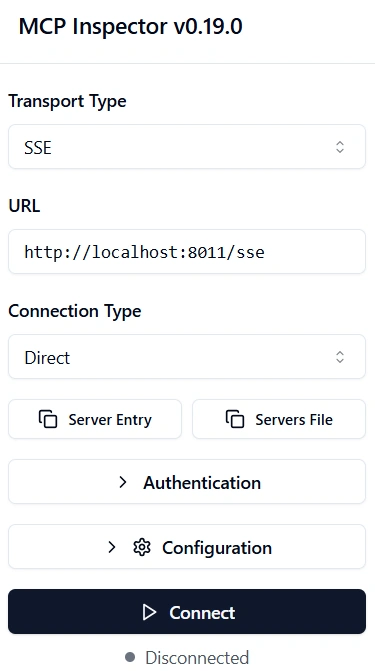
Global Search in Action
Click Tools / List Tools and all 5 tools appear below.
Let's try a thematic query through the Inspector. Select global_search and enter:
What are the main projects and strategic initiatives at TechVenture Inc?
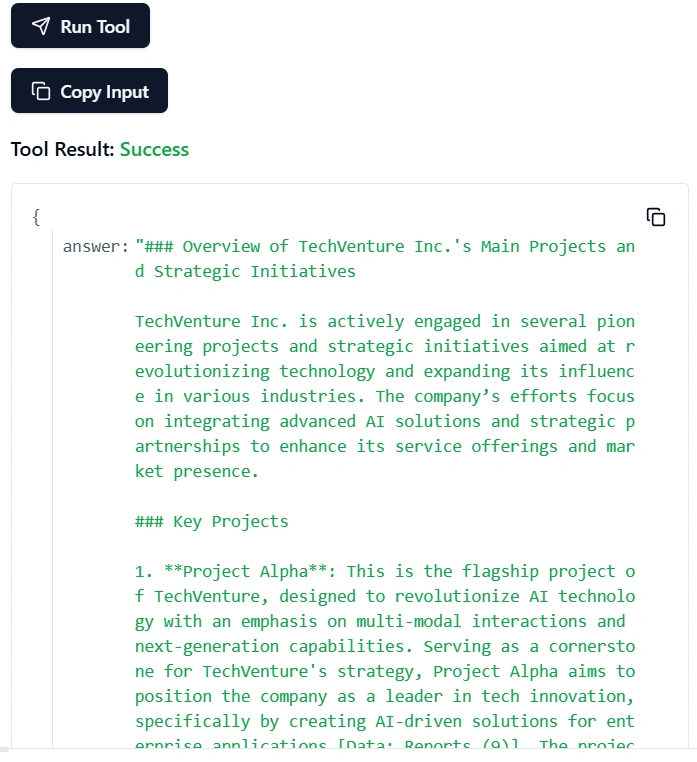
MCP Inspector showing the global_search tool response. The query analyzes all 32 communities and returns a comprehensive summary of TechVenture's initiatives.
Global search uses a map-reduce pattern under the hood: it sends the query to each community report in parallel, then combines the results into a coherent answer. This means it makes many LLM calls, expect 60-120 seconds and possible rate limit retries with Azure OpenAI.
Testing with the Notebook
For programmatic testing, notebooks/02_test_mcp_server.ipynb validates all tools directly (no server needed — it imports the tool functions):
from mcp_server.tools.local_search import local_search_tool

result = await local_search_tool("Who leads Project Alpha?")
print(result["answer"])
Dr. Emily Harrison serves as the Project Lead for Project Alpha. She is also the Head of AI Research at TechVenture Inc., reporting directly to Michael Rodriguez, the Chief Technology Officer (CTO). Dr. Harrison plays a pivotal role in overseeing the project's overall strategy, coordinating between all contributing teams, and managing timeline risks.
The notebook also tests cross-document reasoning — queries that require connecting information from multiple source documents:
result = await local_search_tool(
    "What is the connection between David Kumar, Sophia Lee, and the GraphRAG incident?"
)
GraphRAG connects David Kumar (engineering), Sophia Lee (knowledge graphs), and a production incident described in a completely separate document, something standard RAG could never do.
The Updated Knowledge Graph
Since Part 1, we expanded from 3 documents to 10, covering organizational structure, projects, team profiles, customers, incidents, and technical architecture. Here's the resulting knowledge graph:
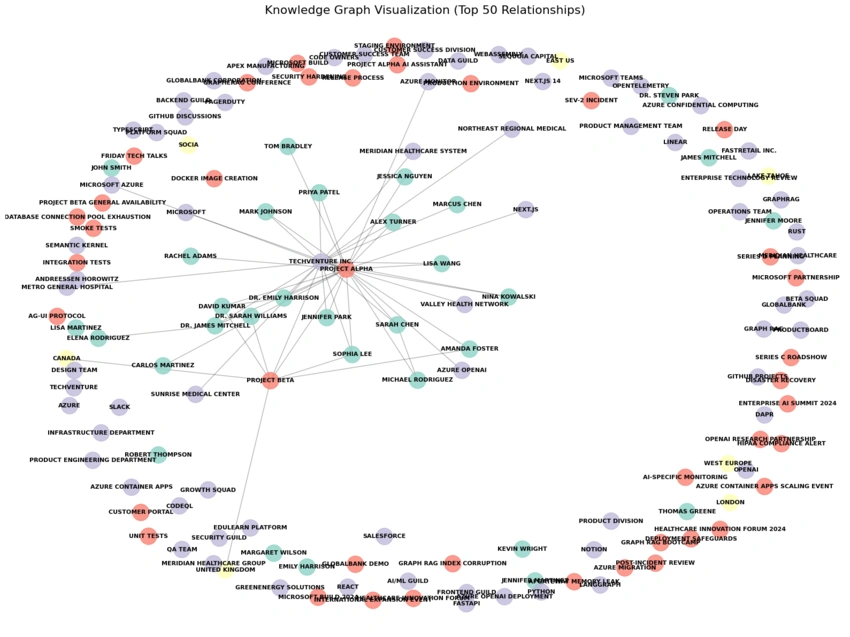
Network visualization limited to top 50 relationships of the knowledge graph. Colors represent entity types: green for people, blue for organizations, orange for projects, yellow for places.
GraphRAG detected 32 communities (clusters of related entities), enabling global search to provide organizational-level insights that would be impossible with chunk-based RAG.
Key Insights
Building this MCP server taught us several lessons worth sharing:
1. MCP is a Thin Layer — Keep It That Way
The MCP server has no business logic. Every tool delegates to core/. This separation pays off immediately: you can test search functions without running a server, swap transport protocols without touching search logic, and add tools without refactoring anything.
2. GraphRAG 3.x Migration Is Non-Trivial
We migrated from GraphRAG 1.2.0 to 3.0.1 for this series. Key breaking changes:
Config format:
llm→completion_models/embedding_modelsinsettings.yamlSearch API: Removed
nodesparameter — passcommunitiesdirectlyParquet files: No more
create_final_prefix on output filenamesEntity column: Renamed from
nametotitle
3. FastMCP Version Pinning Matters
We pin FastMCP to 0.2.0. Why? The FastMCP constructor API changes between minor versions — our code breaks on a simple poetry update. For a tutorial series, reproducibility beats bleeding edge. Always pin MCP server dependencies.
4. CORS Is Required for Browser-Based MCP Clients
MCP Inspector runs in the browser. Without CORS middleware, OPTIONS preflight requests fail silently. This took longer to debug than it should have — if your Inspector connects but shows no tools, check CORS first.
5. Global Search Is Expensive
Global search sends your query to every community report via map-reduce, triggering dozens of parallel LLM calls. On Azure OpenAI with standard quotas, expect 60-120 seconds per query and occasional rate-limit retries. For production, consider increasing your TPM (tokens per minute) quota or using dynamic community selection to reduce the search space.
6. Source Traceability Requires Explicit Resolution
GraphRAG's context returns source references as numeric human_readable_id values — useless for an agent. We built source_resolver.py to trace the full chain (text_unit → document_id → document title), and discovered a type mismatch along the way: sources use str IDs while text_units uses int64. Small detail, but it silently breaks the join if you don't account for it. Local search provides this traceability; global search doesn't — it works from community reports that have already lost the connection to individual documents.
What's Next
In Part 3, we'll connect this MCP server to Microsoft Agent Framework using ChatAgent and MCPStreamableHTTPTool. The agent will automatically discover our 5 tools and decide which one to use for each query, no routing logic needed on our side.
The MCP server we built here becomes the foundation, a reusable knowledge graph endpoint that any agent can plug into.
This is Part 2 of an 8-part series on building enterprise knowledge agents with Microsoft GraphRAG and Azure OpenAI. Part 1 covered building the knowledge graph. Part 3 will introduce the Supervisor Agent Pattern.
Join the conversation! Your thoughts help the community grow.