

Introduction
Nowadays, web applications are being designed with REST API and front-end. For developing a UI application, now, we have so many popular JavaScript frameworks available, like Angular, React, Vue, and many more. For developing REST API, we have multiple options too.
If we select Java as a programming language, we have Spring boot; for .NET, we have REST API Framework; if we choose JavaScript, then we have ExpressJS, HapiJS, and NestJS etc. Here, I will walk you through Nest.js (https://docs.nestjs.com/). We will learn to build a web application using TypeScript for REST API.
Environment setup
First, install the Nest.js CLI on your local machine using the command:
npm i -g @nestjs/cli
Create a new application.
nest new <project-name>
After this command, it will ask for some basic information, like description, author, and version. Then only the installation gets started.
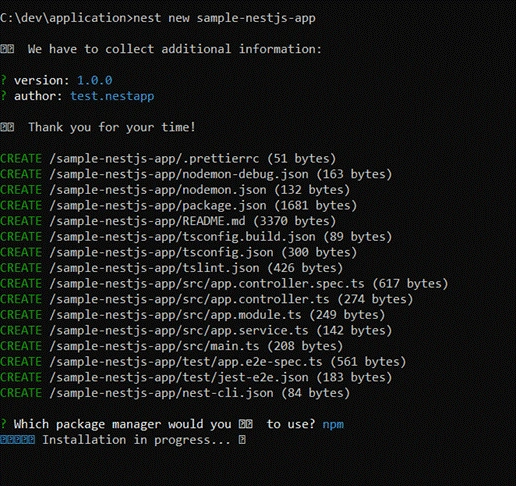
The installation will take 3-5 minutes typically to complete.
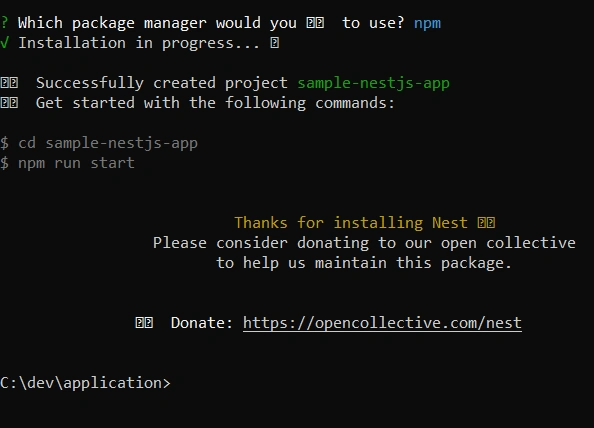
cd sample-nestjs-app and npm run start
Using this command, we can easily start the application.

This application is running on default port 3000.

Understanding Nest.js
Now, let us try to understand what are the different files available and what is the application execution flow NestJS. For this purpose, we have to open the application in an IDE, like Visual Studio Code or Atom.
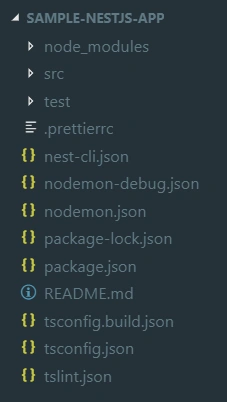
The above image is showing the list of files and folders in our Nest.js application. We will go through these one-by-one.
Package.json
Those who are aware of any node.js based application are already aware of the use of the package.json file. Here, we will try to understand the packages and commands related to NestJS.
- "dependencies": {
- "@nestjs/common": "^5.4.0",
- "@nestjs/core": "^5.4.0",
- "reflect-metadata": "^0.1.12",
- "rimraf": "^2.6.2",
- "rxjs": "^6.2.2",
- "typescript": "^3.0.1"
- }
nestjs/common and nestjs/core are basically for NestJS dependencies.
RxJS is a library for reactive programming used for Observables, to make it easier for composing asynchronous or callback-based code.
TypeScript mainly is required as NestJS builds a TypeScript based application.
- "scripts": {
- "build": "tsc -p tsconfig.build.json",
- "format": "prettier --write \"src/**/*.ts\"",
- "start": "ts-node -r tsconfig-paths/register src/main.ts",
- "start:dev": "nodemon",
- "start:debug": "nodemon --config nodemon-debug.json",
- "prestart:prod": "rimraf dist && npm run build",
- "start:prod": "node dist/main.js",
- "lint": "tslint -p tsconfig.json -c tslint.json",
- "test": "jest",
- "test:watch": "jest --watch",
- "test:cov": "jest --coverage",
- "test:debug": "node --inspect-brk -r tsconfig-paths/register -r ts-node/register node_modules/.bin/jest --runInBand",
- "test:e2e": "jest --config ./test/jest-e2e.json"
- }
These scripts are optional to run multiple options like run the application, build the application, run the unit tests, or run the e2e test cases.
tsconfig.json is mainly used for TypeScript compilation into JavaScript.
Those not having an understanding of TypeScript must first go through https://www.typescriptlang.org/. Here, you will get detailed information about TypeScript.
nodemon.json
- {
- "watch": ["src"],
- "ext": "ts",
- "ignore": ["src/**/*.spec.ts"],
- "exec": "ts-node -r tsconfig-paths/register src/main.ts"
- }
Nodemon is a utility that will monitor the changes, if any, in your source and automatically restart your server.
Exec command calling main.ts
src folder
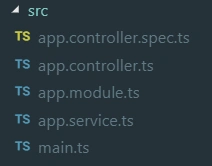
We have so many files available inside the src folder. This is a very important part of our application.
Main.ts
- import { NestFactory } from '@nestjs/core';
- import { AppModule } from './app.module';
- async function bootstrap() {
- const app = await NestFactory.create(AppModule);
- await app.listen(3000);
- }
- bootstrap();
Here, bootstrap method contains 2 lines only.
- First line : const app = await NestFactory.create(AppModule);
NestFactory.create needs to pass the AppModule.
- Second line : await app.listen(3000);
Here, 3000 is the port number. In case one needs to change the application port, then change 3000 to any other port number.
app.module.ts
- import { Module } from '@nestjs/common';
- import { AppController } from './app.controller';
- import { AppService } from './app.service';
- @Module({
- imports: [],
- controllers: [AppController],
- providers: [AppService],
- })
- export class AppModule {}
Join the conversation! Your thoughts help the community grow.