

You are reading the "Understand WCF" article series. In this series we are explaining all about WCF. The previous few articles explained various important concepts of WCF applications. You can read them here:
- Understand WCF: Part 1: What is SOA, Services and Messages
- Understand WCF: Part 2: Understand RESTful Service
- Understand WCF: Part 3: Create simple WCF Service
- Understand WCF: Part 4: What is Address, Binding, and Contract
- Understand WCF: Part 5: Exception handling in WCF
- Understand WCF: Part 6: Function overloading in WCF application
In this article we will learn to host WCF applications in a self-hosting environment. As we know, WCF is the next and updated solution of Web Services and one basic difference between them is, it's a hosting environment. We can host a Web Service only in an IIS server and consume it by HTTP protocol. WCF leverages the limitation, we can host a WCF service in various environments. So, let's see what are the possible ways to host a WCF service.
Various WCF hosting environments
The following are the various hosting environments:
- Self-hosting
- IIS server
- Windows Activation Server (WAS)
Ok, so there are three different environments for WCF services. But the most popular environment is IIS server and the next choice is to self-hosting. We can say that 70% of services run in IIS server, 25% runs self-hosted and the remaining are hosted in WAS.
What WCF Self-Hosting is
Let's learn the concept of Self-Hosting. The single line answer is "It hosts with the same solution". What does that mean? It means that, we have our project (it may be Windows or a web application or something else) and we want to host one WCF service within this solution locally. This type of hosting is called Self-Hosting. To implement self hosting we need to include System.Service.Model.ServiceHost namespace that we will see in the example.
Let's implement a self-hosting example step-by-step.
We will now implement the self-hosting example step-by-step. Please follow it.
Step 1: Create a console application.
As we said, self-hosting can be done in any type of application; we will implement self-hosting in the console application.
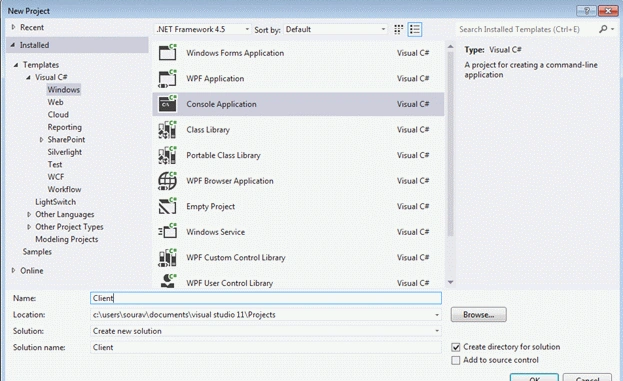
We have given the name "client" to this console application. Now proceed to the next step.
Step 2: Add the System.ServiceModel.dll to the project.
This is our next step, go to Solution Explorer and right-click on References then select "Add references" then add a reference for "System.ServiceModel".
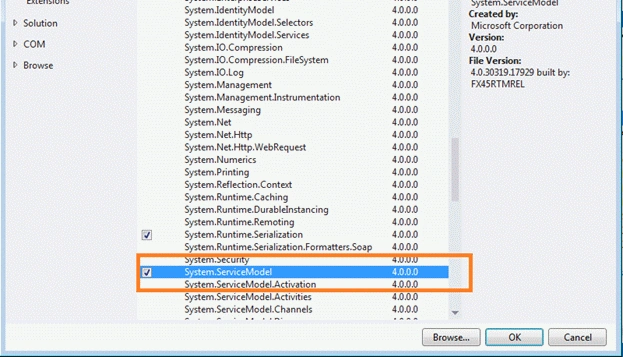
Once you click on "OK" the reference will be added to your solution. So, click "OK" and go to the next step.
Step 3: Add one interface to the solution.
As we know in WCF we need to implement a ServiceContract, so we need to define the interface. Add one interface to the solution.
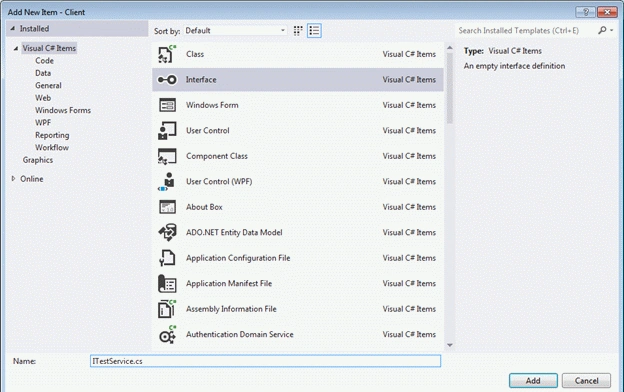
Step 4: Add the following code to the interface.
Now we will declare the methods in the interface. Here is simple code.
- using System;
- using System.Collections.Generic;
- using System.Linq;
- using System.ServiceModel;
- using System.Text;
- using System.Threading.Tasks;
- namespace Client
- {
- [ServiceContract]
- interface ITestService
- {
- [OperationContract]
- String WelcomeUser(String name);
- }
- }
Join the conversation! Your thoughts help the community grow.