

In this article, you'll simplify what data modeling means in Power BI and cover:
What Is Data Modeling?
Data modeling is the process of organizing tables and defining relationships between them. It ensures that your visuals, calculations, and filters behave logically.
In Power BI, the data model is built behind the scenes when you:
- Import multiple tables
- Define relationships between them
- Use these relationships to perform calculations
Primary Key & Foreign Key: A Quick Refresher
These two concepts are foundational to data modeling:
- Primary Key: A column that uniquely identifies each row in a table (e.g., CustomerID in a Customers table)
- Foreign Key: A column in another table that refers to the primary key (e.g., CustomerID in the Orders table)
These keys help link tables so they "talk to each other."
Relationships in Power BI
Power BI lets you define relationships between tables using these keys.
| Type | Description | Example |
|---|---|---|
| One-to-Many | One value in table A maps to many in table B | One customer → many orders |
| Many-to-One | The opposite direction of the above (Power BI still allows) | Many orders → one customer |
| Many-to-Many | Rare but supported (use cautiously) | Products and Suppliers (shared) |
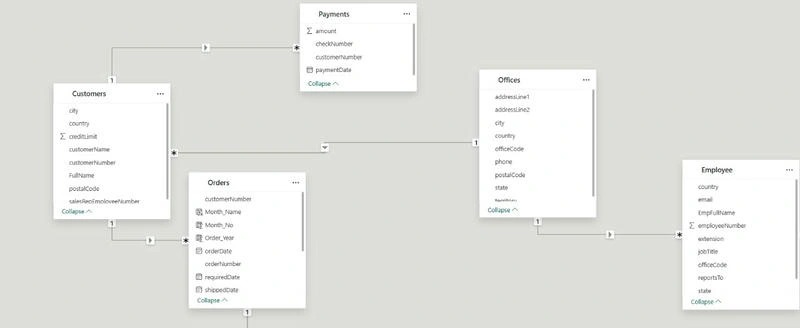
In Power BI, relationships are represented as lines between tables in the Model view.
🧭 How to Create a Relationship:
- Go to Model View
- Drag the field from one table to the matching field in the other table
- Power BI automatically detects the relationship type and cardinality
Or, click Manage Relationships > New, and define it manually.
Joins in Power BI: Behind the Scenes
Power BI doesn’t ask you to manually write SQL joins, but they still happen behind the scenes.
Here’s how Power BI simulates joins:
| Power BI Term | SQL Equivalent |
|---|---|
| Relationship | JOIN |
| Cross Filtering | WHERE / HAVING |
| RELATED() Function | INNER JOIN |
| LOOKUPVALUE() | LEFT JOIN |
You can simulate different join behaviors using:
- RELATED(): pulls data from a related table (like a VLOOKUP)
- LOOKUPVALUE(): custom lookup from another table
- MERGE in Power Query: joins during data load
Real-World Example
Let’s say you have
- Orders table with fields: OrderID, CustomerID, Amount
- Customers table with fields: CustomerID, Name, Region
You create a One-to-Many relationship between Customers.CustomerID and Orders.CustomerID.
Now, you can create visuals like:
- Total Sales by Region
- Top 5 Customers by Orders
- Average Order Value by Customer
All thanks to the model linking the tables behind the scenes.
Best Practices for Data Modeling in Power BI
- Use a Star Schema: Central fact table with surrounding dimension tables
- Avoid circular relationships and bi-directional filters (unless necessary)
- Name columns and tables clearly
- Use surrogate keys if natural keys are missing
- Keep your data model clean and minimal for better performance
A solid data model is the backbone of every effective Power BI report. Understanding relationships, keys, and join logic will help you build faster, smarter, and more scalable dashboards.
Join the conversation! Your thoughts help the community grow.