

What is an Indexed Column?
An Indexed Column in SharePoint is a column that has been optimized to improve the performance of list or library queries. When a column is indexed, SharePoint creates a special data structure that allows it to quickly find and filter items based on that column's values.
Indexing is especially useful when working with large lists (more than 5,000 items) where searching, filtering, or sorting data can otherwise become slow.
Why Use Indexed Columns?
Indexed columns are used to improve the performance of SharePoint lists when the list contains a large number of items (more than 5,000).
They help to:
Improve list performance when working with large data.
Allow faster filtering and sorting of list items.
Prevent List View Threshold errors when querying large lists.
Speed up data retrieval in PowerApps and Power Automate.
How Indexed Columns Work
When you create an index on a column, SharePoint creates a special structure that helps it find data faster. Instead of checking every item in the list, SharePoint can locate the required items directly.
For example:
| ID | Title | Status | Department |
|---|---|---|---|
| 1 | Task A | Pending | HR |
| 2 | Task B | Completed | IT |
| 3 | Task C | Pending | Finance |
If the Status column is indexed, SharePoint can quickly find all items where Status is Pending.
You should use indexed columns when
The SharePoint list has more than 5,000 items.
A column is frequently used for filtering data.
A column is used in SharePoint views.
A column is used in PowerApps functions like Lookup() or Filter().
A column is used in conditions in Power Automate flows.
Limitations of Indexed Columns
A SharePoint list can have up to 20 indexed columns only.
Not all column types support indexing. Columns like Multiple line of text, Calculated columns, and multi-value lookup fields cannot be indexed.
Indexed columns do not always prevent the 5,000 List View Threshold error if the query is not designed properly.
Creating an index on a large list may take time and can temporarily affect performance.
Complex filters or queries using multiple non-indexed columns may still cause threshold issues.
How to Create an Indexed Column
Follow below steps to create an indexed column in SharePoint:
Step 1 - Open your SharePoint List or Library
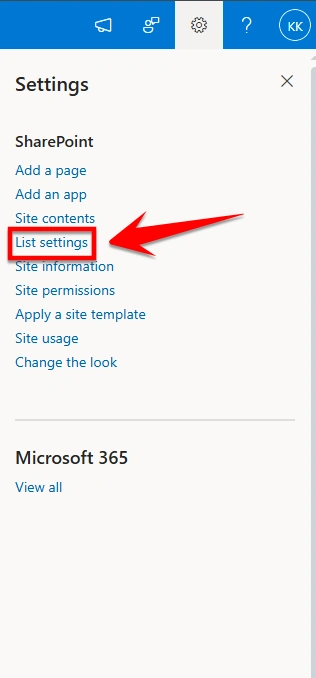
Step 2 - Click on Settings

Step 3 - Select List Settings
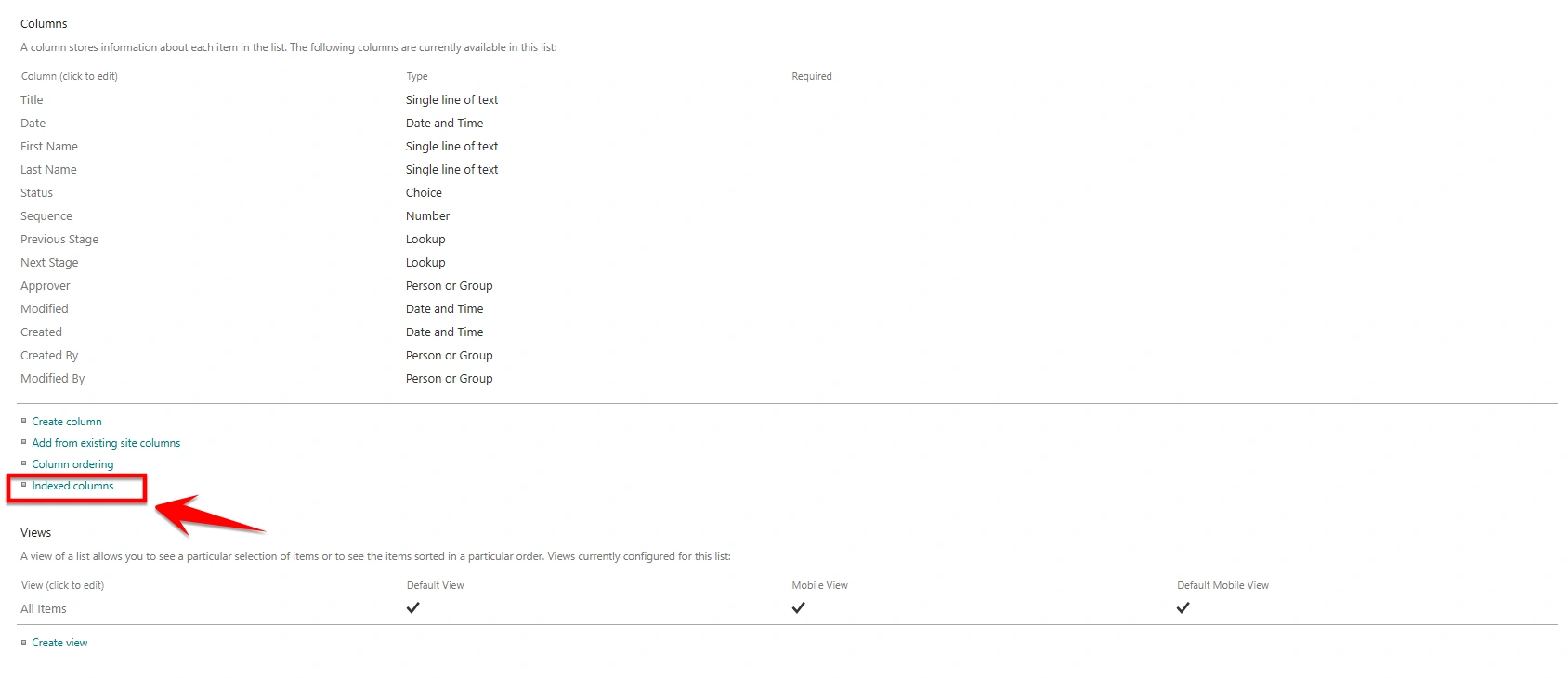
Step 4 - Under Columns, click on Indexed Columns
Step 5- Click on Create a new index
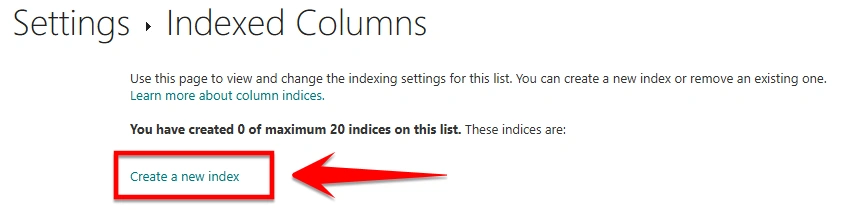
Step 6 - Select the column you want to index and Click on Create

Conclusion
Indexed columns in SharePoint help improve the performance of large lists by making filtering, sorting, and querying faster. They are especially useful when lists contain more than 5,000 items and are used in views, PowerApps, or Power Automate. However, since there are some limitations, indexed columns should be used carefully on the columns that are frequently used for searching or filtering data.
Join the conversation! Your thoughts help the community grow.