

In JavaScript, an array is an ordered list of values. Each value, known as an element, is assigned a numeric position in the array called its index. The indexing starts at 0, so the first element is at position 0, the second at position 1, and so on.
Arrays can hold any type of data-such as numbers, strings, objects, or even other arrays—making them a flexible and essential part of JavaScript programming.
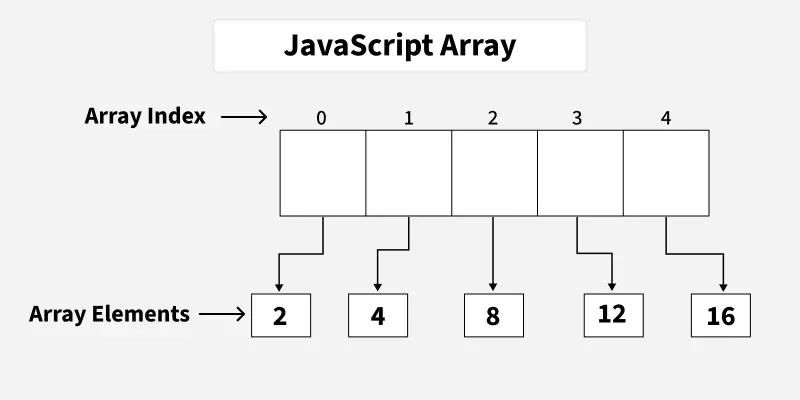
Example
If you have a list of items (a list of car names, for example), storing the cars in single variables could look like this:
    let car1 = "Saab"
let car2 = "Volvo"
let car3 ="BMW"
However, what if you want to loop through the cars and find a specific one? And what if you had not 3 cars, but 300?
The solution is an array!
An array can hold many values under a single name, and you can access the values by referring to an index number.
1. Create Array using Literal
Creating an array using array literal involves using square brackets [] to define and initialize the array.
// Creating an Empty Array
let a = [];
console.log(a);
// Creating an Array and Initializing with Values
let b = [10, 20, 30];
console.log(b);
Output
    []
[ 10, 20, 30 ]
2. Create using new Keyword (Constructor)
The " Array Constructor " refers to a method of creating arrays by invoking the Array constructor function.
// Creating and Initializing an array with values
let a = new Array(10, 20, 30);
console.log(a);
Output
[ 10, 20, 30 ]
Note: Both the above methods do exactly the same. Use the array literal method for efficiency, readability, and speed.
Basic Operations on JavaScript Arrays
1. Accessing Elements of an Array
Any element in the array can be accessed using the index number. The index in the arrays starts with 0.
// Creating an Array and Initializing with Values
let a = ["HTML", "CSS", "JS"];
// Accessing Array Elements
console.log(a[0]);
console.log(a[1]);
Output
    HTML
CSS
2. Accessing the First Element of an Array
The array indexing starts from 0, so we can access first element of array using the index number.
// Creating an Array and Initializing with Values
let a = ["HTML", "CSS", "JS"];
// Accessing First Array Elements
let fst = a[0];
console.log("First Item: ", fst);
Output
First Item: HTML
3. Accessing the Last Element of an Array
We can access the last array element using [array.length - 1] index number.
// Creating an Array and Initializing with Values
let a = ["HTML", "CSS", "JS"];
// Accessing Last Array Elements
let lst = a[a.length - 1];
console.log("First Item: ", lst);
Output
First Item: JS
4. Modifying the Array Elements
Elements in an array can be modified by assigning a new value to their corresponding index.
// Creating an Array and Initializing with Values
let a = ["HTML", "CSS", "JS"];
console.log(a);
a[1]= "Bootstrap";
console.log(a);
Output
    [ 'HTML', 'CSS', 'JS' ]
[ 'HTML', 'Bootstrap', 'JS' ]
5. Adding Elements to the Array
Elements can be added to the array using methods like push() and unshift() .
The push() method add the element to the end of the array.
The unshift() method add the element to the starting of the array.
// Creating an Array and Initializing with Values
let a = ["HTML", "CSS", "JS"];
// Add Element to the end of Array
a.push("Node.js");
// Add Element to the beginning
a.unshift("Web Development");
console.log(a);
Output
[ 'Web Development', 'HTML', 'CSS', 'JS', 'Node.js' ]
6. Removing Elements from an Array
To remove the elements from an array we have different methods like pop() , shift() , or splice() .
The pop() method removes an element from the last index of the array.
The shift() method removes the element from the first index of the array.
The splice() method removes or replaces the element from the array.
// Creating an Array and Initializing with Values
let a = ["HTML", "CSS", "JS"];
console.log("Original Array: " + a);
// Removes and returns the last element
let lst = a.pop();
console.log("After Removing the last: " + a);
// Removes and returns the first element
let fst = a.shift();
console.log("After Removing the First: " + a);
// Removes 2 elements starting from index 1
a.splice(1, 2);
console.log("After Removing 2 elements starting from index 1: " + a);
Output
    Original Array: HTML,CSS,JS
After Removing the last: HTML,CSS
After Removing the First: CSS
After Removing 2 elements starting from index 1: CSS
7. Array Length
We can get the length of the array using the array length property .
// Creating an Array and Initializing with Values
let a = ["HTML", "CSS", "JS"];
let len = a.length;
console.log("Array Length: " + len);
Output
Array Length: 3
8. Increase and Decrease the Array Length
We can increase and decrease the array length using the JavaScript length property.
// Creating an Array and Initializing with Values
let a = ["HTML", "CSS", "JS"]
// Increase the array length to 7
a.length = 7;
console.log("After Increasing Length: ", a);
// Decrease the array length to 2
a.length = 2;
console.log("After Decreasing Length: ", a)
Output
    After Increasing Length:  [ 'HTML', 'CSS', 'JS', <4 empty items> ]
After Decreasing Length:  [ 'HTML', 'CSS' ]
9. Iterating Through Array Elements
We can iterate array and access array elements using for loop and forEach loop.
Example: It is an example of for loop.
// Creating an Array and Initializing with Values
let a = ["HTML", "CSS", "JS"];
// Iterating through for loop
for (let i = 0; i < a.length; i++) {
console.log(a[i])
}
Output
    HTML
CSS
JS
Example: It is the example of Array.forEach() loop.
// Creating an Array and Initializing with Values
let a = ["HTML", "CSS", "JS"];
// Iterating through forEach loop
a.forEach(function myfunc(x) {
console.log(x);
});
Output
    HTML
CSS
JS
10. Array Concatenation
Combine two or more arrays using the concat() method. It returns new array containing joined arrays elements.
// Creating an Array and Initializing with Values
let a = ["HTML", "CSS", "JS", "React"];
let b = ["Node.js", "Expess.js"];
// Concatenate both arrays
let concateArray = a.concat(b);
console.log("Concatenated Array: ", concateArray);
Output
Concatenated Array: [ 'HTML', 'CSS', 'JS', 'React', 'Node.js', 'Expess.js' ]
11. Conversion of an Array to String
We have a builtin method toString() to converts an array to a string.
// Creating an Array and Initializing with Values
let a = ["HTML", "CSS", "JS"];
// Convert array ot String
console.log(a.toString());
Output
HTML,CSS,JS
12. Check the Type of an Arrays
The JavaScript typeof operator is used ot check the type of an array. It returns "object" for arrays.
// Creating an Array and Initializing with Values
let a = ["HTML", "CSS", "JS"];
// Check type of array
console.log(typeof a);
Output
object
Recognizing a JavaScript Array
There are two methods by which we can recognize a JavaScript array:
By using Array.isArray() method
By using instanceof method
Below is an example showing both approaches:
const courses = ["HTML", "CSS", "Javascript"];
console.log("Using Array.isArray() method: ", Array.isArray(courses))
console.log("Using instanceof method: ", courses instanceof Array)
Output
    Using Array.isArray() method:  true
Using instanceof method:  true
Note: A common error is faced while writing the arrays:
    const a = [5]
// and
const a = new Array(5)
The above two statements are not the same.
Output: This statement creates an array with an element " [5] ". Try with the following examples
// Example 1
const a1 = [5]
console.log(a1)
// Example 2
const a2 = new Array(5)
console.log(a2)
Output
    [ 5 ]
[ <5 empty items> ]
Join the conversation! Your thoughts help the community grow.