

Understanding Schema Registry in Apache Kafka using .net
Previous Article related to Kafka:
Example Use Case with Avro:
Let’s look at how Schema Registry works with Avro serialization in a Kafka-based system.
Producer:
The producer defines an Avro schema for a message (e.g., a user profile).
It registers the schema with the Schema Registry, which assigns a unique ID.
The producer then serializes the data using the Avro format and embeds the schema ID in the message.
The producer sends the message to a Kafka topic.
Consumer:
The consumer reads the message from the Kafka topic.
It extracts the schema ID from the message.
The consumer queries the Schema Registry to retrieve the schema based on the schema ID.
Using the schema, the consumer deserializes the Avro message and processes the user profile data.
This workflow ensures that both the producer and consumer operate on the same schema version, and if the schema evolves, the Schema Registry ensures that the changes are compatible.
Configuring Kafka Broker, Schema Registry and Kafka-UI:
Attached docker-compose-kafka-schemaRegistry.yaml to configure Kafka Broker and Kafka-UI using Docker.
version: '3'
services:
  kafka-1:
    image: 'bitnami/kafka:latest'
    hostname: kafka-1
    container_name: kafka-1
    environment:
      - KAFKA_ENABLE_KRAFT=yes
      - KAFKA_CFG_PROCESS_ROLES=broker,controller
      - KAFKA_CFG_CONTROLLER_LISTENER_NAMES=CONTROLLER
      - KAFKA_CFG_INTER_BROKER_LISTENER_NAME=PLAINTEXT #SSL
      - KAFKA_CFG_LISTENERS=PLAINTEXT://:9092,EXTERNAL://:9192,CONTROLLER://:9094 #SSL://:9092,EXTERNAL_SSL://:9192
      - KAFKA_CFG_LISTENER_SECURITY_PROTOCOL_MAP=CONTROLLER:PLAINTEXT,PLAINTEXT:PLAINTEXT,EXTERNAL:PLAINTEXT #CONTROLLER:PLAINTEXT,SSL:SSL,EXTERNAL_SSL:SSL
      - KAFKA_CFG_BROKER_ID=1
      - KAFKA_CFG_CONTROLLER_QUORUM_VOTERS=1@kafka-1:9094
      - KAFKA_CFG_ADVERTISED_LISTENERS=PLAINTEXT://kafka-1:9092,EXTERNAL://localhost:9192  # Change IP to localhost for local access #SSL://kafka-1:9092,EXTERNAL_SSL://localhost:9191
      - ALLOW_PLAINTEXT_LISTENER=yes #no
      - KAFKA_KRAFT_CLUSTER_ID=Kafka_KRAFT
      - KAFKA_CFG_NODE_ID=1
    ports:
      - 9092:9092  # Internal listener port
      - 9192:9192  # External listener port
    networks:
      - kafka-network

  schema-registry-1:
    image: confluentinc/cp-schema-registry:latest
    hostname: schema-registry
    container_name: schema-registry
    environment:
      - SCHEMA_REGISTRY_KAFKASTORE_BOOTSTRAP_SERVERS= kafka-1:9092
      - SCHEMA_REGISTRY_HOST_NAME=schema-registry   #http://schema-registry:8081/ to add internally,http://localhost:8085/ to add externally
      - SCHEMA_REGISTRY_LISTENERS=http://0.0.0.0:8081
    ports:
      - 8085:8081
    networks:
      - kafka-network

  kafka-ui-1:
    container_name: kafka-ui
    image: 'provectuslabs/kafka-ui:latest'
    ports:
      - "9091:8080"
    depends_on:
      - kafka-1
    environment:
      KAFKA_CLUSTERS_0_NAME: Kafka_KRAFT_1
      KAFKA_CLUSTERS_0_BOOTSTRAPSERVERS: kafka-1:9092  # For internal Docker access
      DYNAMIC_CONFIG_ENABLED: 'true'
    networks:
      - kafka-network

networks:
  kafka-network:
    external: true
In the above code, Service Kafka-1 will create Kafka broker , schema-registrty will create schema for kafka broker and kafka-ui will create UI for kafka broker. Need to create Network to communicate between kafka broker and schema.
Navigate to the folder where the docker compose file is saved, Open Powershell pointing to that location and execute docker-compose -f docker-compose-kafka-schemaRegistry.yaml up -d command to configure things in docker.
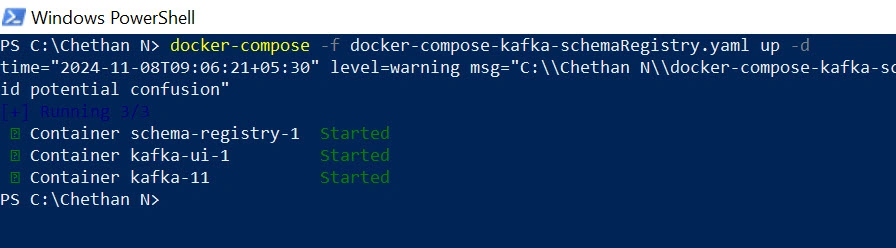
After executing above command, a docker container will be created for Kafka-broker, Schema registry, Kafka-UI.
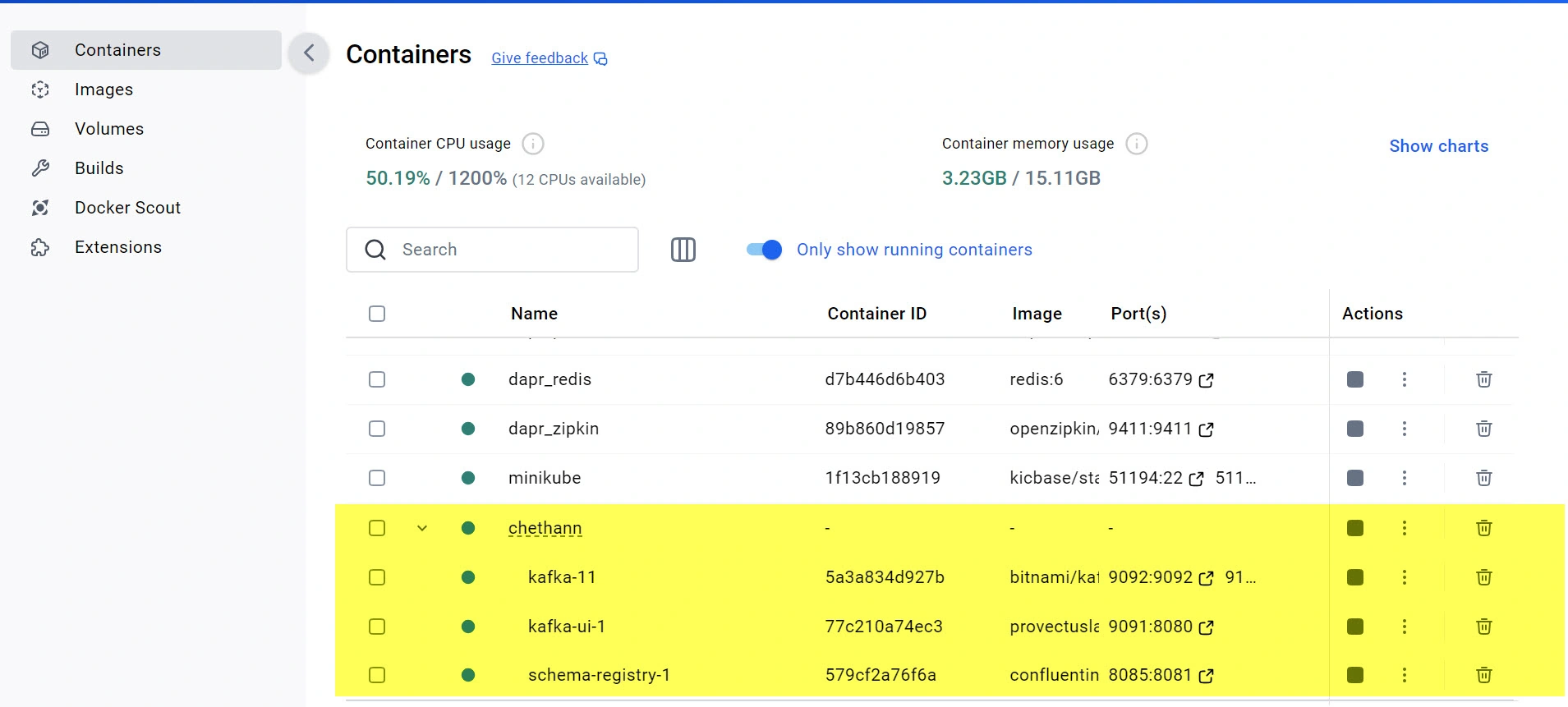
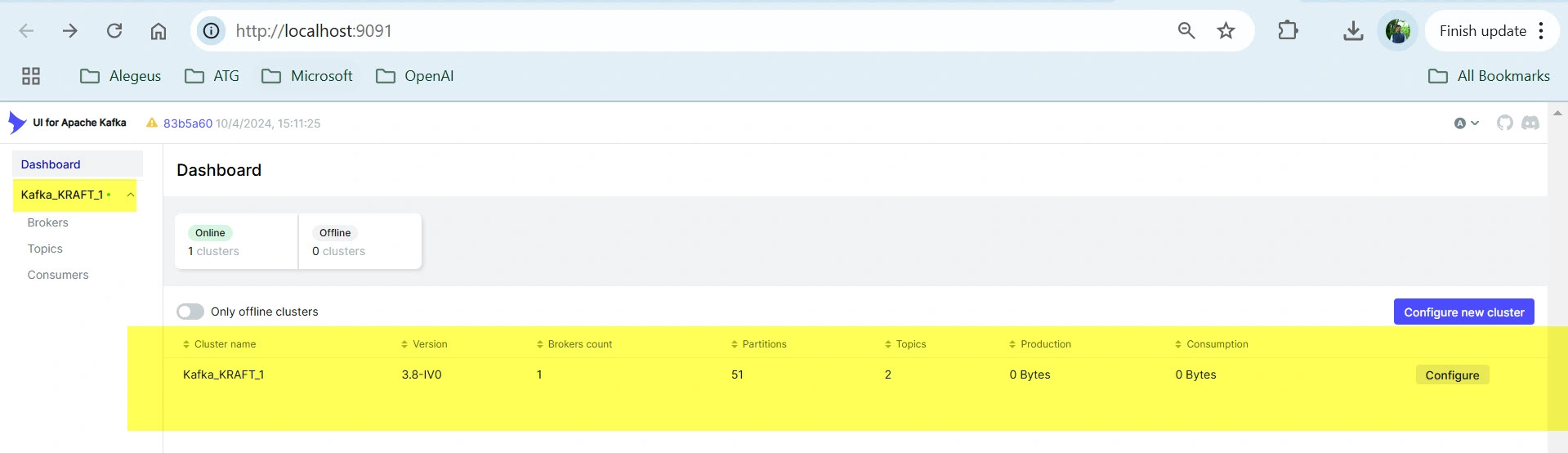
Same can be verified by browsing Kafka-UI:
Schema-Registry:

Configuring Schema-Registry in Kafka-UI:
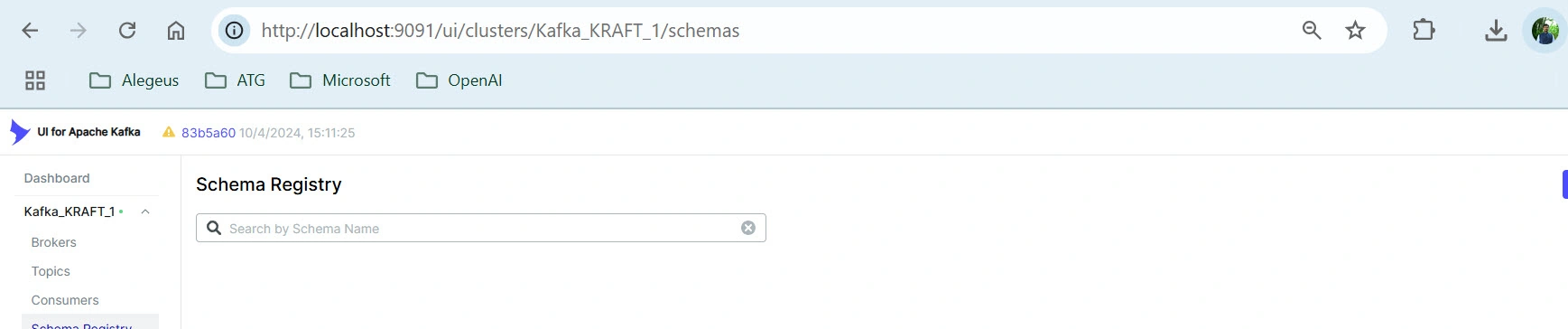
At Kafka-UI, navigate to Dashboard -> Kafka cluster -> Configure and add schema registry URL and click on Submit to add schema registry.
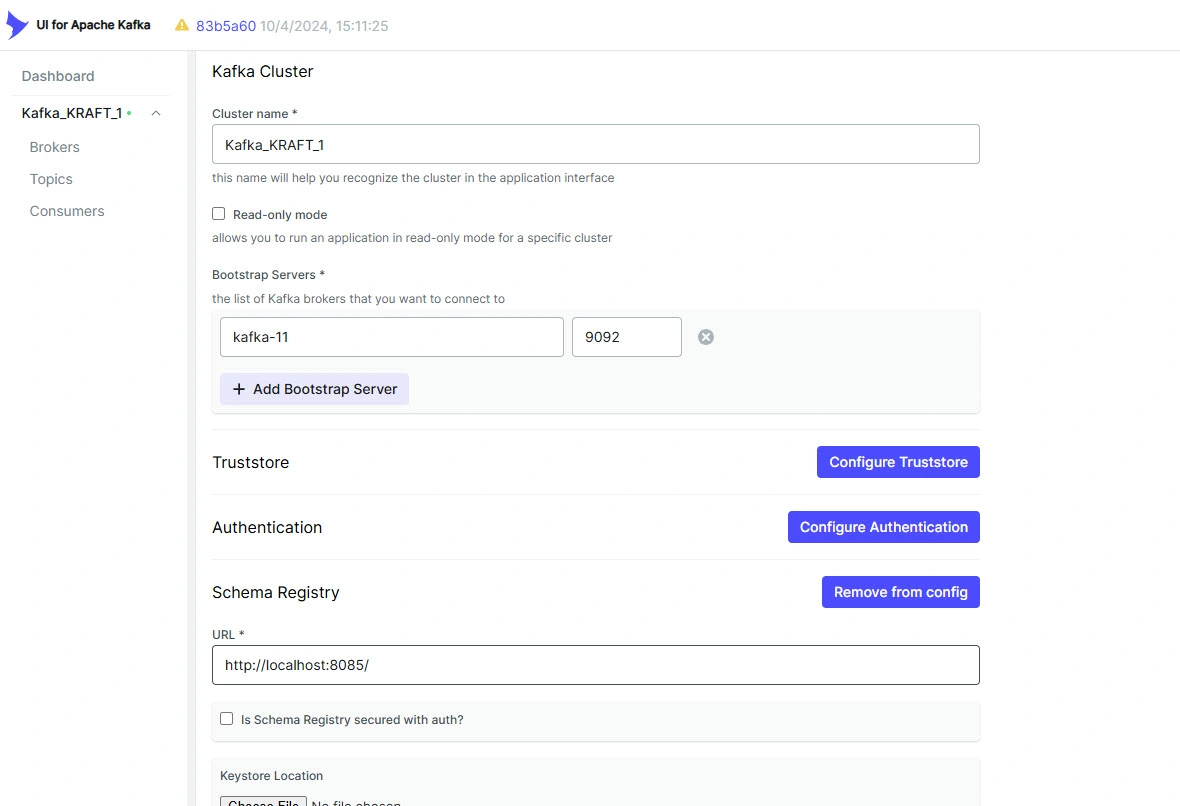
After submitting Schema registry configuration, will get Schema-registry menu.
Configuring Avrogen tool:
The .NET Avro serializer and deserializer allow you to work with Avro data in one of two ways:
Via specific classes generated using the avrogen tool
Using the GenericRecord class to read and write records with any schema, without needing to pre-generate any class files
Lets concentrate on schema register using avrogen tool.
1) Installing Avrogen tool:
dotnet tool install --global Apache.Avro.Tools
Above tool is used in .NET to globally install the Apache.Avro.Tools tool, which is a .NET command-line utility provided by the Apache Avro library. This tool helps developers generate C# classes from Avro schemas and perform Avro-related tasks within .NET applications.
Primary Uses:
Schema-to-Code Generation: It generates .NET classes (as C# files) from .avsc Avro schema files, which describe data structures. These classes can then be used directly in code for serialization and deserialization of Avro messages.
Avro Message Serialization/Deserialization: Supports the conversion of objects to Avro format and vice versa, facilitating data handling in applications that use Avro serialization, like those integrated with Kafka.
2) Create .avsc extension file:
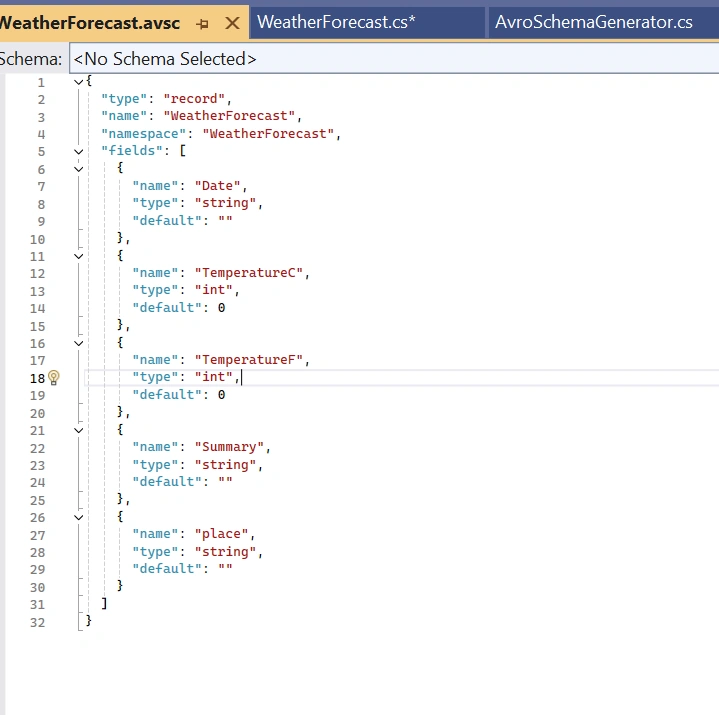
An .avsc file is a JSON-formatted file that defines the schema for data serialized with Apache Avro. Avro is a data serialization framework commonly used in data pipelines, distributed systems, and big data applications, including those involving Apache Kafka. An .avsc file is typically used to specify the structure and data types of records that Avro can serialize and de-serialize.
Key Components of an .avsc File
An Avro schema in a .avsc file includes:
Type: Specifies that the schema describes a record structure. The top-level type is usually "record".
Name: Defines the name of the record (the entity or class it represents).
Namespace: Helps uniquely identify the schema, often used to prevent naming conflicts.
Fields: An array of field definitions, where each field includes:
Name: The field's name.
Type: The Avro-compatible data type (e.g., string, int, float, or nested types like arrays and records).
Default (optional): A default value for the field, which can be used if a value is missing when the data is read.
Documentation (optional): An optional description to explain the field's purpose.
Here’s what an .avsc file might look like for a WeatherForecast model:
3) Generating Schema file from .avsc file using avrogen tool:
Note: This is required only for non-Dapr version of PubSub.
Open Powershell -> navigate to the folder where .avsc file is stored and execute below command:
avrogen -s WeatherForecast.avsc . --skip-directoriesThis will generate partial class of WeatherForecast model which looks as below and same has to be used while Publishing and Subscribing to topic.
// ------------------------------------------------------------------------------
// <auto-generated>
//    Generated by avrogen, version 1.12.0+8c27801dc8d42ccc00997f25c0b8f45f8d4a233e
//    Changes to this file may cause incorrect behavior and will be lost if code
//    is regenerated
// </auto-generated>
// ------------------------------------------------------------------------------
namespace WeatherForecast
{
	using System;
	using System.Collections.Generic;
	using System.Text;
	using global::Avro;
	using global::Avro.Specific;

	[global::System.CodeDom.Compiler.GeneratedCodeAttribute("avrogen", "1.12.0+8c27801dc8d42ccc00997f25c0b8f45f8d4a233e")]
	public partial class WeatherForecast : global::Avro.Specific.ISpecificRecord
	{
		public static global::Avro.Schema _SCHEMA = global::Avro.Schema.Parse(@"{""type"":""record"",""name"":""WeatherForecast"",""namespace"":""WeatherForecast"",""fields"":[{""name"":""date"",""default"":0,""type"":""long""},{""name"":""temperatureC"",""default"":0,""type"":""int""},{""name"":""temperatureF"",""default"":0,""type"":""int""},{""name"":""summary"",""default"":"""",""type"":""string""},{""name"":""place"",""default"":"""",""type"":""string""}]}");
		private long _date;
		private int _temperatureC;
		private int _temperatureF;
		private string _summary;
		private string _place;
		public virtual global::Avro.Schema Schema
		{
			get
			{
				return WeatherForecast._SCHEMA;
			}
		}
		public long date
		{
			get
			{
				return this._date;
			}
			set
			{
				this._date = value;
			}
		}
		public int temperatureC
		{
			get
			{
				return this._temperatureC;
			}
			set
			{
				this._temperatureC = value;
			}
		}
		public int temperatureF
		{
			get
			{
				return this._temperatureF;
			}
			set
			{
				this._temperatureF = value;
			}
		}
		public string summary
		{
			get
			{
				return this._summary;
			}
			set
			{
				this._summary = value;
			}
		}
		public string place
		{
			get
			{
				return this._place;
			}
			set
			{
				this._place = value;
			}
		}
		public virtual object Get(int fieldPos)
		{
			switch (fieldPos)
			{
			case 0: return this.date;
			case 1: return this.temperatureC;
			case 2: return this.temperatureF;
			case 3: return this.summary;
			case 4: return this.place;
			default: throw new global::Avro.AvroRuntimeException("Bad index " + fieldPos + " in Get()");
			};
		}
		public virtual void Put(int fieldPos, object fieldValue)
		{
			switch (fieldPos)
			{
			case 0: this.date = (System.Int64)fieldValue; break;
			case 1: this.temperatureC = (System.Int32)fieldValue; break;
			case 2: this.temperatureF = (System.Int32)fieldValue; break;
			case 3: this.summary = (System.String)fieldValue; break;
			case 4: this.place = (System.String)fieldValue; break;
			default: throw new global::Avro.AvroRuntimeException("Bad index " + fieldPos + " in Put()");
			};
		}
	}
}
Configuring Kafka Publisher, Consumer, Schema Registry using .Net app:
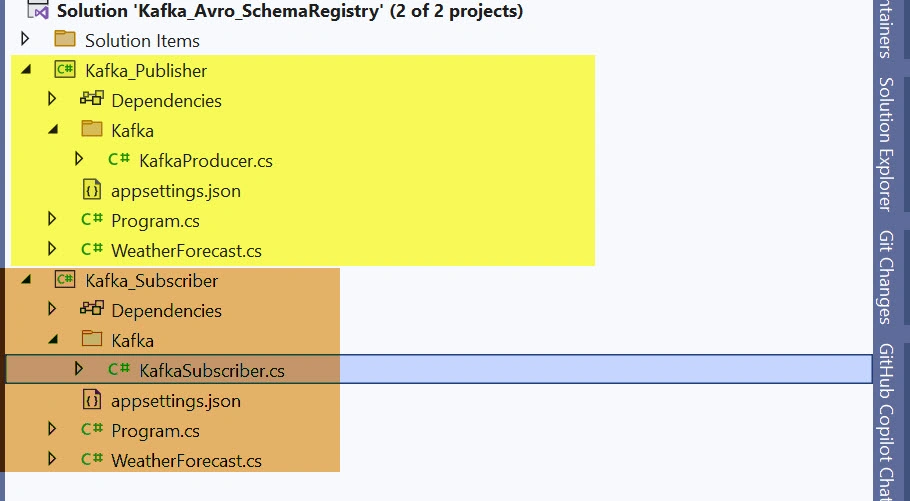
Step 1: Create a Empty solution and add 2 WebApi projects.
1- for Publishing messages into topic
2- for consuming messages that came into topic
and Folder structure looks as below:
Step 2: need to add below Nuget packages:
Confluent.Kafka - for publishing and consuming messages
Confluent.SchemaRegistry.Serdes.Avro - for serilizing and deserializing the messages in Avro format.
Step 3: Appsettings.json configuration:
Publisher: will configure endpoint of kafka bootstrap server and schema registry
{
  "KafkaProducerConfig": {
    "BootstrapServers": "localhost:9192",
    "SchemaRegistryUrl": "http://localhost:8085/"
  }
}
Subscriber: will configure endpoint of kafka bootstrap server, schema registry, group_ID
{
  "KafkaSubscriberConfig": {
    "GroupId": "AVRO_Schema",
    "BootstrapServers": "localhost:9192",
    "SchemaRegistryUrl": "http://localhost:8085/",
    "AutoOffsetRest": "Earliest",
    "EnableAutoOffsetStore": false
  }
}
Step 4: Creating Models
Publisher:
namespace Kafka_Publisher;

using Avro;
using Avro.Specific;

public class WeatherForecast : ISpecificRecord
{
    public static Schema _SCHEMA = Schema.Parse(@"
    {
        ""type"": ""record"",
        ""name"": ""WeatherForecast"",
        ""fields"": [
            { ""name"": ""Date"", ""type"": ""string"" },
            { ""name"": ""TemperatureC"", ""type"": ""int"" },
            { ""name"": ""Summary"", ""type"": ""string"" },
            { ""name"": ""Humidity"", ""type"": ""int"" },
            { ""name"": ""test"", ""type"": ""int"", ""default"": 0 }

        ]
    }");

    public Schema Schema { get { return _SCHEMA; } }
    public object Get(int fieldPos)
    {
        switch (fieldPos)
        {
            case 0: return Date;
            case 1: return TemperatureC;
            case 2: return Summary;
            case 3: return Humidity;
            case 4: return test;
            default: throw new AvroRuntimeException("Bad index " + fieldPos + " in Get()");
        }
    }
    public void Put(int fieldPos, object fieldValue)
    {
        switch (fieldPos)
        {
            case 0: Date = (string)fieldValue; break;
            case 1: TemperatureC = (int)fieldValue; break;
            case 2: Summary = (string)fieldValue; break;
            case 3: Humidity = (int)fieldValue; break;
            case 4: test = (int)fieldValue; break;
            default: throw new AvroRuntimeException("Bad index " + fieldPos + " in Put()");
        }
    }

    public string Date { get; set; }
    public int TemperatureC { get; set; }
    public string Summary { get; set; }
    public int Humidity { get; set; }
    public int test { get; set; } = 0;

}
Subscriber:
using Avro;
using Avro.Specific;

namespace Kafka_Subscriber;

public class WeatherForecast : ISpecificRecord
{
    public static Schema _SCHEMA = Schema.Parse(@"
    {
        ""type"": ""record"",
        ""name"": ""WeatherForecast"",
        ""fields"": [
            { ""name"": ""Date"", ""type"": ""string"" },
            { ""name"": ""TemperatureC"", ""type"": ""int"" },
            { ""name"": ""Summary"", ""type"": ""string"" },
            { ""name"": ""Humidity"", ""type"": ""int"" }

        ]
    }");

    public Schema Schema { get { return _SCHEMA; } }
    public object Get(int fieldPos)
    {
        switch (fieldPos)
        {
            case 0: return Date;
            case 1: return TemperatureC;
            case 2: return Summary;
            case 3: return Humidity;
            default: throw new AvroRuntimeException("Bad index " + fieldPos + " in Get()");
        }
    }
    public void Put(int fieldPos, object fieldValue)
    {
        switch (fieldPos)
        {
            case 0: Date = (string)fieldValue; break;
            case 1: TemperatureC = (int)fieldValue; break;
            case 2: Summary = (string)fieldValue; break;
            case 3: Humidity = (int)fieldValue; break;
            default: throw new AvroRuntimeException("Bad index " + fieldPos + " in Put()");
        }
    }

    public string Date { get; set; }
    public int TemperatureC { get; set; }
    public string Summary { get; set; }
    public int Humidity { get; set; }
}
Step 5: Configuring Kafka Producer and Subscriber class.
In the constuctor method, we configure Kafka Bootstrapserver and SchemaRegistry details and the format of Serialization and Deserialization. Here we are considering Avro format for serializationa and Deserialization.
KafkaProducer.cs
using Confluent.Kafka;
using Confluent.Kafka.SyncOverAsync;
using Confluent.SchemaRegistry;
using Confluent.SchemaRegistry.Serdes;

namespace Kafka_Publisher.Kafka
{
    public class KafkaProducer<T> : IDisposable
        where T : class
    {
        private IProducer<string, T> kafkaProducer;
        private readonly ProducerConfig producerConfig;
        private readonly SchemaRegistryConfig schemaRegistryConfig;
        private readonly CachedSchemaRegistryClient schemaRegistryClient;

        public KafkaProducer(string bootstrapServers, string schemaRegistryUrl)
        {
            producerConfig = new ProducerConfig
            {
                BootstrapServers = bootstrapServers,

            };

            schemaRegistryConfig = new SchemaRegistryConfig
            {
                Url = schemaRegistryUrl,
            };

            schemaRegistryClient = new CachedSchemaRegistryClient(schemaRegistryConfig);

            this.kafkaProducer = new ProducerBuilder<string, T>(producerConfig)
                .SetValueSerializer(new AvroSerializer<T>(schemaRegistryClient).AsSyncOverAsync())
                .Build();
        }

        public void SendMessage(string topic, string key, T message)
        {
            kafkaProducer.Produce(topic, new Message<string, T> { Key = key, Value = message }, (deliveryReport) =>
            {
                if (deliveryReport.Error.IsError)
                {
                    Console.WriteLine($"Error: {deliveryReport.Error.Reason} \n");
                }
                else
                {
                    Console.WriteLine($"Delivered message to {deliveryReport.TopicPartitionOffset} \n");
                }
            });
        }

        public void Dispose()
        {
            kafkaProducer?.Dispose();
            schemaRegistryClient?.Dispose();
        }
    }
}
KafkaSubscriber.cs:
using Confluent.Kafka;
using Confluent.Kafka.SyncOverAsync;
using Confluent.SchemaRegistry;
using Confluent.SchemaRegistry.Serdes;

namespace Kafka_Subscriber.Kafka
{
    public class KafkaSubscriber<T> : IDisposable
        where T : class
    {
        private IConsumer<string, T> kafkaConsumer;
        private readonly ConsumerConfig consumerConfig;
        private readonly SchemaRegistryConfig _schemaRegistryConfig;
        private CachedSchemaRegistryClient _schemaRegistry;

        public KafkaSubscriber(string bootstrapServers, string schemaRegistryUrl, string groupId, string autoOffsetRest, string enableAutoOffsetStore)
        {
            consumerConfig = new ConsumerConfig
            {
                BootstrapServers = bootstrapServers,
                GroupId = groupId,
                AutoOffsetReset =  AutoOffsetReset.Earliest, //ConvertToAutoOffsetReset(autoOffsetRest),
                EnableAutoOffsetStore = Convert.ToBoolean(enableAutoOffsetStore),
            };

            _schemaRegistryConfig = new SchemaRegistryConfig
            {
                Url = schemaRegistryUrl
            };

            _schemaRegistry = new CachedSchemaRegistryClient(_schemaRegistryConfig);

            this.kafkaConsumer = new ConsumerBuilder<string, T>(consumerConfig)
                .SetKeyDeserializer(Deserializers.Utf8)
                .SetValueDeserializer(new AvroDeserializer<T>(_schemaRegistry).AsSyncOverAsync())
                .SetErrorHandler((_, e) => Console.WriteLine($"Error: {e.Reason}"))
                .Build();
        }

        static AutoOffsetReset ConvertToAutoOffsetReset(string value)
        {
            return value.ToLower() switch
            {
                "earliest" => AutoOffsetReset.Earliest,
                "latest" => AutoOffsetReset.Latest,
                "error" => AutoOffsetReset.Error,
                _ => throw new ArgumentException($"Invalid AutoOffsetReset value: {value}")
            };
        }

        public T StartConsuming(string topic)
        {
            kafkaConsumer.Subscribe(topic);

            while (true)
            {
                try
                {
                    var consumeResult = kafkaConsumer.Consume(CancellationToken.None);

                    Console.WriteLine($"Received message from offset: {consumeResult.Offset} \n");

                    kafkaConsumer.Commit(consumeResult);

                    return consumeResult.Message.Value;
                }
                catch (ConsumeException ex)
                {
                    Console.WriteLine($"Error consuming message: {ex.Error.Reason}");
                }
                return default(T);
            }
        }

        public void Dispose()
        {
            kafkaConsumer?.Dispose();
            _schemaRegistry.Dispose();
        }
    }
}
Step 6: Make bothe the projects as startup and run the solution.
Messages shoult be published from publisher in Avro format that matches the schema and subscriber should read those messages immediately that is published to topic that is configured.
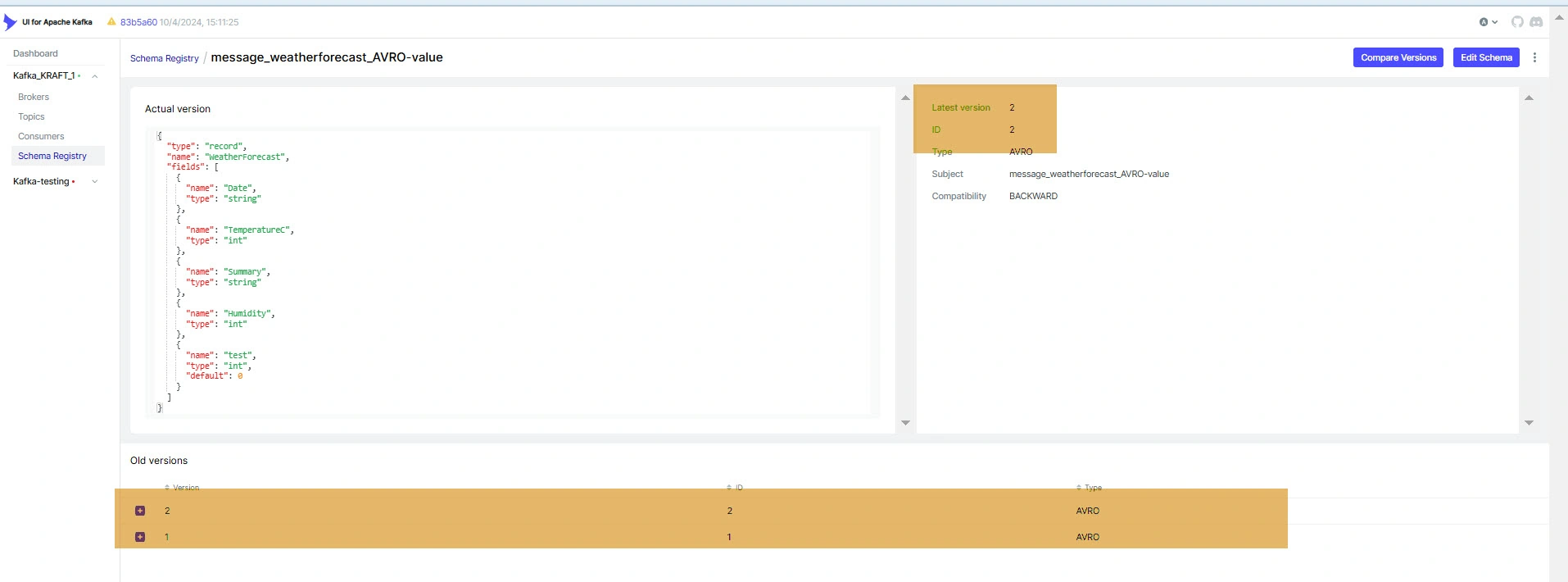
Step 7: When there are multiple version of Schema configured, same can be observed in kafka-UI.
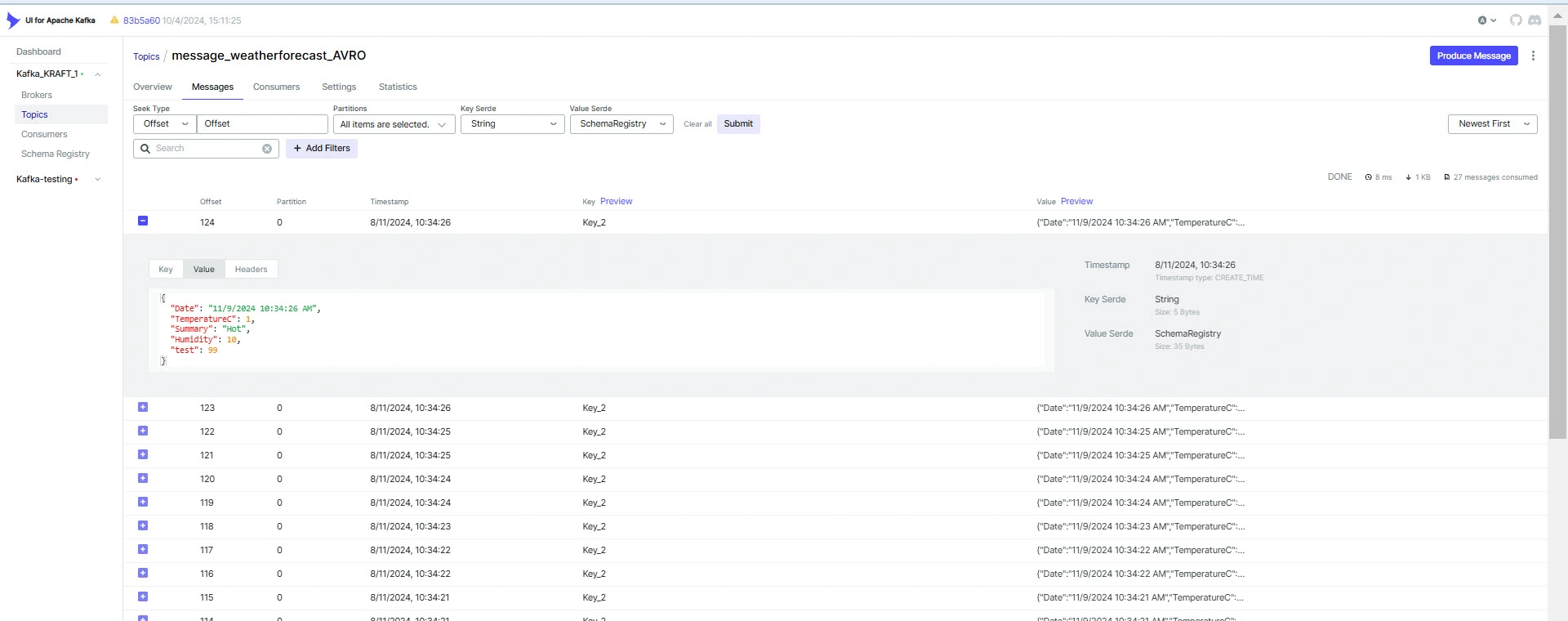
Step 8: we can observe the messages that is pulished in kafka -ui
Benefits of Using Schema Registry:
Reduced Message Size: Only the schema ID is transmitted with messages, keeping them compact and efficient.
Easier Schema Evolution: Schema Registry provides compatibility checks, allowing teams to safely evolve schemas without breaking existing consumers.
Data Validation: Since schemas are centrally registered, producers cannot publish invalid data that doesn’t conform to the schema.
Decoupling Producers and Consumers: With versioning and compatibility checks, producers and consumers can evolve independently, reducing tight coupling in the system.
Conclusion
Schema Registry is an essential component in modern event-driven architectures using Apache Kafka. By centralizing schema management and enforcing compatibility rules, it allows systems to evolve schemas without breaking data pipelines, ensuring long-term reliability and consistency. Whether you're using Avro, JSON, or Protobuf, a Schema Registry can help streamline your data serialization and deserialization processes.
For developers and system architects building distributed data pipelines, understanding and utilizing Schema Registry is a powerful way to enforce data consistency and manage schema evolution efficiently.
Join the conversation! Your thoughts help the community grow.