

Introduction
Unit testing is like checking each piece of a puzzle before putting the whole thing together. In software development, it means testing small parts of your code, like a single function or method, to make sure they work correctly on their own.
Why Do Unit Testing?
Find Errors Fast: Spot problems in one spot without running the entire app.
Save Time: Easier to fix small issues than big ones later.
Better Code: Encourages writing clean, reusable code.
Teamwork: Developers can trust each other's work.
How to Get Started
Pick a Tool : Use JUnit for Java, PyTest for Python, or Jest for JavaScript. They're free and easy.
Write a Test (JavaScript) :
Create a test function that calls your code.
Check if the output matches what you expect. Example in JavaScript (save as add.test.js):
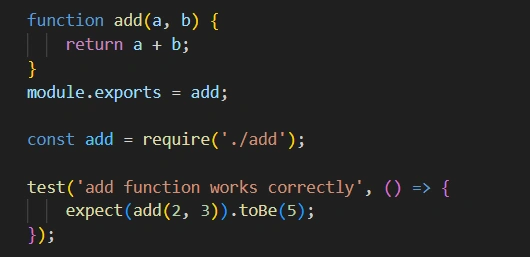
Run Tests : Use a command like npx jest to run all tests. If one fails, fix the code.
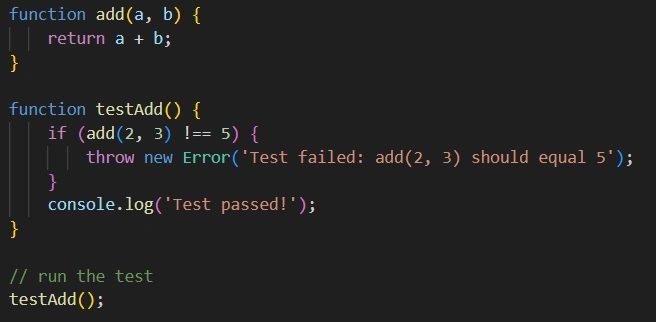
For a simple no-framework version (just Node.js)
Types of Unit Tests
Positive Tests: Check normal inputs (e.g., adding two numbers).
Negative Tests: Check bad inputs (e.g., adding a letter should error).
Edge Cases: Extreme values (e.g., adding 0 or negative numbers).
Tips for Success
Keep tests simple: One test per idea.
Run them often: Before commits or daily.
Automate: Add to your build process so they run automatically.
Common Mistakes to Avoid
Testing too much at once: Stick to one unit.
Ignoring tests: Update them when code changes.
Conclusion
Unit testing isn't just another checkbox in the development process. It's a foundational practice that transforms how you build, maintain, and scale software. Start with one test today; it'll make your coding life easier.
Join the conversation! Your thoughts help the community grow.