Introduction
It will walk through step-by-step how to upload the file in SharePoint Online.
Step 1
Create a library in Sharepoint online, eg. Name it Test_ABC.
Step 2
Install Node.js from
here
Step 3
Create an Angular project(LargeFileUpload) using
AngularCLI
Step 4
Step 5
Create a FileUpload Component using the below Command
Step 6
Create a FileUpload and GlobalServices services using the following commandL
- ng g s services/FileUpload
- ng g s services/GlobalService
GlobalServices.ts
- export class GlobalServiceService {
- constructor() { }
- public sharePointPageObject = {
- webAbsoluteUrl: '',
- webRelativeUrl : '',
- userId: 0
- };
- }
app.component.ts
- import { Component } from '@angular/core';
- import { GlobalServiceService } from './services/global-service.service';
- declare const _spPageContextInfo;
- @Component({
- selector: 'app-root',
- templateUrl: './app.component.html',
- styleUrls: ['./app.component.css']
- })
- export class AppComponent {
- constructor(
- private globalService: GlobalServiceService
- ) { }
- ngOnInit() {
- this.globalService.sharePointPageObject.webAbsoluteUrl = window.location.href.indexOf('localhost') > -1 ? '/Your sitecollection'
- : _spPageContextInfo.webAbsoluteUrl;
- this.globalService.sharePointPageObject.webRelativeUrl = window.location.href.indexOf('localhost') > -1 ? '/Your sitecollection'
- : _spPageContextInfo.webRelativeUrl;
- this.globalService.sharePointPageObject.userId = window.location.href.indexOf('localhost') > -1 ? 22 : _spPageContextInfo.userId;
- }
- }
Once the template for file upload is created, then update the file-upload.component.html
- File Upload: <input placeholder="Upload File" type="file" (change)="largeFileUpload($event)">
Then file-upload.component.ts as:
- import { Component, OnInit } from '@angular/core';
- import { FileUploadService } from '../services/file-upload.service';
-
- @Component({
- selector: 'app-file-upload',
- templateUrl: './file-upload.component.html',
- styleUrls: ['./file-upload.component.css']
- })
- export class FileUploadComponent implements OnInit {
-
- constructor(
- private fileUploadService: FileUploadService
- ) { }
-
- ngOnInit() {
- }
- largeFileUpload(event: any) {
- let fileList: FileList = event.target.files;
- if (fileList.length != 0) {
- this.fileUploadService.fileUpload(fileList[0], "Test_ABC", fileList[0].name).then(addFileToFolder => {
- console.log("Large File Uploaded Successfully");
- }).catch(error => {
- console.log("Error while uploading" + error);
- });
- }
- }
- }
file-upload.services.ts
- import { Injectable } from '@angular/core';
- import { GlobalServiceService } from './global-service.service';
- import { HttpClient, HttpErrorResponse } from '@angular/common/http';
- declare const $: any;
- @Injectable({
- providedIn: 'root'
- })
- export class FileUploadService {
-
- constructor(
- private globalService: GlobalServiceService,
- private httpClient: HttpClient
- ) { }
- public siteUrl: string = this.globalService.sharePointPageObject.webAbsoluteUrl;
- public siteRelativeUrl: string = this.globalService.sharePointPageObject.webAbsoluteUrl != "/" ? this.globalService.sharePointPageObject.webAbsoluteUrl : "";
- public fileUpload(file: any, documentLibrary: string, fileName: string) {
- return new Promise((resolve, reject) => {
- this.createDummyFile(fileName, documentLibrary).then(result => {
- let fr = new FileReader();
- let offset = 0;
-
- let total = file.size;
-
- let length = 1000000 > total ? Math.round(total * 0.8) : 1000000
- let chunks = [];
-
- fr.readAsArrayBuffer(file);
- fr.onload = (evt: any) => {
- while (offset < total) {
-
- if (offset + length > total) {
- length = total - offset;
- }
-
- chunks.push({
- offset,
- length,
- method: this.getUploadMethod(offset, length, total)
- });
- offset += length;
- }
-
- const chunkPercentage = (total / chunks.length) / total * 100;
- console.log("Chunk Percentage: "+chunkPercentage);
- if (chunks.length > 0) {
-
- const id = this.generateGUID();
-
- this.uploadFile(evt.target.result, id, documentLibrary, fileName, chunks, 0, 0, chunkPercentage, resolve, reject);
- }
- };
- })
- });
- }
-
- createDummyFile(fileName, libraryName) {
- return new Promise((resolve, reject) => {
-
- var serverRelativeUrlToFolder = "decodedurl='" + this.siteRelativeUrl + "/" + libraryName + "'";
- var endpoint = this.siteUrl + "/_api/Web/GetFolderByServerRelativePath(" + serverRelativeUrlToFolder + ")/files" + "/add(overwrite=true, url='" + fileName + "')"
- const headers = {
- "accept": "application/json;odata=verbose"
- };
- this.executePost(endpoint, this.convertDataBinaryString(2), headers).then(file => resolve(true)).catch(err => reject(err));
- });
- }
-
- convertDataBinaryString(data) {
- let fileData = '';
- let byteArray = new Uint8Array(data);
- for (var i = 0; i < byteArray.byteLength; i++) {
- fileData += String.fromCharCode(byteArray[i]);
- }
- return fileData;
- }
-
- uploadFileChunk(id, libraryPath, fileName, chunk, data, byteOffset) {
- return new Promise((resolve, reject) => {
- let offset = chunk.offset === 0 ? '' : ',fileOffset=' + chunk.offset;
-
- let endpoint = this.siteUrl + "/_api/web/getfilebyserverrelativeurl('" + this.siteRelativeUrl + "/" + libraryPath + "/" + fileName + "')/" + chunk.method + "(uploadId=guid'" + id + "'" + offset + ")";
- const headers = {
- "Accept": "application/json; odata=verbose",
- "Content-Type": "application/octet-stream"
- };
- this.executePost(endpoint, data, headers).then(offset => resolve(offset)).catch(err => reject(err));
- });
- }
-
- uploadFile(result, id, libraryPath, fileName, chunks, index, byteOffset, chunkPercentage, resolve, reject) {
-
- const data = this.convertFileToBlobChunks(result, chunks[index]);
-
- this.uploadFileChunk(id, libraryPath, fileName, chunks[index], data, byteOffset).then(value => {
- const isFinished = index === chunks.length - 1;
- index += 1;
- const percentageComplete = isFinished ? 100 : Math.round((index * chunkPercentage));
- console.log("Percentage Completed:" +percentageComplete)
-
- if (index < chunks.length) {
- this.uploadFile(result, id, libraryPath, fileName, chunks, index, byteOffset, chunkPercentage, resolve, reject);
- } else {
- resolve(value);
- }
- }).catch(err => {
- console.log('Error in uploadFileChunk! ' + err);
- reject(err);
- });
- }
-
- getUploadMethod(offset, length, total) {
- if (offset + length + 1 > total) {
- return 'finishupload';
- } else if (offset === 0) {
- return 'startupload';
- } else if (offset < total) {
- return 'continueupload';
- }
- return null;
- }
-
- convertFileToBlobChunks(result, chunkInfo) {
- return result.slice(chunkInfo.offset, chunkInfo.offset + chunkInfo.length);
- }
- generateGUID() {
- function s4() {
- return Math.floor((1 + Math.random()) * 0x10000).toString(16).substring(1);
- }
- return s4() + s4() + '-' + s4() + '-' + s4() + '-' + s4() + '-' + s4() + s4() + s4();
- }
- async executePost(url, data, requestHeaders) {
- const res = await this.httpClient.post(url, data, requestHeaders).toPromise().catch((err: HttpErrorResponse) => {
- const error = err.error;
- return error;
- });
- return this.parseRetSingle(res);
- }
- parseRetSingle(res) {
- if (res) {
- if (res.hasOwnProperty('d')) {
- return res.d;
- } else if (res.hasOwnProperty('error')) {
- const obj: any = res.error;
- obj.hasError = true;
- return obj;
- } else {
- return {
- hasError: true,
- comments: res
- };
- }
- } else {
- return {
- hasError: true,
- comments: 'Check the response in network trace'
- };
- }
- }
- }
Finally, run the code using the command:
Now, your requests will be served at http://localhost:4200/.
Click on browse and select the file for upload.
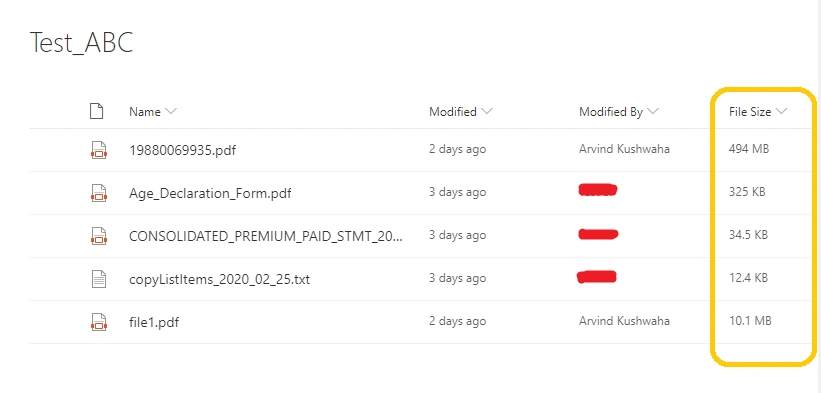
Once the project runs successfully, the library looks like:
Download the full source code from the attachment.


G.sanjhai 9DPosted Jul 23, 2021, 5:20 PM
Hi, Arvind, how to make the check size large like 1GB or 500MB
Pratik GorawadePosted Feb 4, 2021, 6:37 AM
Hi Arvind I have a similar scenario where using file upload service I am sending file to sp doc library the solution is working well for localhost using proxy however when I am trying to make a build using spfx the functionality is not working. Could you please suggest me some solution which will work for sp online