Pre-requisite to understand this
Reverse Proxy – A server that sits in front of app and forwards requests to it.
DNS (Domain Name System) – Maps domain (e.g., app.example.com) to an IP address.
Authentication (AuthN) – Verifying a user’s identity.
Authorization (AuthZ) – Deciding what an authenticated user can access.
Identity Provider (IdP) – System that validates users (Azure AD, Okta, Google, etc.).
Zero Trust Model – Never trust by default; always verify identity and context.
SAML / OIDC – Standard protocols used for Single Sign-On (SSO).
Introduction
Cloudflare can act as a Login Shield for any web or cloud application without modifying the application itself by using Cloudflare Access (Zero Trust). It works as an identity-aware reverse proxy placed in front of the application. All user requests first pass through Cloudflare, where authentication is enforced using an external Identity Provider (IdP). Only after successful authentication does Cloudflare forward the request to the backend application. Because authentication is handled at the network edge, the application does not need any code changes, plugins, or login logic updates.
What problem we can solve with this?
Many legacy or third-party applications do not support modern authentication standards like SSO or MFA. Some cloud apps are publicly exposed on the internet without strong access control. Modifying application code to integrate SAML/OIDC may not be possible due to vendor restrictions, lack of source code, or risk of downtime. Additionally, managing authentication separately in every application increases operational complexity and security risks.
Cloudflare Login Shield solves this by enforcing authentication before traffic reaches the application. It centralizes identity enforcement, reduces exposure, and protects apps without internal changes. It also supports MFA, device posture checks, IP restrictions, and bot protection at the edge. This is especially useful for protecting admin panels, legacy apps, internal dashboards, and cloud-hosted services.
Problems solved:
Protects legacy apps without code changes
Adds SSO & MFA to apps that don’t support it
Prevents direct public access to backend servers
Reduces attack surface (DDoS, brute force, bots)
Centralizes authentication policy management
Enables Zero Trust access control
How to implement/use this?
To use Cloudflare as a login shield, you place your application behind Cloudflare by pointing DNS to Cloudflare and enabling proxy mode. Then, configure Cloudflare Access to protect the application’s domain. You integrate Cloudflare Access with an Identity Provider (Azure AD, Okta, Google, etc.). Access policies are created to define who can log in. Once configured, every incoming request is intercepted by Cloudflare. If the user is not authenticated, they are redirected to the IdP login page. After successful authentication, Cloudflare issues a secure token and forwards the request to the application. The application simply sees a valid request and does not need modification.
Implementation steps:
Move DNS to Cloudflare and enable proxy (orange cloud).
Enable Cloudflare Zero Trust / Access.
Add your application domain under Access.
Integrate Identity Provider (SAML/OIDC).
Define access policies (users, groups, devices).
Test authentication flow.
Block direct origin access (allow only Cloudflare IPs).
Sequence diagram
When a user requests the protected application, the request first reaches Cloudflare. Cloudflare checks whether the user has a valid session. If not authenticated, Cloudflare redirects the user to the configured Identity Provider. After successful authentication, the IdP sends a token back to Cloudflare. Cloudflare validates the token and creates a secure session. It then forwards the original request to the application, optionally injecting identity headers. The application processes the request normally and returns the response to the user via Cloudflare.
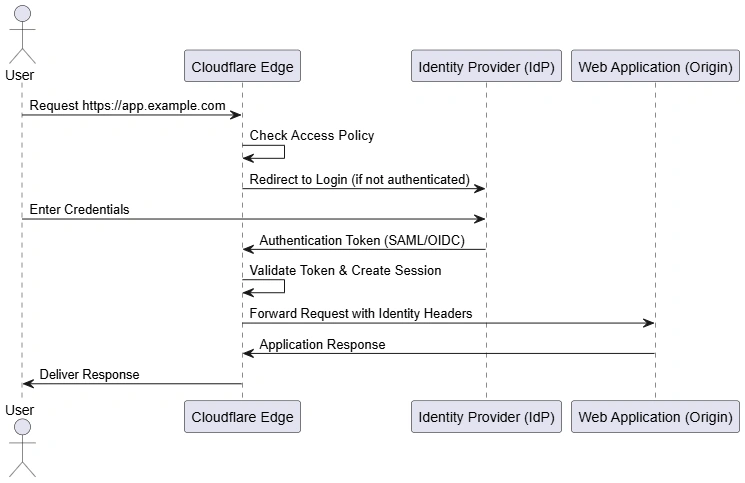
Key Flow Points:
All traffic hits Cloudflare first
Authentication happens before origin access
IdP validates user identity
Cloudflare issues secure session cookie
Application remains unchanged
Identity headers can be passed to backend
Component diagram
The browser communicates only with Cloudflare’s proxy endpoint. Within Cloudflare, Access enforces authentication policies. The Identity Provider performs credential verification. Once validated, Cloudflare forwards traffic to the backend application. The backend environment is isolated and does not directly interact with the public internet. This separation ensures security and centralized policy control.
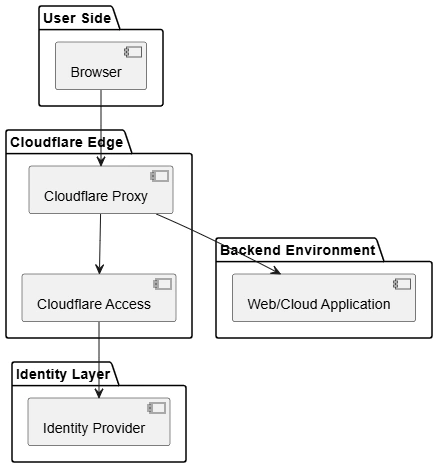
Component Highlights:
Browser never directly connects to origin
Cloudflare Proxy handles traffic routing
Access module enforces authentication
IdP manages credentials
Backend app stays isolated
Policy logic resides at edge
Deployment diagram
The deployment architecture shows physical/logical distribution. The user device connects to Cloudflare’s globally distributed edge network. Authentication is validated against an external Identity Provider hosted separately. The backend application can be hosted in a private cloud, public cloud, or on-premise data center. The origin server is not publicly exposed and only accepts traffic from Cloudflare IP ranges. This architecture supports Zero Trust and minimizes direct attack exposure.
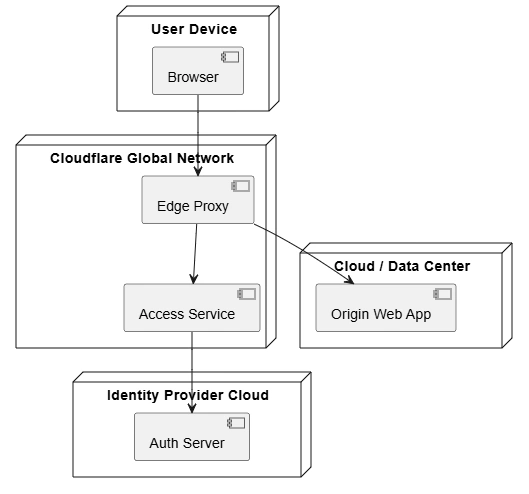
Deployment Insights:
Edge nodes are globally distributed
Origin server can be private or public cloud
Identity service is external
Only Cloudflare can reach origin
Public IP exposure is minimized
Supports hybrid deployments
Advantages
No application code changes required
Adds SSO and MFA to any web app
Works with legacy and third-party apps
Centralized policy management
Reduces attack surface
Prevents direct origin exposure
Supports Zero Trust model
Scalable via global edge network
Summary
Using Cloudflare as a Login Shield enables organizations to enforce modern authentication and Zero Trust access controls without modifying their applications. By acting as an identity-aware reverse proxy, Cloudflare intercepts all incoming traffic, validates users through an external Identity Provider, and forwards only authorized requests to the backend. This approach protects legacy, cloud, and third-party applications while simplifying security management. It enhances security posture, reduces operational complexity, and ensures consistent access control across environments.


Join the conversation! Your thoughts help the community grow.