

Introduction
In this article I'll explain 'How to Use Multiple Modules on the Same Page.'
While you are working with AngularJS, you might find a situation where you are having some scopes which are available in some controller, but those controllers belong to different modules; in such a case you might have introduced new scope in controller so that you can use it. This is because you can't declare multiple modules in "ng-app", this is a limitation of ng-app, it restricts you to only one module per page. To get rid of this problem you can choose "ng-module" which is available in "angular.ng-modules". angular.ng-modules is a new directive which needs to be provided where you had provided the AngularJS directive, you can download it from my source code.
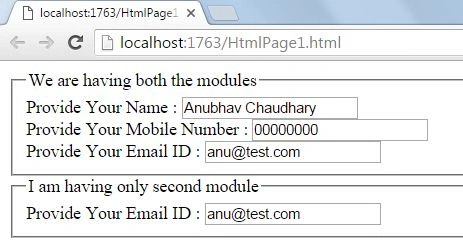
I am creating a sample application to show how you can use this feature.
Step 1: Firstly, download the "angular.ng-modules" using the above links.
After this provide where you had provided the "angularjs" directive.
- <head>
- <title></title>
- <script src="angular.js"></script>
- <script src="angular.ng-modules.js"></script>
- <script src="AngularController.js"></script>
- </head>
Step 2: Now I am creating a new JavaScript file where we will declare our modules, controller, and scopes.
- var firstModule = angular.module('firstModule', []);
- firstModule.controller('firstController', function ($scope) {
- $scope.UserName = 'Anubhav Chaudhary';
- });
- firstModule.controller('secondController', function ($scope) {
- $scope.MobileNumber = '00000000';
- });
- var secondModule = angular.module('secondModule', []);
- secondModule.controller('thirdController', function ($scope) {
- $scope.EmailId = '[email protected]';
- });
Here you can see that I declared two modules named "firstModule" and "secondModule," inside the firstModule I created two controllers and in those controllers I created some scope properties, inside secondModule only one controller is created and in the controller one scope property is created. To all these scopes some default value is also provided.
Step 3: Now it's time to work on the main section i.e. HTML section.
SubashPosted Aug 17, 2016, 3:58 AM
Nice
Pramod ThakurPosted Feb 5, 2016, 5:48 AM
thanks for sharing..
Rupali ShindePosted Feb 1, 2016, 4:12 AM
thank for sharing new concept in angularjs
Anubhav ChaudharyPosted Jan 20, 2016, 7:13 AM
Thanks Nanddeep Nachan and Anupam Singh
Anupam SinghPosted Jan 20, 2016, 5:24 AM
cool..
Nanddeep NachanPosted Jan 20, 2016, 5:02 AM
Nice share
Anubhav ChaudharyPosted Jan 20, 2016, 3:32 AM
Thanks Debasis Saha and Shubham Kumar
Shubham KumarPosted Jan 20, 2016, 2:44 AM
nice
Debasis SahaPosted Jan 20, 2016, 12:18 AM
Nice article..
Anubhav ChaudharyPosted Jan 19, 2016, 3:22 PM
Thanks All
Santhakumar MunuswamyPosted Jan 19, 2016, 2:53 PM
Thanks for nice article.
Pradeep SahooPosted Jan 19, 2016, 10:09 AM
Thanks Anubhav, can this feature applied to two div instead of forms .which versions of angular support this
Humayun Kabir MamunPosted Jan 19, 2016, 7:51 AM
Nice...