

Introduction
Mostly everyone is familiar with C# replace function. In this article I will explain the use of replace function in Microsoft SQL Server. A simple function to replace bulk amount of data in the database. Here I will also give some examples.
Table
My table contains bulk amount of data and some of the values are wrongly entered into the database. So I want to change those particular values into the table using a single query.
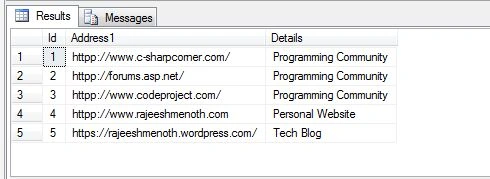
The given table contains incorrect address in the "Address1" column like httpp://www.c-sharpcorner.com/, so http is appended with an extra p ("httpp"). So we can update those values in a single query. How ? Microsoft SQL Server provides Replace function to replace particular data.
Mostly everyone is familiar with C# replace function. In this article I will explain the use of replace function in Microsoft SQL Server. A simple function to replace bulk amount of data in the database. Here I will also give some examples.
Table
My table contains bulk amount of data and some of the values are wrongly entered into the database. So I want to change those particular values into the table using a single query.
The given table contains incorrect address in the "Address1" column like httpp://www.c-sharpcorner.com/, so http is appended with an extra p ("httpp"). So we can update those values in a single query. How ? Microsoft SQL Server provides Replace function to replace particular data.
SQL Query
The following code will replace that particular data.
- update dbo.Tbl_Replace set Address1 = Replace(Address1,'httpp','http')
We can directly use the update method in the above query. Why we are using replace function in SQL?
Because when you are trying to update bulk amount of data you can use the replace function. It will consume the time of update, since you don't have to update each and every address separately.
Because when you are trying to update bulk amount of data you can use the replace function. It will consume the time of update, since you don't have to update each and every address separately.
- update dbo.Tbl_Replace set Address1 = 'http://www.c-sharpcorner.com/' where Id=1
Example 1
Replace Function
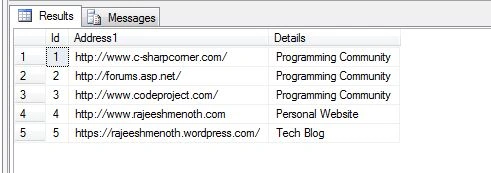
The SQL Replace function replacing "httpp" to "http".
- update dbo.Tbl_Replace set Address1 = Replace(Address1,'httpp','http')
The Replace function replaced the appended value using a single query.
Example 2
Table
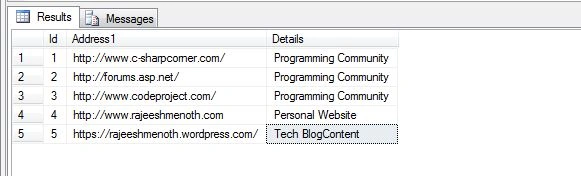
How to put space between "BlogContent" like "Blog Content" without affecting whole content in the database.
Replace Function
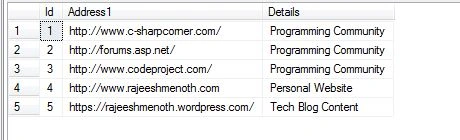
You can use a single space.Like 'Content' to ' Content'.
- update dbo.Tbl_Replace set Details = Replace(Details,'Content',' Content')
Reference
Summary
We learned how to use a replace function in Microsoft SQL Server. I hope this article is useful for .NET programmers.
We learned how to use a replace function in Microsoft SQL Server. I hope this article is useful for .NET programmers.
Rajeesh MenothPosted Sep 10, 2015, 1:31 AM
Thank you Saritha K T :)
Saritha K TPosted Sep 10, 2015, 1:22 AM
nice article
Rajeesh MenothPosted Sep 6, 2015, 1:24 PM
Thank you Karthikeyan K
Rajeesh MenothPosted Sep 6, 2015, 1:23 PM
Thank you Santhakumar Munuswamy sir
Santhakumar MunuswamyPosted Sep 6, 2015, 1:08 PM
Good one. Thanks for sharing
Karthikeyan KPosted Sep 6, 2015, 12:44 PM
Good one Rajeesh sir...Thanks for sharing
Rajeesh MenothPosted Sep 6, 2015, 2:09 AM
Thanks Pankaj Kumar Choudhary
Pankaj Kumar ChoudharyPosted Sep 6, 2015, 1:23 AM
Nice Show Sir.....