

Today we are going to learn how to create and work with user control in Windows Store apps. You are all familiar with the advantage or feature of using user controls in an application. In Windows Store apps the user can also have the option to create their own user control and use it in an application mutliple times. You can create a User Control in the application and also add other control elements in it.
In Windows Store apps the User Control template is provided for creating composite controls. You can add this template to your application and easily create a user control. UserControls are defined within a namespace, so to use them in some page, you must declare a namespace in the XAML root elements; the namespace containing the UserControl.
In this article I will create a simple application that defines a UserControl and encapsulates it within a MainPage.XAML file.
Step 1
Create a Windows 8 Application using C#.
Step 2
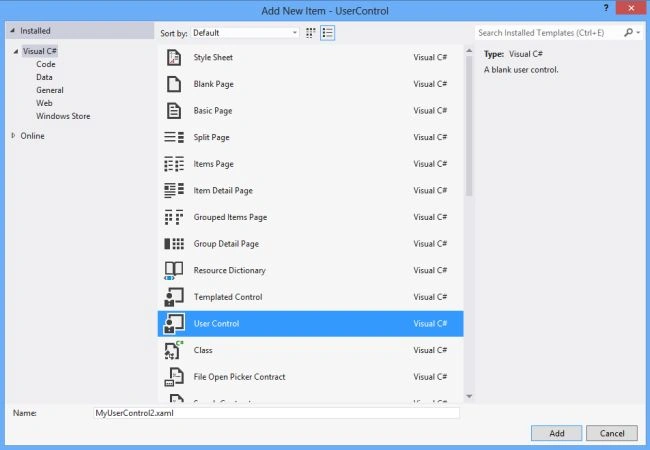
Add a User Control to the application.
- Right-click on the Solution Explorer.
- Select Add -> New Item.
- Select User Control template.
- Click on the Add button.
Step 3
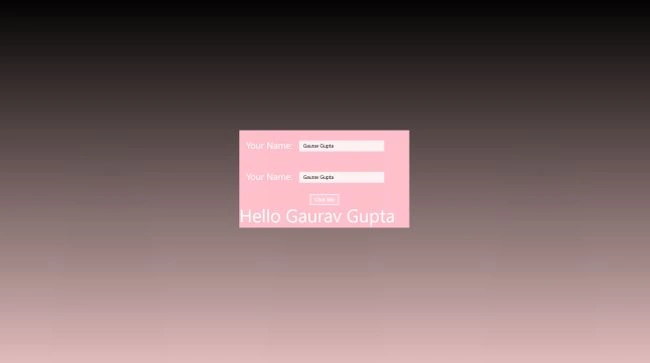
In the XAML file of the User Control define the control elements of XAML.
<UserControl
x:Class="UserControl.MyUserControl1"
xmlns="http://schemas.microsoft.com/winfx/2006/xaml/presentation"
xmlns:x="http://schemas.microsoft.com/winfx/2006/xaml"
xmlns:local="using:UserControl"
xmlns:d="http://schemas.microsoft.com/expression/blend/2008"
xmlns:mc="http://schemas.openxmlformats.org/markup-compatibility/2006"
mc:Ignorable="d"
d:DesignHeight="300"
d:DesignWidth="400">
<Grid>
<StackPanel Background="Pink">
<StackPanel Orientation="Vertical">
<StackPanel Orientation="Horizontal" Margin="20,30">
<TextBlock Text="Your Name: " FontSize="26.667" Margin="0,0,20,0" />
<TextBox x:Name="NameInput" Width="250" />
</StackPanel>
<StackPanel Orientation="Horizontal" Margin="20,30">
<TextBlock Text="Your Name: " FontSize="26.667" Margin="0,0,20,0" />
<TextBox x:Name="pwdeInput" Width="250" />
</StackPanel>
<Button Content="Click Me" HorizontalAlignment="Center" Click="ClickMeButtonClicked"/>
<TextBlock FontSize="53" x:Name="OutputText" />
Join the conversation! Your thoughts help the community grow.