

Introduction
In daily development we use UserControls. Now the question is, what are UserControls and why do we use them.
In Software Development, everybody is talking about reusability. A UserControl also provides for reusability. In other words, we can create and edit in one thing and get results everywhere, wherever you use the item.
For example we have an e-mail form or a contact us form and I want to use it in 4 different pages in various parts. And if the client requirnments change then I just make the changes in one place and automatically the changes will be done in all forms. So for this we can use a UserControl.
How to create a User Control
Have a look at the following example:
- Open Visual Studio.
- "File" -> "New" -> "Project..." then seelct ASP.NET Webform Application.
- Add a new web form.
To create a new UserControl, in Solution Expolrer, Add New Item, provide your File Name and click Add.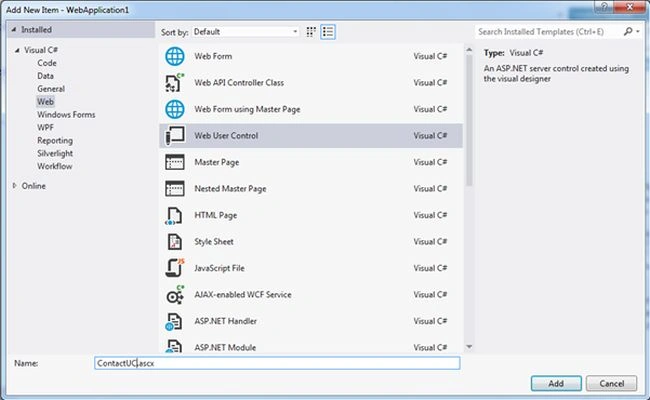
When you click on the Add Button the following screen will be shown.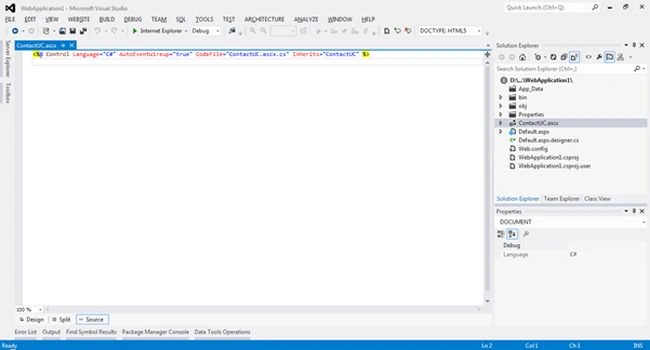
ContactUC.ascx
- <%@ Control Language="C#" AutoEventWireup="true" CodeBehind="ContactUC.ascx.cs" Inherits="UserControlDemo.ContactUC" %>
- <table>
- <tr>
- <td>
- <fieldset>
- <asp:Label ID="lblMessage" runat="server"></asp:Label>
- </fieldset>
- </td>
- </tr>
- <tr>
- <td>
- <asp:Label ID="lblName" runat="server" Text="Name"></asp:Label>
- </td>
- <td>
- <asp:TextBox ID="txtName" runat="server"></asp:TextBox>
- </td>
- </tr>
- <tr>
- <td>
- <asp:Label ID="lblAddress" runat="server" Text="Address"></asp:Label>
- </td>
- <td>
- <asp:TextBox ID="txtAddress" runat="server"></asp:TextBox>
- </td>
- </tr>
- <tr>
- <td>
- <asp:Label ID="lblPhone" runat="server" Text="Phone"></asp:Label>
- </td>
- <td>
- <asp:TextBox ID="txtPhone" runat="server"></asp:TextBox>
- </td>
- </tr>
- <tr>
- <td>
- <asp:Label ID="lblEmail" runat="server" Text="Email"></asp:Label>
- </td>
- <td>
- <asp:TextBox ID="txtEmail" runat="server"></asp:TextBox>
- </td>
- </tr>
- <tr>
- <td>
- <asp:Button ID="btnSubmit" runat="server" Text="Submit" />
- </td>
- </tr>
- </table>
- using System;
- using System.Collections.Generic;
- using System.Linq;
- using System.Web;
- using System.Web.UI;
- using System.Web.UI.WebControls;
- namespace UserControlDemo
- {
- public partial class ContactUC : System.Web.UI.UserControl
- {
- private string _header;
- public string Header
- {
- get { return _header; }
- set { _header = value; }
- }
- protected void Page_Load(object sender, EventArgs e)
- {
- lblMessage.Text = _header;
- }
- }
- }
- <%@ Page Language="C#" AutoEventWireup="true" CodeBehind="UcDemo.aspx.cs" Inherits="UserControlDemo.UcDemo" %>
- <%@ Register Src="~/ContactUC.ascx" TagPrefix="uc1" TagName="ContactUC" %>
- <!DOCTYPE html>
- <html xmlns="http://www.w3.org/1999/xhtml">
- <head runat="server">
- <title></title>
- </head>
- <body>
- <form id="form1" runat="server">
- <div>
- <uc1:ContactUC runat="server" id="ContactUC"/>
- </div>
- </form>
- </body>
- </html>
A UserControl is nothing but a webpage where you can put your controls, write their events into a .cs file and use whenever you want. In the preceding example as you can see we have a UserControl where we want to create a contactus kind of page, where we have one lblMessage, where we use the UserControl property for header. Here we have 4 textboxes and one button, for inserting user info. If we want to write code for the submit button then we can write it here.
In ContactUC.ascx.cs, here we add a property and use this property in lblMessage.Text at the PageLoad event.
- private string _header;
- public string Header
- {
- get { return _header; }
- set { _header = value; }
- }
- protected void Page_Load(object sender, EventArgs e)
- {
- lblMessage.Text = _header;
- }
When you drag a UserControl onto a page. You can see this code.
- <%@ Register Src="~/ContactUC.ascx" TagPrefix="uc1" TagName="ContactUC" %>
- <uc1:ContactUC runat="server" id="ContactUC" Header="User Contact Us Page" />
- <%@ Page Language="C#" AutoEventWireup="true" CodeBehind="UcDemo.aspx.cs" Inherits="UserControlDemo.UcDemo" %>
- <%@ Register Src="~/ContactUC.ascx" TagPrefix="uc1" TagName="ContactUC" %>
- <!DOCTYPE html>
- <html xmlns="http://www.w3.org/1999/xhtml">
- <head runat="server">
- <title></title>
- </head>
- <body>
- <form id="form1" runat="server">
- <div>
- <uc1:ContactUC runat="server" id="ContactUC" Header="User Contact Us Page" />
- </div>
- </form>
- </body>
- </html>
That's it. Press F5 and run your code.
Manoj KumarPosted Mar 21, 2022, 6:00 AM
Very useful one thank you
Manoj KallaPosted Dec 12, 2015, 5:07 AM
Good One
Dinesh BeniwalPosted Nov 9, 2014, 10:22 AM
Great work Saurabh.