

For many years writing business logic has been technology and software specific, especially in terms of databases.
For example, assume you want to create a Stored Procedure or any other database object that requires complex SQL code. The only way out that had been known to programmers was to code such logic in a database and the calling code in the programming language.
This approach is still very popular, but there is an easy way that allows C# programmers to take control in their hands and code all the database oriented objects like Stored Procedures, functions, triggers and so on in the .NET language of their; choice for example, C#.
In this article, I'll cover the following:
- Introduction to SQL CLR
- Choosing Between T-SQL and SQL CLR
- Enabling SQL CLR Integration
- Creating a SQL CLR Stored Procedure
- Deploying a SQL CLR Stored Procedure into SQL Server
- Executing the SQL CLR Stored Procedure
Introduction to SQL CLR
SQL CLR is a tiny version of the .NET CLR that is integrated into the SQL Server 2005 and onwards. The existence of CLR in SQL Server allows the C# programmers and other .NET compliant language programmers to write database specific business logic in a programming language like C# instead of T-SQL. Let's understand what type of objects a programmer can create with SQL CLR integration.
The following are objects that can be created using SQL CLR:
- The following types of database objects can be created with SQL CLR Integration:
- Stored Procedures
- User defined aggregates
- Triggers
- User defined types
Choosing Between T-SQL and SQL CLR
It became obvious that we have two choices to implement the same functionality, but based on your scenario and requirements one can be advantageous over the other one. A few important points that will help you to decide what you may want to choose and in what situation are:
- T-SQL is best used to perform declarative, set-based operations (select, insert, update and delete).
- T-SQL also has a procedural capability, in other words can perform procedural operations like While and so on but when it comes to feature rich or more complex logic T-SQL is not the best choice. In such a scenario, SQL CLR with C# allows the programmer to have a better control on functionality.
- T-SQL is interpreted whereas SQL CLR is compiled. Hence; interpreted code is slower than compiled procedural code.
- Before SQL CLR code can be executed, it requires the CLR to be loaded by the SQL Server. Whereas T-SQL does not incur any such overhead.
- When any T-SQL code executes it shares the same stack frame in memory; whereas, every SQL CLR code requires its own stack frame hence result in larger memory allocation but better concurrent performance.
- T-SQL is composed of libraries full of data-centric functions and hence better suited to set-based operations. Whereas SQL CLR is better suited to recursive, mathematical, string manipulation types of operations.
Enabling SQL CLR Integration
After creating a database object using C#, you must enable the SQL CLR in your SQL Server 2012 where you would like to either use it or deploy it. By default, this feature is turned off (config_value is set to 0); to enable it (config_value is set to 1), use the following procedure:
- Open SQL Server 2012 Management Studio; connect using Windows or SQL Authentication based on your setup type.
- Once connected, click on the New Query button and it will open a query window. Enter the following text in the query window and notice the value of the "config_value" column is:
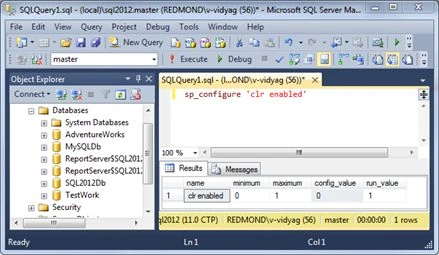
Figure 1-1: Showing default behavior (disabled) of SQL CLR
- Next, we need to enable the SQL CLR, to do so modify the code to appear as shown in Figure 1-2 and it will enable the SQL CLR integration.
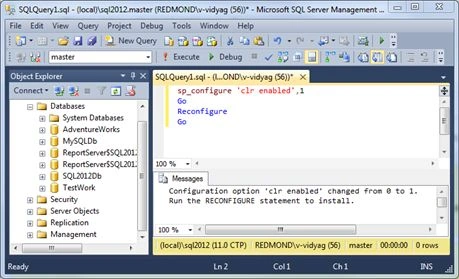
Figure 1-2: Showing SQL CLR enabled
- Now your SQL Server is ready to execute the database objects that are built using the C# programming language unlike T-SQL.
Creating SQL CLR Stored Procedure
Microsoft Visual Studio 2012 provides the project template and class files for various SQL Server objects, like Stored Procedures, triggers, functions and so on that you can code in C# as an assembly, in other words Dynamic Link Library (DLL).
Try It Out: Creating a SQL CLR Stored Procedure using C#
- In this exercise, you'll create a SQL Stored Procedure by adding a SQL CLR C# Stored Procedure item template into the SQL Server database project. The SQL CLR C# Stored Procedure we are creating will help you insert currency data into an AdventureWorks.Sales.Currency table.
Create a new Windows Forms Application project. When Solution Explorer opens, save the solution as shown in Figure 1-3.
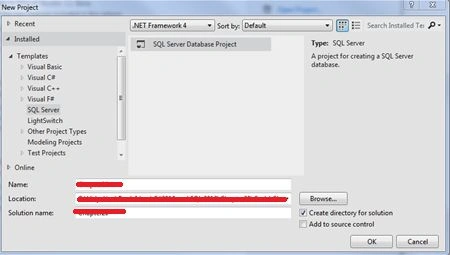
Figure 1-3: Showing SQL Server Database Project template
- This will load an empty project, in other words without any .cs class file in it as shown in Figure 1-4.
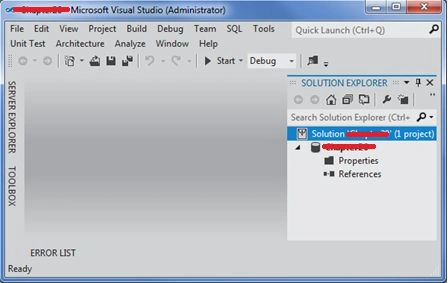
Figure 1-4: Empty Project listed in Solution Explorer
- Right-click the project, choose "Add New Item", and in the "Add New Item" dialog from the SQL CLR C# tab, select "SQL CLR Stored Procedure" and name it as shown in SQLCLRStoredProcedure in Figure 1-5. Click "Add".
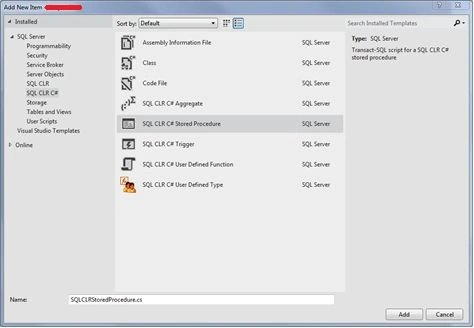
Figure 1-5: Adding a SQL CLR C# Stored Procedure as New Item to the project
- Your Visual Studio environment will now look as shown in Figure 1-6.
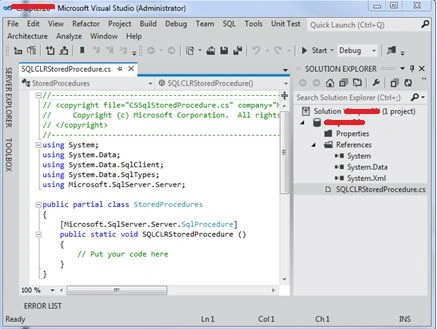
Figure 1-6: Showing Visual Studio after adding the SQL CLR C# Stored Procedure
- Replace the code inside the StoredProcedure class with the code listed under Listing 1-1.
Listing 1-1. SQLCLRStoredProcedure.cs
- [Microsoft.SqlServer.Server.SqlProcedure()]
- public static void InsertCurrency_CS(SqlString currencyCode, SqlString currencyName)
- {
- SqlConnection conn = null;
- try
- {
- conn = new SqlConnection(@"server = .\sql2012;integrated security = true;database = AdventureWorks");
- SqlCommand cmdInsertCurrency = new SqlCommand();
- cmdInsertCurrency.Connection = conn;
- SqlParameter parmCurrencyCode = new SqlParameter("@CCode",
- SqlDbType.NVarChar, 3);
- SqlParameter parmCurrencyName = new SqlParameter("@Name", SqlDbType.NVarChar, 50);
- parmCurrencyCode.Value = currencyCode;
- parmCurrencyName.Value = currencyName;
- cmdInsertCurrency.Parameters.Add(parmCurrencyCode);
- cmdInsertCurrency.Parameters.Add(parmCurrencyName);
- cmdInsertCurrency.CommandText =
- "INSERT Sales.Currency (CurrencyCode, CurrencyName, ModifiedCurrencyDate)" +
- " VALUES(@CCode, @Name, GetDate())";
- conn.Open();
- cmdInsertCurrency.ExecuteNonQuery();
- }
- catch (SqlException ex)
- {
- SqlContext.Pipe.Send("An error occured" + ex.Message +
- ex.StackTrace);
- }
- finally
- {
- conn.Close();
- }
- }
- Save the project and build the solution. After successful build it will produce a .dll under the project location's \bin\debug folder.
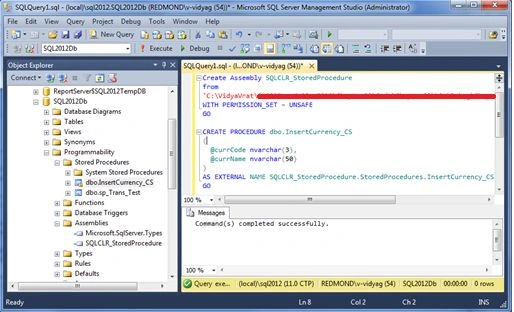
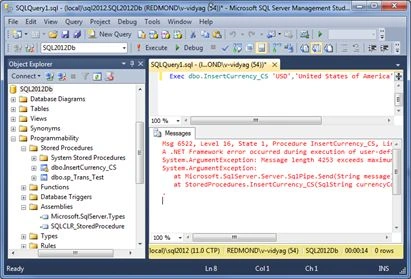
Sr KarthigaPosted May 6, 2016, 9:18 PM
good one sir
Vithal WadjePosted Feb 7, 2015, 1:49 PM
outstanding article,thanks for sharing
Sam HobbsPosted Dec 8, 2013, 3:31 AM
When you say the "only way out that had been known to programmers", you mean SQL Server programmers, correct? Because there are very many other database systems with many other ways to do things.