

A few days back, I saw this awesome video on Channel 9 by James Montemagno and learned about Microsoft Cognitive Services. The services are pretty awesome. Another awesome thing about these is that currently they are free (up to certain number of calls). The sample application which James showed in the video is in Xamarin Native. So, I thought to build the same application in Xamarin.Forms.
In this article, we will create a Xamarin.Forms mobile application which will use the following APIs of Microsoft Cognitive Services.
James' sample app uses 2 services. I added one more as some value adds.
Before starting the code, get Microsoft Cognitive Services API Keys (These steps may change if Microsoft updates its site).
- Visit the site of Microsoft Cognitive Services.
- Click ‘Get Started for Free’ button.

- Click ‘Let’s Go’ button on next page.
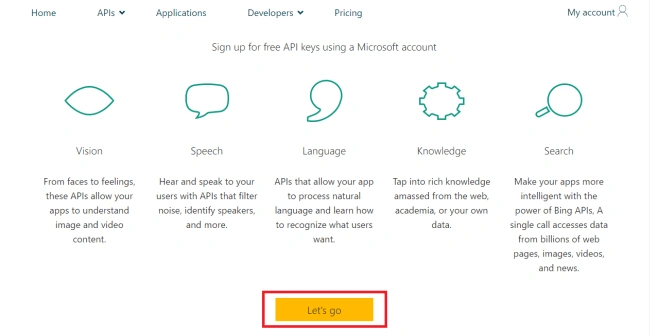
- Sign In using your Microsoft ID account (If you have one) or create a new one.

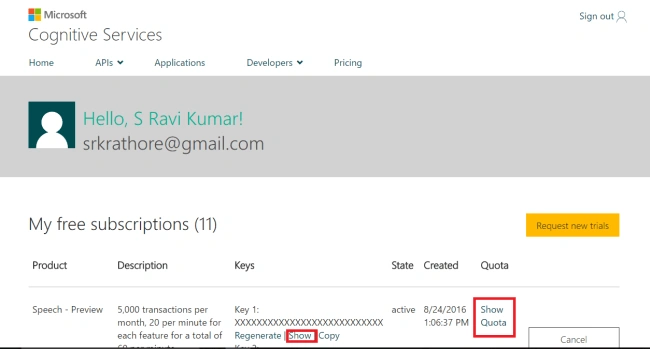
- Once signed in, you will be presented with the below screen which will contain all your Cognitive Service API keys. These keys will be used to access these services and Microsoft will use them to track your number of Service calls.
Now, create a new Xamarin Forms project and follow the steps, given below.
As the code of the Application is a bit longer, I will only be sharing the main code snippets. Due to this, you won’t be able to execute the application if you only follow the steps and copy the code from this article. Rather, I would suggest you to read this article as an explanation of the associated code saved on my Github.
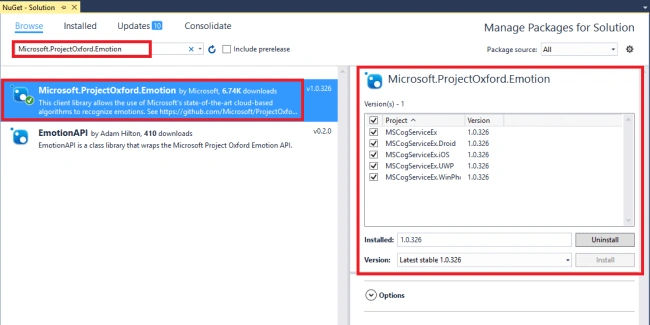
- The best part of using Microsoft Cognitive Services is that they have NuGet packages especially targeted to use them. The first step is to install the required packages, which are-
- Newtonsoft.Json
- Microsoft.Net.Http

- Microsoft.ProjectOxford.Common

- Microsoft.ProjectOxford.Emotion
- Microsoft.ProjectOxford.Face
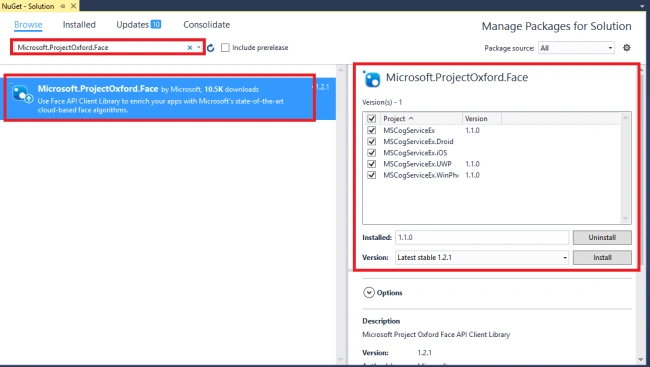
To add these, right click on the solution file and select ‘Manage NuGet Packages for solution‘ option from popup context menu.
- Since I am reusing the code of James' sample, the project structure will be the same and like this project, this application will also have MVVM architecture.
- Create a folder named ‘Model‘. Add a class file named ‘ImageResult.cs‘ which is used to show the Images got as a result from the Bing Image Search. The reason, we are keeping this Model class in separate folder, is that this is application specific model and not service specific model.
- Create a folder named ‘Services‘. This folder will be used to store the code related to Web Service calling etc.
- Create another folder inside the ‘Services‘ folder named as ‘BingSearch‘. As the Application is invoking Bing Image search API directly, so this folder will be used to store the class/model files which will be used to interact with it and manage its results. The Classes inside this folder are-
- Image
- SearchResult
- Suggestion
- Thumbnail
- Create a class named ‘EmotionService‘ inside ‘Services‘ folder. This will contain the code, given below, which will be used to invoke and utilize the Microsoft Emotion Service API.As you can see from the code, given above, we are using ‘GetHappinessAsync‘ method to get the emotion results of the image stream that we passed to the Emotion Service. Then, using the remaining methods to show the emotions of the people, present in the image.
- using Microsoft.ProjectOxford.Emotion;
- using Microsoft.ProjectOxford.Emotion.Contract;
- using System;
- using System.IO;
- using System.Linq;
- using System.Threading.Tasks;
- namespace MSCogServiceEx.Services
- {
- public class EmotionService
- {
- private static async Task<Emotion[]> GetHappinessAsync(Stream stream)
- {
- var emotionClient = new EmotionServiceClient(CognitiveServicesKeys.Emotion);
- var emotionResults = await emotionClient.RecognizeAsync(stream);
- if (emotionResults == null || emotionResults.Count() == 0)
- {
- throw new Exception("Can't detect face");
- }
- return emotionResults;
- }
- //Average happiness calculation in case of multiple people
- public static async Task<float> GetAverageHappinessScoreAsync(Stream stream)
- {
- Emotion[] emotionResults = await GetHappinessAsync(stream);
- float score = 0;
- foreach (var emotionResult in emotionResults)
- {
- score = score + emotionResult.Scores.Happiness;
- }
- return score / emotionResults.Count();
- }
- public static string GetHappinessMessage(float score)
- {
- score = score * 100;
- double result = Math.Round(score, 2);
- if (score >= 50)
- return result + " % :-)";
- else
- return result + "% :-(";
- }
- }
- }
- Create the class named ‘FaceService‘ inside ‘Services‘ folder to contain the following code to interact with Microsoft Face API-In this code, we are using Face Service to return back an array of facerect object (which is a class containing rectangular co-ordinates of the faces present in picture). We will show the number of faces present in the image by the length of this array.
- using Microsoft.ProjectOxford.Face;
- using Microsoft.ProjectOxford.Face.Contract;
- using System;
- using System.IO;
- using System.Linq;
- using System.Threading.Tasks;
- namespace MSCogServiceEx.Services
- {
- public class FaceService
- {
- public static async Task<FaceRectangle[]> UploadAndDetectFaces(Stream stream)
- {
- var fClient = new FaceServiceClient(CognitiveServicesKeys.FaceKey);
- var faces = await fClient.DetectAsync(stream);
- var faceRects = faces.Select(face => face.FaceRectangle);
- if (faceRects == null || faceRects.Count() == 0)
- {
- throw new Exception("Can't detect the faces");
- }
- return faceRects.ToArray();
- }
- }
- }
- Create another class named ‘CognitiveServicesKeys‘ inside ‘Services’ folder. This class is used to store the Keys to pass along with service call (Microsoft will use this key to identify your API account and count the number of calls). As the number of calls are limited so I have not shared my key you can get one for yourself by following the steps mentioned in the beginning of blog.
- Create a new folder named ‘ViewModel‘ as we are following the MVVM design this folder will be used to store the View-Models which will interact with the UI,
- Create a class named ‘ImageSearchViewModel‘ implementing ‘INotifyPropertyChanged‘ Interface inside ‘ViewModel‘ folder. The main method of this class which invokes Microsoft Bing API is as follows,
- public async Task SearchForImages()
- {
- if (IsBusy)
- return;
- IsBusy = true;
- //Bing Image API
- var url = $"https://api.cognitive.microsoft.com/bing/v5.0/images/" +
- $"search?q={searchString}" +
- $"&count=20&offset=0&mkt=en-us&safeSearch=Strict";
- try
- {
- using (var client = new HttpClient())
- {
- client.DefaultRequestHeaders.Add("Ocp-Apim-Subscription-Key", CognitiveServicesKeys.BingSearch);
- var json = await client.GetStringAsync(url);
- var result = JsonConvert.DeserializeObject<SearchResult>(json);
- Images = result.Images.Select(i => new ImageResult
- {
- ContextLink = i.HostPageUrl,
- FileFormat = i.EncodingFormat,
- ImageLink = i.ContentUrl,
- ThumbnailLink = i.ThumbnailUrl,
- Title = i.Name
- }).ToList();
- }
- }
- catch (Exception ex)
- {
- // ("Unable to query images: " + ex.Message);
- }
- finally
- {
- IsBusy = false;
- }
- }
- Create another class named ‘EmotionViewModel‘ implementing ‘INotifyPropertyChanged‘ Interface inside ‘ViewModel‘ folder for managing Emotion Service UI View.
- Create another class named ‘FaceViewModel‘ implementing ‘INotifyPropertyChanged‘ Interface inside ‘ViewModel‘ folder for managing Face Service UI view.
. - Create a folder Named ‘View‘ to store UI Views of the application.
- Create a file named ‘ImageSearch‘ for Bing Image Search. The XAML code of the same is,
- <?xml version="1.0" encoding="utf-8" ?>
- <ContentPage xmlns="http://xamarin.com/schemas/2014/forms"
- xmlns:x="http://schemas.microsoft.com/winfx/2009/xaml"
- x:Class="MSCogServiceEx.View.ImageSearch">
- <StackLayout Padding="5" Spacing="5">
- <StackLayout Orientation="Horizontal">
- <Entry Text="{Binding SearchString}"/>
- <Button Text="Search" Command="{Binding GetImagesCommand}"/>
- </StackLayout>
- <ActivityIndicator IsRunning="{Binding IsBusy}" IsVisible="{Binding IsBusy}"/>
- <ListView ItemsSource="{Binding Images}" CachingStrategy="RecycleElement">
- <ListView.SeparatorColor>
- <OnPlatform x:TypeArguments="Color" iOS="Transparent"/>
- </ListView.SeparatorColor>
- <ListView.ItemTemplate>
- <DataTemplate>
- <ViewCell>
- <StackLayout Orientation="Horizontal" Padding="10,0,0,0">
- <Image HeightRequest="50" WidthRequest="50"
- Source="{Binding ThumbnailLink}"/>
- <StackLayout Padding="10" Spacing="5">
- <Label Text="{Binding Title}"
- TextColor="#3498db"
- Style="{DynamicResource ListItemTextStyle}"/>
- <Label Text="{Binding FileFormat}"
- Style="{DynamicResource ListItemDetailTextStyle}"/>
- </StackLayout>
- </StackLayout>
- </ViewCell> </DataTemplate>
- </ListView.ItemTemplate>
- </ListView>
- </StackLayout>
- </ContentPage>
- Create a file named ‘EmotionEx‘ for Emotion API. The XAML code of the same is,
- <?xml version="1.0" encoding="utf-8" ?>
- <ContentPage xmlns="http://xamarin.com/schemas/2014/forms"
- xmlns:x="http://schemas.microsoft.com/winfx/2009/xaml"
- x:Class="MSCogServiceEx.View.EmotionEx">
- <ContentPage.Resources>
- <ResourceDictionary>
- <Style TargetType="Button">
- <Setter Property="BorderRadius" Value="10" />
- <Setter Property="BorderWidth" Value="2" />
- <Setter Property="WidthRequest" Value="350" />
- <Setter Property="HeightRequest" Value="50" />
- <Setter Property="HorizontalOptions" Value="Center" />
- <Setter Property="VerticalOptions" Value="Center" />
- <Setter Property="FontSize" Value="Medium" />
- <Setter Property="BackgroundColor" Value="Blue" />
- <Setter Property="TextColor" Value="White" />
- </Style>
- </ResourceDictionary>
- </ContentPage.Resources>
- <ScrollView>
- <StackLayout Spacing="10" Padding="10" HorizontalOptions="Center" >
- <Label Text="Emotion Service Example" FontSize="Large" FontAttributes="Bold" />
- <StackLayout Spacing="10">
- <Button Text="Take Photo to Check Emotion " Command="{Binding TakePhotoCommand}"/>
- <Button Text="Pick Photo to Check Emotion " Command="{Binding PickPhotoCommand}"/>
- </StackLayout>
- <ActivityIndicator IsRunning="{Binding IsBusy}" IsVisible="{Binding IsBusy}"/>
- <Label Text="{Binding Message}" FontSize="Large" FontAttributes="Bold" />
- <Image Source="{Binding SelectedImage}" />
- </StackLayout>
- </ScrollView>
- </ContentPage>
- Create a file named ‘FaceEx‘ for Face API. The XAML code of it is,
- public App()
- {
- var tabs = new TabbedPage
- {
- Title = "MS Cognitive Services",
- //BindingContext = new WeatherViewModel(),
- Children =
- {
- new ImageSearch() {Title="Search Image" ,BindingContext = new ImageSearchViewModel() } ,
- new EmotionEx() { Title="Emotion Ex.", BindingContext = new EmotionViewModel()},
- new FaceEx() {Title="Face Ex.",BindingContext=new FaceViewModel()}
- }
- };
- MainPage = new NavigationPage(tabs)
- {
- BarBackgroundColor = Color.FromHex("3498db"),
- BarTextColor = Color.White
- };
- }
- Inside App class constructor, create the object of Views and bind them with View-Models and add them like the following code,
- public App()
- {
- var tabs = new TabbedPage
- {
- Title = "MS Cognitive Services",
- //BindingContext = new WeatherViewModel(),
- Children =
- {
- new ImageSearch() {Title="Search Image" ,BindingContext = new ImageSearchViewModel() } ,
- new EmotionEx() { Title="Emotion Ex.", BindingContext = new EmotionViewModel()},
- new FaceEx() {Title="Face Ex.",BindingContext=new FaceViewModel()}
- }
- };
- MainPage = new NavigationPage(tabs)
- {
- BarBackgroundColor = Color.FromHex("3498db"),
- BarTextColor = Color.White
- };
- }
This is how application looks on iPhone Simulator,

So, this is how we can use Microsoft Cognitive Services with Xamarin.Forms. Let me know if I have missed anything.
Chittaranjan SwainPosted Dec 19, 2019, 5:01 AM
Nice article.