

Introduction
Redis is a NoSQL key-value cache that stores the information in a hash table format, providing the possibilities to store different types of structured data like strings, hashes, lists, sets, sorted sets, bitmaps and hyperloglogs.
Installing REDIS on Windows
Officially Redis doesn't have an official version for windows, but being an open-source project, there is a fork by MSOpenTech where there is the possibility of running Redis on Windows.
Requirements to install Redis:
- 64 bit OS
- The windows package manager Chocolatey
In order to install Redis on Windows using Chocolatey, we need to run a simple command with the command prompt (as administrator) and just follow the instructions:
- C:\> choco install redis-64
- SET PATH=%PATH%;"c:\Program Files\Redis"
I will be using Visual Studio 2015 Community Edition and I'm sure you already have it, if not you can download it from here.
We are going to create a Console Application using .Net 4.5 or higher (this is important) naming the project RedisConnectionTest:
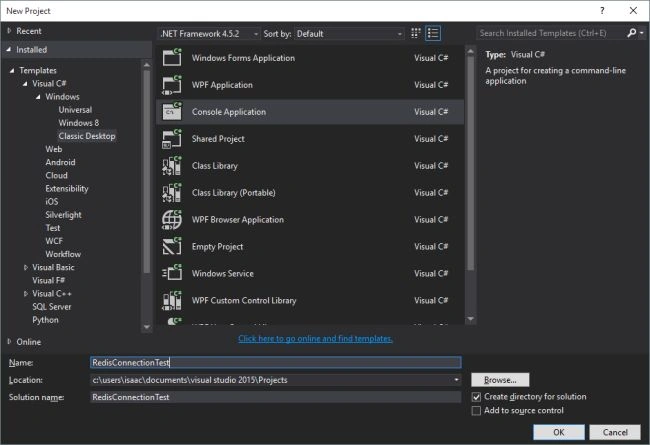 Having this empty project, we need a Nuget package that is our connector to redis(StackExchange.Redis). Using the Visual Studio tools, we add this Nuget package:

Once this package is installed, we are going to create a new class named RedisConnectorHelper.cs. In order to have an easy way to manage our connection to redis, we type the following:
- public class RedisConnectorHelper
- {
- static RedisConnectorHelper()
- {
- RedisConnectorHelper.lazyConnection = new Lazy<ConnectionMultiplexer>(() =>
- {
- return ConnectionMultiplexer.Connect("localhost");
- });
- }
- private static Lazy<ConnectionMultiplexer> lazyConnection;
- public static ConnectionMultiplexer Connection
- {
- get
- {
- return lazyConnection.Value;
- }
- }
- }
An easy way to share the Multiplexer instance is using a static property. This class was designed to be used like this, singleton and thread-safe.
Setting and Getting data from the cache
- class Program
- {
- static void Main(string[] args)
- {
- var program = new Program();
- Console.WriteLine("Saving random data in cache");
- program.SaveBigData();
- Console.WriteLine("Reading data from cache");
- program.ReadData();
- Console.ReadLine();
- }
- public void ReadData()
- {
- var cache = RedisConnectorHelper.Connection.GetDatabase();
- var devicesCount = 10000;
- for (int i = 0; i < devicesCount; i++)
- {
- var value = cache.StringGet($"Device_Status:{i}");
- Console.WriteLine($"Valor={value}");
- }
- }
- public void SaveBigData()
- {
- var devicesCount = 10000;
- var rnd = new Random();
- var cache = RedisConnectorHelper.Connection.GetDatabase();
- for (int i = 1; i < devicesCount; i++)
- {
- var value = rnd.Next(0, 10000);
- cache.StringSet($"Device_Status:{i}", value);
- }
- }
- }
We use the method GetDatabase from the Multiplexer to access the cache. This instance has too many methods: can read, save, delete, increase data, concatenate and finally, all the commands that Redis has. We use StringSet to save a string (or any primitive type) using the "Device_Status: NUMBER" as a key.
Comment the line number 10 and 11 and run the application, you are going to see something similar to this (left window):

The operation of Redis is to have everything in memory and depending on certain rules, it will save everything to the hard disk.
To view these random data we just add, use a totally similar to StringSet method: StringGet.
Uncomment the lines 10-11 and comment the lines 07-08 and run again the console application, you will see the following (left window):

This is how we connect to Redis using the StackOverflow framework (the NuGet package) and get&set some random items to the cache with disk persistence.
Regards and Code4Fun.
Adalat KhanPosted Aug 31, 2021, 1:19 PM
Great Article
PaoloPosted Aug 20, 2021, 7:50 AM
You are missing a disclaimer: "DO NOT USE IN PRODUCTION" The MS Open Tech Redis on Windows was frozen at version 3.x when it was archived few years ago. Since that time there were a few new major releases of Redis on Linux. Reading the release notes for Redis 4.x and Redis 5.x, one can see that there are several security vulnerabilities that were fixed since. The current package might pose risk to systems and it is better to retire it. As an alternative to the old package we recommend using Memurai which is on par with Redis 5.x and has the known security vulnerabilities addressed.
ashish fPosted Oct 11, 2020, 11:01 AM
I have a question , i have one web job which is continuously inserting string data into azure redis cache from morning 9am to 3 pm. and after every 5 minutes i read that data using another azure function is it a good approach to go with? pls guide thanks
Jin NecesarioPosted Aug 1, 2020, 5:48 AM
Great article sir, keep it up. Cheers!
Hamid KhanPosted Aug 7, 2019, 4:52 AM
Good example..........for redis Cache with C#
Tridip BhattacharjeePosted Aug 1, 2017, 6:28 AM
How to update or delete few specific cached data? discuss this point with code sample if possible.
Tridip BhattacharjeePosted Aug 1, 2017, 6:27 AM
How to invalidate cache later after caching....discuss it here if possible.
ravindra naikPosted Jan 26, 2017, 10:43 AM
Great article. I have also done something similar in my video tutorial here in my YouTube channel https://youtu.be/o0Ar7DC7aSo
Yudi VitrianPosted Sep 21, 2016, 6:36 AM
Great article, any redis with asp.net mvc?
ahmed sakrPosted Feb 20, 2016, 8:27 AM
I am getting the error with the character $ .. please let me know the solution ...
Hemant MahajanPosted Feb 14, 2016, 9:01 AM
Good one Isaac!
Vaibhav GuptaPosted Jan 15, 2016, 5:02 AM
I am getting the error that the invalid character $ .. please let me know the resolution ...
Santhakumar MunuswamyPosted Sep 2, 2015, 3:08 PM
Good article. Thanks for sharing
RakeshPosted Sep 2, 2015, 6:51 AM
Good one
Ankit BansalPosted Sep 2, 2015, 12:43 AM
good one..
Pankaj Kumar ChoudharyPosted Sep 1, 2015, 9:43 AM
Thanks Isaac sir to share a demo of REDIS NoSQL Database.
Shakti SaxenaPosted Sep 1, 2015, 8:13 AM
Nice share
Rajeesh MenothPosted Sep 1, 2015, 8:02 AM
Nice Share
Sibeesh VenuPosted Sep 1, 2015, 7:25 AM
Nice Share
Yashwanth MuthineniPosted Sep 1, 2015, 5:59 AM
Nice Share
Karthikeyan KPosted Sep 1, 2015, 5:25 AM
Thanks for share sir...