

Redis is a high-performance, in-memory data store widely used for caching, session management, real-time analytics, and more. In this guide, we’ll explore how to integrate Redis with a .NET application using StackExchange.Redis, one of the most popular Redis clients for .NET.
1. Prerequisites
Before you start, make sure you have:
.NET 8/9/10 SDK installed
Visual Studio or VS Code
Redis server running locally or via Docker
You can run Redis locally with Docker:
docker run --name redis -p 6379:6379 -d redis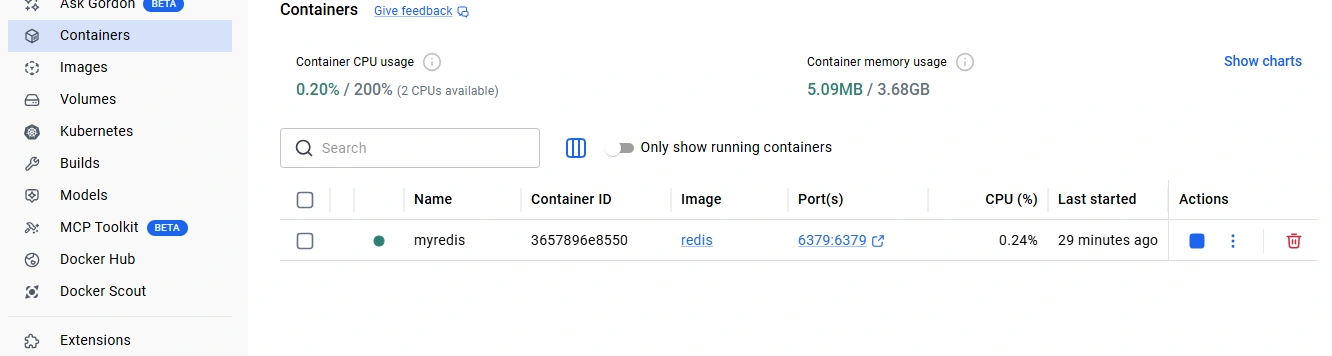
2. Installing the Redis Client
Project → Right click → Manage NuGet → Install:
Microsoft.EntityFrameworkCore
Npgsql.EntityFrameworkCore.PostgreSQL
Microsoft.Extensions.Caching.StackExchangeRedis
Step 3: Program.cs setup
using Microsoft.EntityFrameworkCore;

var builder = WebApplication.CreateBuilder(args);

// PostgreSQL
builder.Services.AddDbContext<AppDbContext>(options =>
    options.UseNpgsql("Host=localhost;Port=5432;Database=testdb;Username=postgres;Password=1234"));

// Redis
builder.Services.AddStackExchangeRedisCache(options =>
{
    options.Configuration = "localhost:6379";
});

builder.Services.AddControllers();

var app = builder.Build();

app.MapControllers();
app.Run();
Step 4: Model + DbContext
👉 Product.cs
public class Product
{
    public int Id { get; set; }
    public string Name { get; set; }
}
👉 AppDbContext.cs
using Microsoft.EntityFrameworkCore;

public class AppDbContext : DbContext
{
    public AppDbContext(DbContextOptions<AppDbContext> options) : base(options) {}

    public DbSet<Product> Products { get; set; }
}
Step 5: Database create (PostgreSQL)
CREATE TABLE "Products" (
    "Id" SERIAL PRIMARY KEY,
    "Name" TEXT
);

INSERT INTO "Products" ("Name") VALUES ('Laptop'), ('Mobile');
Step 6: Controller create
👉 Controllers folder → Add → Controller → API Controller
👉 ProductController.cs
using Microsoft.AspNetCore.Mvc;
using Microsoft.Extensions.Caching.Distributed;
using System.Text.Json;

[ApiController]
[Route("api/[controller]")]
public class ProductController : ControllerBase
{
    private readonly AppDbContext _context;
    private readonly IDistributedCache _cache;

    public ProductController(AppDbContext context, IDistributedCache cache)
    {
        _context = context;
        _cache = cache;
    }

    [HttpGet("{id}")]
    public async Task<IActionResult> Get(int id)
    {
        string cacheKey = $"product_{id}";

        // 🔴 Redis check
        var cachedData = await _cache.GetStringAsync(cacheKey);

        if (cachedData != null)
        {
            var product = JsonSerializer.Deserialize<Product>(cachedData);

            return Ok(new
            {
                source = "Redis",
                data = product
            });
        }

        // 🗄️ DB call
        var productFromDb = await _context.Products.FindAsync(id);

        if (productFromDb == null)
            return NotFound();

        // 🔥 Save to Redis
        var options = new DistributedCacheEntryOptions()
            .SetAbsoluteExpiration(TimeSpan.FromMinutes(5));

        await _cache.SetStringAsync(
            cacheKey,
            JsonSerializer.Serialize(productFromDb),
            options
        );

        return Ok(new
        {
            source = "Database",
            data = productFromDb
        });
    }
}
Workflow:
Check Redis cache first.
If cache miss, fetch from DB.
Store data in Redis with expiration.
5. Advanced Redis Usage
Hashes: Store structured data:
await _db.HashSetAsync("user:1", new HashEntry[]
{
    new HashEntry("name", "Shafaet"),
    new HashEntry("age", 26)
});
Lists: Implement queues or message lists:
await _db.ListRightPushAsync("messages", "Hello World");
var msg = await _db.ListLeftPopAsync("messages");
Pub/Sub: Real-time notifications:
var sub = _redis.GetSubscriber();
await sub.SubscribeAsync("channel", (ch, val) => Console.WriteLine(val));
await sub.PublishAsync("channel", "Hello subscribers!");
6. Best Practices
Use ConnectionMultiplexer as a singleton to avoid multiple connections.
Use Redis primarily as a cache, not a primary database.
Set expiration (TTL) for cached keys to prevent memory issues.
🧪 Step 7: Run & Test
👉 Run project
👉 Browser / Postman এ call :
https://localhost:xxxx/api/product/1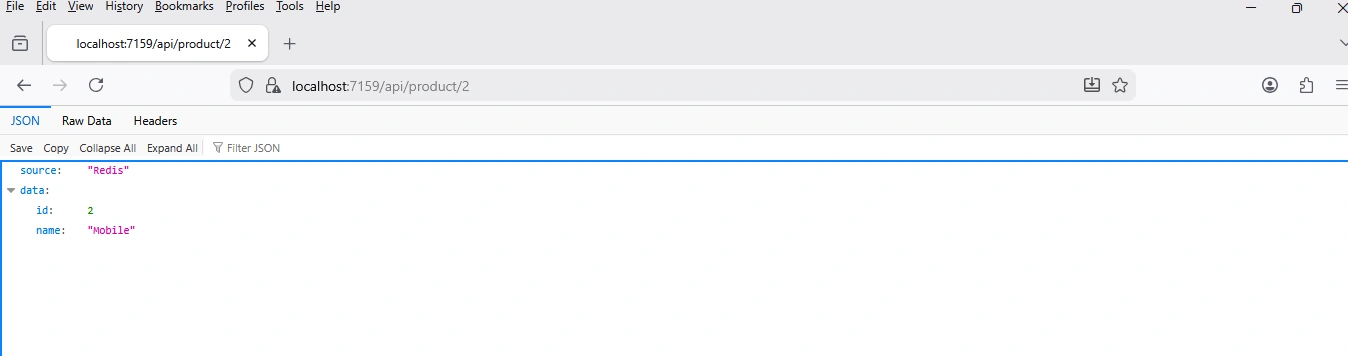
Join the conversation! Your thoughts help the community grow.